Introduction
LinkedIn Ads promise something no other platform can: direct access to the decision-makers who sign your contracts. Job titles, seniority, company size, industry, it's all sitting right there in the targeting menu.
So why does the pipeline feel so thin after weeks of spend?
"Not working" rarely means one thing. The problem could be:
- Ads aren't delivering at all, often a targeting or bid issue
- Ads are showing up, but nobody's converting once they click
- You're judging a 90-day sales cycle against 20 days of data
Each of these problems has a distinct fix, and confusing them wastes both budget and patience. This guide walks through the most common reasons LinkedIn campaigns underperform. You'll also get a diagnostic process you can run today inside Campaign Manager, plus how to tell when the issue needs more than a settings tweak.
Key Takeaways
- Most LinkedIn ad problems fall into three buckets: delivery, targeting, or timing issues
- Most underperformance traces back to a specific, identifiable cause, not a broken platform
- Long B2B sales cycles often make early campaigns look like failures
- A step-by-step diagnostic beats blindly raising budget or pausing too soon
Common Reasons Your LinkedIn Ads Aren't Working
Most underperforming campaigns fall into one of four predictable patterns. Each one leaves fingerprints inside Campaign Manager, if you know where to look.
Your Ads Aren't Getting Impressions
If your impression count is stuck near zero, check the ad status first.
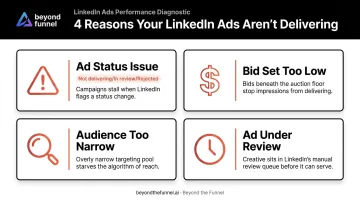
- "Not delivering," "In review," or "Rejected" status flags stop your ad before it reaches a single feed
- LinkedIn's ad review typically completes within 24 hours, and rejected ads receive a specific reason inside Campaign Manager and by email
- A bid set below LinkedIn's suggested range throttles delivery, even on an approved ad
- An audience defined too narrowly, like a handful of job titles in one metro area, leaves too few eligible members for the auction to function
Fix the status issue or bid first. It's usually the fastest win in the whole diagnostic process.
Your Ads Are Showing But Not Converting
Healthy impressions and a decent click-through rate don't guarantee leads. If your cost-per-lead is climbing well past what your vertical typically sees, look downstream of the click.
Common culprits:
- The ad promises one thing, the landing page delivers another
- A "Book a demo" CTA aimed at a cold audience that's never heard of your brand
- A Lead Gen form asking for company revenue, phone number, and job function before a prospect has any context for handing it over
Results Look Broken Because It's Still Too Early
Zero closed-won revenue in the first 30 days feels like proof the campaign failed. It usually isn't.
Dreamdata's 2025 LinkedIn Ads benchmarks report, built on thousands of B2B deals, found it takes an average of 320 days from first ad impression to closed revenue. The overall B2B customer journey averages 211 days. Judging a campaign at day 30 against numbers like that is like grading a semester off the first pop quiz.
The Wrong Audience Is Actually Seeing Your Ads
Pull up the Demographics report. If the job titles, seniority levels, or company sizes look nothing like your ideal customer profile, that's your answer.
The usual suspect: Audience Expansion or Audience Network left on by default. Both broaden reach toward cheaper, lower-quality impressions that inflate your numbers without moving actual pipeline.
Why LinkedIn Ads Fail: The Root Causes
Symptoms point to what's broken. Root causes explain why it kept happening. Three conditions show up again and again across underperforming accounts:
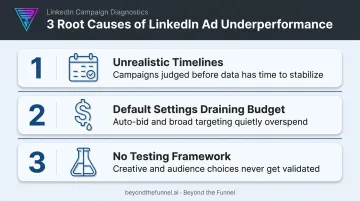
- Unrealistic timelines. Expecting a 6-12 month enterprise sales cycle to produce ROI inside a single quarter sets campaigns up to get killed before they've had a real chance to work.
- Default settings drain your budget. Audience Expansion, Audience Network, and Maximum Delivery bidding are built to spend your budget efficiently from LinkedIn's perspective, not necessarily to reach your exact buyers.
- No testing framework. Launching one audience, one ad, and one CTA, then leaving it alone for months, means you never learn what's actually working versus what's just running.
None of these are cheap mistakes to make twice. B2B SaaS advertisers paid an average CPC of $10.48 in Q1 and $15.72 in Q3 of 2025, according to HockeyStack's analysis of $28 million in LinkedIn ad spend across 70+ companies.
At that cost per click, a poorly targeted campaign doesn't just underperform. It burns through months of budget before anyone notices the audience was wrong from the start.
Left unaddressed, these root causes produce a familiar cycle:
- Wasted spend that never gets reinvested into what works
- Pipeline that never gets attributed correctly
- A program that gets cut in month two, right before it would have started to compound
How to Fix LinkedIn Ads That Aren't Working
Raising budget or swapping creative before you know the actual problem just adds cost to a broken process. Diagnose first, isolate the root cause, apply a targeted fix, then validate it.
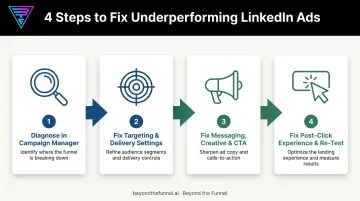
Step 1: Diagnose Inside Campaign Manager
Pull three reports before touching anything else:
- Demographics: who's actually seeing your ads right now
- Performance: impressions, CTR, and CPL measured against your vertical's typical range
- Revenue Attribution: whether pipeline is already being influenced, even without direct conversions yet
Compare your numbers to a benchmark before concluding anything is broken. A CTR that looks low in isolation might be completely normal for your industry and ad format. B2B SaaS single-image ads often run in the 0.35%-0.55% CTR range, while video ads can perform higher.
Step 2: Fix Targeting and Delivery Settings
- Turn off Audience Expansion and Audience Network unless you're intentionally broadening reach
- Tighten job title and function targeting to match your ICP, and exclude non-buying roles and existing customers
- Move your bid toward the higher end of LinkedIn's suggested range if impressions are still thin
Step 3: Fix Messaging, Creative, and CTA
Rewrite ad copy using language pulled from real sales calls and customer interviews, not internal marketing jargon. Rotate creative regularly to prevent fatigue, and match your CTA to the audience's actual funnel stage. A cold audience typically responds better to 'Watch a 2-minute walkthrough' than 'Book a demo.'
Step 4: Fix the Post-Click Experience and Re-Test
Make sure your landing page headline matches the ad's exact promise, and that it loads fast on both desktop and mobile. Shorten Lead Gen form fields down to the essentials, and cut anything that isn't needed for the first conversation.
Then relaunch and give the campaign at least 90 days before judging results again. One round of quick fixes followed by another premature pause tells you nothing.
When to Optimize In-House vs When to Bring in a LinkedIn Ads Expert
Not every problem needs an agency. Some do.
Handle it in-house when: A single ad is disapproved, or a bid sits below LinkedIn's suggested range. These are typically five-minute fixes inside Campaign Manager.
Get a deeper audit when:
- CPL has stayed high for four or more weeks with no obvious reason
- Zero engaged target accounts show up in the Revenue Attribution report after a full month
- You're genuinely unsure whether your month-one numbers are normal for your industry
Bring in a dedicated partner when: You're managing multiple campaigns, industries, or a full-funnel strategy at scale, and trial-and-error is eating months you don't have.
This is where a track record matters. Beyond the Funnel's founder, Joshua Stout, is one of 80 LinkedIn Certified Marketing Experts worldwide and has managed and optimized more than 1,000 LinkedIn ad accounts.
That kind of pattern recognition shortens a diagnostic process most in-house teams spend months working through alone. Beyond the Funnel's audit guide walks through the same structural checks the team uses with clients.
One example: Evidation came to Beyond the Funnel with a LinkedIn presence that wasn't translating into pipeline. Within a year, the partnership took their opportunity count from a few dozen to over 100.
Common Mistakes to Avoid
Even a technically correct fix can get undone by one of these habits:
- Panicking too early. Pausing a campaign at day 20 doesn't give a 90- to 180-day sales cycle any real chance to show results.
- Treating symptoms, not causes. Swapping images or raising budget blindly rarely fixes a targeting problem sitting underneath.
- Ignoring default settings. Audience Network and Audience Expansion can skew who sees your ads while making cost-per-result look artificially better.
- Skipping documentation. Without tracking what changed and when, you'll never know which fix actually worked.
Frequently Asked Questions
Why is my LinkedIn ad not delivering?
Non-delivery usually traces back to ad disapproval, a bid below LinkedIn's suggested range, an audience set too narrow, or an ad set that has hit its budget or end date. Check the ad status inside Campaign Manager first.
Why are my LinkedIn ads not converting?
Conversions typically stall when the ad message doesn't match the landing page, the CTA is too aggressive for a cold audience, or the Lead Gen form asks for too much information too soon.
Is LinkedIn having issues right now?
Platform-wide outages are rare. Check LinkedIn's status page first, then rule out account-level issues like holds or rejected ads before assuming it's a broader problem.
How long should I run a LinkedIn campaign before deciding it's not working?
Give campaigns at least 30 days for initial signals, and 90-180 days before drawing revenue-based conclusions. B2B sales cycles rarely close inside the first month.
What's a good CPL or CTR benchmark for LinkedIn ads?
Benchmarks vary by vertical and ad format. Compare your numbers against a documented industry range for your specific format rather than assuming any single figure is universally "bad."
Should I pause my LinkedIn ads if I don't see leads in the first month?
Not immediately. Check the Revenue Attribution report and your engaged accounts list first. Influenced pipeline often shows up well before click-attributed conversions do.