Introduction
LinkedIn's median CPC sits around $3.94, compared to roughly $5.26 for Google Search and $1.92 for Meta lead campaigns, according to AgencyAnalytics' 2025 benchmark data drawn from over 150,000 campaigns. That premium price tag means unaudited waste compounds faster on LinkedIn than almost anywhere else.
Here's the trap: your dashboard can look great. Healthy CTR. A "reasonable" cost per lead. Everyone on the team feels good.
Then someone asks how many of those leads turned into pipeline, and the room goes quiet. LinkedIn's native reporting measures activity, not revenue, and that gap is where budgets bleed out.
This checklist walks through the audit Beyond the Funnel runs on B2B accounts, in order of leverage: tracking, targeting, structure, bidding, and creative. It's built for marketers in SaaS, finance, tech, and healthcare who manage real LinkedIn spend and need proof it's working.
Key Takeaways
- Tracking comes first in any audit, since every other metric is judged against it
- Targeting and exclusions determine whether spend reaches buyers or gets wasted on noise
- Structure and bidding drive efficiency as much as creative quality does
- Full audits belong on a quarterly calendar; lighter checks happen monthly
- A second set of expert eyes catches what dashboard-only reviews miss
Why Auditing Your LinkedIn Ads Account Matters
LinkedIn charges a premium for access to its professional audience. That premium makes inefficiency more expensive than on cheaper platforms.
A 10% targeting mismatch on a $2 CPC channel stings. The same mismatch on a $4-5 CPC channel can quietly eat thousands of dollars a month.
The flattering metrics problem is real and measurable. In a 2025 eMarketer and Demandbase survey of 231 B2B marketers and agencies, 52.4% estimated that 16% to 45% of their ad spend was wasted on irrelevant accounts. Nearly 58% called B2B ad waste a significant issue.
Accounts don't announce this problem. They just keep producing clicks and leads that never close.
Signs it's time for an audit:
- CPL or CTR has plateaued for two or more reporting cycles
- Exclusion lists or creative rotation haven't been reviewed in 90+ days
- Budget increased without a documented strategy behind the increase
- Leadership asks where the pipeline is, and nobody has a clean answer
If two or more of these sound familiar, the account needs eyes on it before more budget goes out the door.
The Foundation Check: Tracking, Targeting & Audience Setup
Before judging any number in Campaign Manager, confirm the number is real. This is the part of the audit most teams skip, and it's the one that invalidates everything downstream if it's wrong.
Confirm Your Tracking Tells the Truth
Start in Campaign Manager > Data > Signals and check the Insight Tag status. LinkedIn marks it active when it's received a signal within the last 7 days; anything older shows as inactive, and a tag that's never fired shows red.
Next, look at what's actually configured as a conversion:
- Good conversions: lead form submissions, thank-you page views, demo bookings
- Red flags: generic page views or clicks counted as "conversions"
Then cross-check LinkedIn's reported conversion count against your CRM and GA4 numbers. They won't match exactly, but if LinkedIn is reporting triple what your CRM shows, something is broken.
Finish the tracking pass with two more checks:
- Confirm lead source survives the pipeline from MQL to SQL to closed-won, not just the first CRM touch
- Consolidate to one or two primary conversion actions per account so overlapping events don't double-count
Audit Audience Targeting, Size & Exclusions
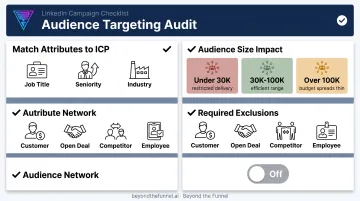
Pull up your targeting attributes: job title, seniority, function, company size, industry, Matched Audiences. Ask a blunt question: does this actually describe your ICP, or does it describe who was easiest to select in the targeting menu?
Then use Campaign Manager's demographic breakdown to see who's really being reached. This is where mismatched segments show up, and where you'll find your first exclusion candidates.
Audience size matters more than most accounts treat it:
| Audience size | What typically happens |
|---|---|
| Under 30,000 | Delivery gets restricted; premium bids can't find enough impressions |
| 30,000-100,000 | Efficient range for most B2B campaigns |
| Over 100,000 | Budget spreads too thin across loosely relevant reach |
Confirm these exclusions exist in every campaign:
- Current customers
- Open or in-progress deals
- Direct competitors
- Company employees
Finally, check whether the LinkedIn Audience Network is enabled. It extends delivery to third-party apps and sites beyond the LinkedIn feed. Keep it off unless you have documented proof it converts—LAN usually brings lower-quality traffic, even at a lower CPC.
Campaign Structure, Bidding, Budget & Creative
Structure and bidding decide whether your creative even gets a fair shot. Get this layer wrong, and the best ad in the world won't save the account.
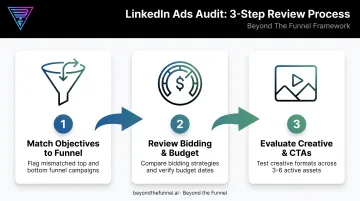
Match Campaign Objectives to the Funnel
Map every active campaign objective (Brand Awareness, Engagement, Website Visits, Lead Gen, Website Conversions) against what the account is actually trying to accomplish.
Common mismatches worth flagging:
- A bottom-funnel offer, like a demo request, running under a Brand Awareness objective
- 100% of budget concentrated on conversion campaigns with zero top-of-funnel nurture
- Retargeting pools (website visitors, video viewers, lead form openers) sitting unused
If your account is prospecting-only with no retargeting connecting the stages, you're rebuilding cold awareness every single month instead of compounding it.
Review Bidding Strategy and Budget Discipline
Identify which bidding option is running: maximum delivery, cost cap, or manual. Manual bidding gives you the most control over premium LinkedIn spend, though it takes more active management.
Then rank spend by campaign, audience, and format against qualified pipeline, not just CPL. This is where the real waste usually hides. A campaign can post a great CPL and still contribute nothing to pipeline.
Also verify that daily and lifetime budgets match your actual spend targets, and that start and end dates still align with your marketing calendar—not leftover settings from a campaign launched six months ago.
Evaluate Ad Format, Creative Variety & CTAs
Check your format mix. Accounts relying solely on single-image ads leave efficiency on the table. Test these against your current baseline:
- Document ads for denser product or offer education
- Thought leader ads for organic-style reach from real voices
- Video for engagement and stronger retargeting pools
Run 3-6 active creatives per campaign to prevent fatigue. Watch for rising frequency paired with falling CTR. That combination is your signal to rotate.
Review CTAs against funnel stage. If your account asks for a demo or free trial with no supporting case study, report, or webinar upstream, you're asking cold traffic to make a hot commitment.
AgencyAnalytics reports a 0.52% median CTR across LinkedIn Ads campaigns based on data from over 7,000 agencies. Use that as a guardrail, then benchmark against your own account's historical performance by format.
Red Flags: Common LinkedIn Ads Audit Findings That Waste Spend
After auditing 1,000+ accounts across SaaS, finance, tech, and healthcare, the same issues surface again and again:
- Judging health by CPL or clicks instead of cost-per-SQL. A cheap lead that never converts isn't cheap. It's a distraction.
- One all-in-one campaign with no funnel separation. Awareness, consideration, and conversion audiences all get the same message.
- Audience Network left on with no placement review. Nobody checks the on/off network breakdown to see whether it's helping.
- Broad targeting masquerading as reach strategy. A Demandbase/eMarketer study found 50.2% of marketers cite reaching the right buying group as their top ROI obstacle.
Any one of these can quietly drain a five-figure monthly budget. Two or three together, and you've got an account that looks active but isn't building pipeline.
How Often to Audit — and When to Bring in an Expert
Run a full structured audit quarterly. That window is long enough to collect meaningful data and short enough that issues don’t sit unnoticed for half a year.
Between full audits, check monthly:
- Creative frequency and fatigue signals
- Exclusion list accuracy
- Spend-to-pipeline trend, not just spend-to-lead
Self-audits catch the obvious mechanical stuff: a missing exclusion, a stale creative, a tracking gap. What they usually don't catch is which audiences, offers, and creative angles actually convert into pipeline. That takes a testing framework built from managing many accounts across industries, not just one.
Bring in an expert when self-checks stop moving pipeline. Common triggers:
- Spend is steady (or rising) but qualified pipeline is flat
- You’ve refreshed creative and audiences without a clear winner
- You’re preparing to scale budget and need validation before you do
That’s the gap Beyond the Funnel fills. Founder Joshua Stout is one of 80 LinkedIn Certified Marketing Experts worldwide and has managed 1,000+ LinkedIn ad accounts across SaaS, finance, technology, and healthcare—experience that shapes a testing framework for validating audiences and scaling what converts.
If you want that second read, request an audit-style consultation for a clear view of where your budget is going.
Frequently Asked Questions
What is a LinkedIn Ads audit?
It's a structured review of your tracking, targeting, campaign structure, bidding, and creative to find where premium budget is being wasted and where pipeline is getting missed. It goes beyond checking CPL and CTR.
How often should you audit your LinkedIn Ads account?
Run a full audit quarterly, and check creative fatigue, exclusions, and spend-to-pipeline trends monthly in between. This cadence catches problems before they compound across a full quarter.
What's the ideal audience size for LinkedIn Ads campaigns?
Roughly 30,000 to 100,000 is the efficient range for most B2B campaigns. Smaller audiences restrict delivery; larger ones waste premium budget on loosely relevant reach.
Should I turn on LinkedIn's Audience Network?
No, unless you have documented performance data showing it converts for your account. It extends delivery beyond the LinkedIn feed and commonly delivers lower-quality traffic.
What's a good CTR for LinkedIn Ads?
Industry data puts the median around 0.52% across formats. Use that as a rough floor, then compare against your own account's historical baseline by format. CTR affects long-term cost efficiency, not just engagement.
What's the most common mistake found in a LinkedIn Ads audit?
Accounts often look healthy on CPL and CTR while producing little qualified pipeline. It's usually caused by weak conversion tracking, targeting that's too broad, and campaigns structured with no funnel separation.