Introduction
Most teams still measure "LinkedIn ROI" with CPL or CTR pulled straight from Campaign Manager. Those numbers look clean on a dashboard, but they say nothing about pipeline. That gap gets budget cut from campaigns quietly doing the heaviest lifting.
A B2B attribution framework for LinkedIn Ads is a structured system that connects your ad spend and every touchpoint to actual pipeline and revenue outcomes, not just clicks or form fills.
This is written for demand gen managers, CMOs, and marketing leaders running LinkedIn campaigns with multi-month sales cycles who need to justify budget to leadership.
It draws on Beyond the Funnel's experience managing and optimizing over 1,000 LinkedIn ad accounts across SaaS, finance, technology, and healthcare.
This article breaks down why default LinkedIn and last-click measurement fall apart for B2B, then walks through a step-by-step attribution model you can actually implement.
Key Takeaways
- Judge LinkedIn Ads ROI by CRM revenue data, not CPC or CTR alone
- LinkedIn's default attribution window is far shorter than most B2B sales cycles
- Combine funnel mapping, extended windows, CRM integration, multi-touch models, and incrementality tests
- Avoid comparing raw ROI across unequal budgets or expecting fast returns on long-cycle deals
What Is B2B Attribution for LinkedIn Ads?
Attribution is the process of assigning revenue credit across every LinkedIn touchpoint a buyer interacts with before becoming a customer. That includes:
- Impressions on sponsored content
- Clicks on single-image or carousel ads
- Video views past a completion threshold
- Form fills on Lead Gen Forms
- Retargeting clicks weeks or months later
The goal is identifying which campaigns, formats, and audiences actually contribute to closed revenue, not just top-of-funnel volume.
This differs from a basic ROI or ROAS calculation in one key way: ROAS typically relies on single-touch, ad-platform-only data. It credits whichever click or conversion event LinkedIn happened to log, then divides revenue by spend.
That works fine for a same-day purchase. It breaks down the moment a deal takes four sales calls and three internal stakeholders to close.
Attribution picks up everything ROAS misses: the video someone watched in month one, the case study they read in month three, the retargeting click right before they filled out a demo request.
A standalone ROAS number might say a campaign underperformed. A revenue-based attribution view might show that same campaign influenced a third of the deals that closed that quarter, just earlier in the journey than the platform's default reporting window can see.
Why Standard Measurement Fails B2B LinkedIn Campaigns
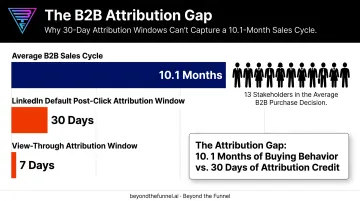
B2B sales cycles keep getting longer. The average B2B buying cycle now runs 10.1 months, according to 6sense's 2025 B2B Buyer Experience Report, which surveyed nearly 4,000 buyers across North America, APAC, and EMEA.
Compare that to LinkedIn's own conversion tracking defaults: a 30-day post-click window and a 7-day view-through window for most conversion types. Anything outside that window doesn't get credited back to the ad that started it. For a deal that takes 10 months to close, that's most of the journey going untracked.
The buying committee problem compounds this. Forrester's 2024 State of Business Buying report found that an average of 13 people participate in a single B2B purchase decision, and 89% of deals involve at least two departments. Each stakeholder may encounter your ads at a different point, weeks apart from each other.
LinkedIn Rarely Gets the Last Click
LinkedIn tends to function as an early- or mid-funnel channel. It builds awareness and educates buying committee members long before anyone fills out a form. Last-click models systematically undervalue that work. First-click models overcorrect, handing LinkedIn too much credit for deals it only partially influenced.
Beyond the Funnel has seen this play out directly. After rebuilding a full-funnel LinkedIn strategy for one client, Evidation, pipeline grew from a few dozen open opportunities to more than 100 in a single year, a shift that would look invisible under a last-click, 30-day reporting window.
That's the practical risk: high-performing awareness campaigns get paused because short-window, last-touch reporting makes them look unproductive.
Content Marketing Institute's 2025 survey of 1,015 B2B marketers found that a third struggle to measure content effectiveness at all. Most B2B teams still lack the infrastructure to prove long-term channel impact.
The B2B Attribution Framework: A Step-by-Step Model
This framework connects three things: LinkedIn Campaign Manager data, CRM opportunity data, and a chosen attribution model. Together, they produce a revenue-based view of ad performance instead of a click-based one.
Before any data crunching starts, marketing and sales need to agree on funnel definitions. If sales calls something an "opportunity" that marketing calls an "MQL," every report downstream ends up arguing over vocabulary instead of measuring performance.
Step 1: Map Your Funnel and Conversion Events
Define clear stages: MQL, SQL, Opportunity, Closed-Won. Then map which LinkedIn actions feed each one:
- Form fill on a Lead Gen Form → MQL
- Video view plus a follow-up site visit → pre-MQL consideration signal
- Retargeting click on a case study ad → SQL
- Demo request submitted → Opportunity
Without this mapping, a spike in form fills tells you nothing about whether it actually moved anyone toward revenue.
Step 2: Extend Your Attribution Window to Match Your Sales Cycle
LinkedIn's default post-click window caps at 30 days for most conversion types. Longer options exist through the Conversions API for select categories, but a 10-month sales cycle still outruns those defaults.
The fix: supplement Campaign Manager data with CRM timestamps. When a lead converts, pull the original LinkedIn touch date from your CRM's lead-source field rather than relying only on what Campaign Manager reports.
Step 3: Integrate CRM and Ad Platform Data for Closed-Loop Tracking
This is where most attribution efforts stall. You need:
- Consistent UTM parameters on every ad, tagged with campaign, ad group, and creative variant
- The LinkedIn Insight Tag installed sitewide, not just on landing pages
- CRM fields mapped for Campaign ID and Lead Source, so a Closed-Won deal traces back to the ad that first touched it
LinkedIn's native connectors support HubSpot, Salesforce, and Dynamics 365, which covers most B2B tech stacks without custom development.
Step 4: Choose and Apply a Multi-Touch Attribution Model
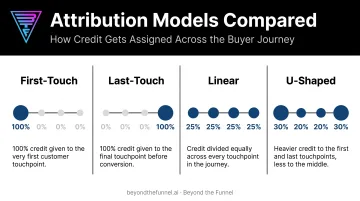
Four common models to consider:
- First-touch: all credit to the first interaction
- Last-touch: all credit to the final interaction before conversion
- Linear: equal credit spread across every touchpoint
- U-shaped: heavier credit to the first and last touches, with the rest split among the middle
For journeys involving 13 stakeholders over roughly a year, a U-shaped or multi-touch model reflects the path more accurately than any single-touch approach.
Step 5: Validate with Incrementality Testing
Attribution models show correlation. Incrementality testing shows causation.
Split your target audience into an exposed group that sees LinkedIn ads and a control group that doesn't. Compare pipeline generated by each over the same period.
If the exposed group produces $250,000 in pipeline and the control group produces $180,000, that $70,000 gap is LinkedIn's real incremental lift—not activity that would have happened anyway.
Key Factors That Affect Attribution Accuracy
Even a well-built framework produces misleading numbers if the inputs aren't solid. Watch for:
- UTM consistency: every campaign needs the same tagging convention, or you break the trail back to the CRM.
- Sales team habits: reps who manually overwrite the original lead-source field erase the data that attribution depends on.
- Window alignment: a 30-day attribution window on a 10-month sales cycle guarantees you're missing most of the story.
- Conversion volume: multi-touch and incrementality models need enough data points to be statistically meaningful.
- Marketing-sales alignment: if the two teams define MQL, SQL, or qualified opportunity differently, the report reflects that disagreement instead of real performance.
Fix the inputs before questioning the model. Most "attribution doesn't work" complaints trace back to one of these five issues.
Common Mistakes and When to Simplify Your Approach
Even teams that understand attribution in theory make the same handful of mistakes in practice.
- Judging campaigns on CPL or CTR alone. These measure ad efficiency, not business impact. A high-CPL campaign can still be your most profitable if it feeds pipeline other channels aren't reaching.
- Assuming the last-clicked touchpoint "worked." This undervalues the awareness and thought-leadership content that built buyer intent in the first place.
- Comparing raw ROI percentages across unequal budgets. A $2,000 campaign at 300% ROI produced $6,000 in profit; a $50,000 campaign at 150% ROI produced $75,000 in profit. Without absolute dollars, the percentages alone won't tell you which campaign matters more.
When a Simpler Model Makes More Sense
Multi-touch attribution needs volume to work. If you close fewer than a dozen won deals per quarter, a multi-touch model produces numbers that look precise but aren't statistically meaningful.
In that case, a simpler last-touch view paired with direct sales feedback, asking reps what actually influenced each deal, is often more honest than a sophisticated model built on too little data.
When deal volume supports multi-touch and you still need CRM integrations, multi-touch models, and full-funnel reporting, building it all in-house takes real technical lift. Many teams partner with a specialist agency instead. Beyond the Funnel, led by one of 80 LinkedIn Certified Marketing Experts worldwide, has built this kind of reporting across more than 1,000 managed LinkedIn accounts.

Frequently Asked Questions
Is $20 a day a good budget for LinkedIn Ads?
$20 a day works for narrow testing, like validating a single audience segment or creative concept. It's usually too low to generate the conversion volume most B2B teams need for reliable attribution modeling.
What is a good ROI for LinkedIn ads?
There's no fixed benchmark. Good ROI depends on your deal size, sales cycle length, and customer lifetime value. Judge it against pipeline and closed revenue, not CPC or CTR alone.
How long does it take to see ROI from LinkedIn ads?
B2B sales cycles often run six months to a year or longer, so ROI should be evaluated over that full cycle, not the first 30-60 days. Engagement signals show up fast; revenue-based ROI takes longer.
What attribution model is best for B2B companies?
Multi-touch or U-shaped models fit B2B buying journeys better than single-touch models. They credit the multiple touchpoints a buying committee interacts with over months.
How do I connect my CRM to LinkedIn Campaign Manager?
Install the LinkedIn Insight Tag sitewide and set up conversion actions in Campaign Manager. Then use LinkedIn's native connectors (HubSpot, Salesforce, Dynamics 365) or the Conversions API for closed-loop syncing.
Can I measure LinkedIn ROI without a big budget or dedicated analytics team?
Yes. Start with consistent UTM tagging and a CRM lead-source field before investing in advanced attribution tooling. That alone gets you closer to pipeline-based reporting than CPC or CTR ever will.