Introduction
The LinkedIn feed is where B2B buyers actually pay attention. Decision-makers scroll it during coffee breaks, before meetings, between calls.
Sponsored Content puts your brand's message directly into that feed, positioned like a native post instead of a banner ad shouting from the sidebar.
Here's the problem: most brands boost a random post, cross their fingers, and call it a strategy. No format testing. No audience validation. Just budget disappearing with no system to tell them what actually worked.
This guide breaks down Sponsored Content formats, real cost benchmarks, setup requirements, and the best practices that separate brands running predictable campaigns from those still guessing.
Key Takeaways
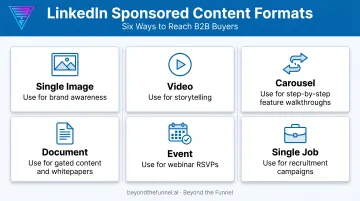
- Sponsored Content is LinkedIn’s native in-feed ad across six formats: image, video, carousel, document, event, and job
- Pricing is auction-based—set by competition, objective, and industry, not a fixed rate card
- Confirm Page and ad account permissions before you open Campaign Manager
- Creative quality and tight targeting drive results; set-and-forget campaigns underperform
What Are LinkedIn Sponsored Content Ads?
Sponsored Content is a paid ad format that appears directly inside a target audience's LinkedIn feed, on desktop, tablet, and mobile. It's "native" because it looks and feels like an organic post, not a sidebar banner or a message dropped into someone's inbox.
Advertisers can create Sponsored Content from three sources:
- Sponsoring a member post — amplifying an organic post from an employee or thought leader
- Sponsoring an organic Page post — boosting content that's already published on your Company Page
- Building Direct Sponsored Content — creating and launching an ad from scratch in Campaign Manager, without ever publishing it as a Page post
That last option matters. Direct Sponsored Content never appears organically on your Page, which makes it ideal for A/B testing messages against different audience segments without cluttering your public feed.
Sponsored Content vs. Targeted Page Posts
Targeted Page posts are free, but they only reach people who already follow your Page. Sponsored Content is paid, and it extends your reach to a defined target audience well beyond your existing follower base. If your follower count is small, organic reach alone won't move the needle.
Reach can extend past the main feed as well. Some Sponsored Content formats also run on the LinkedIn Audience Network, which places ads on partner apps and sites. Not every format qualifies—Document Ads, for instance, are excluded—so check eligibility per format before assuming full reach.
Relevance affects what you pay in the auction, too. LinkedIn uses dynamic tracking macros (such as campaign and creative IDs) to route landing-page attribution. Ads with higher relevance scores tend to win more efficient placements, which means generic, low-relevance creative usually costs more for less reach.
Types of LinkedIn Sponsored Content Ad Formats
Each campaign supports one primary ad format, unless you use the flexible creation option that automatically mixes image and video variations. Testing across formats, not just within one, is often what reveals which content actually resonates with your audience.
Single Image Ads
The workhorse format. A single image plus short copy in-feed. Best suited for brand awareness, product launches, and retargeting warm audiences who already know your brand. You can't mix single image and carousel creatives in the same campaign—each campaign still needs one primary format.
Video Ads
Video autoplays in the LinkedIn feed without sound. That single fact should shape your entire creative approach:
- Front-load the most compelling visual or claim in the first 3 seconds
- Add captions or on-screen text since most viewers scroll past without tapping for audio
- Keep most cuts to 15–30 seconds; in-feed attention drops fast after that
Carousel Ads
A swipeable, multi-image format that works well for step-by-step stories, before-and-after comparisons, or walking prospects through a product feature set.
CTA buttons only work when the campaign uses a Lead Generation Form. Individual cards can point to different destination URLs, but with Lead Gen as the objective, every card links to that same form.
Document Ads
Document Ads let you promote whitepapers, ebooks, and case studies directly in-feed. Prospects can preview and read without leaving LinkedIn, which cuts the friction that stalls other formats—making Document Ads one of the stronger plays for gated, high-value lead gen.
Event Ads
Event Ads promote webinars or conferences with a built-in RSVP call-to-action, pulling the event image and details directly from your LinkedIn Event page.
Single Job Ads
Single Job Ads promote one live job posting and only work with the "Job applicants" objective—a narrow but useful format for recruitment-focused advertisers.
How Much Do LinkedIn Sponsored Content Ads Cost?
LinkedIn doesn't publish a fixed rate card. Every impression, click, and lead is priced through a real-time auction where your ad competes against other advertisers targeting similar audiences.
Here's what third-party benchmark data shows:
| Metric | Benchmark | Source & Scope |
|---|---|---|
| CPC (median) | $3.44 | Databox, April 2023, 405 contributors, all-industry LinkedIn Ads |
| CPM (median) | $30.19 | Databox, April 2023, 127 contributors, all-industry LinkedIn Ads |
| CPC (Q1 avg) | $10.48 | HockeyStack 2025 report, 70+ B2B SaaS companies, $28M in ad spend |
| CPC (Q3 avg) | $15.72 | HockeyStack 2025 report |
These figures aren't specific to Sponsored Content, and they shouldn't be treated as fixed rates. No verified, format-specific CPL benchmark exists publicly. Anyone quoting an exact "LinkedIn Sponsored Content CPL" is likely guessing.
What actually moves your cost up or down:
- Audience competitiveness (a niche of 5,000 CFOs costs more per click than a broad audience of 500,000)
- Campaign objective (lead generation typically costs more than awareness)
- Ad relevance and quality score (stronger creative and tighter targeting usually lower cost per result)
- Seasonality — HockeyStack found Q3 CPC climbed to $15.72 while Q1 sat at $10.48
- Industry — regulated or high-value sectors like finance and healthcare often see steeper competition
You control two levers: your bid strategy (automated, cost cap, or manual) and your budget/pacing settings. Push either one aggressively and cost per result shifts accordingly.
Don't chase the cheapest CPL. A $150 lead from a validated VP of Sales audience often converts to pipeline far faster than a $40 lead from a broad, unqualified list. HockeyStack's data backs this up: their sample saw 6.01x pipeline ROI in Q3, driven by high-intent MQL definitions, not rock-bottom acquisition costs.
How to Set Up and Launch a Sponsored Content Campaign
Before you can sponsor anything, you need the right access on two separate systems: the LinkedIn Page and the linked ad account.
Page-level permissions needed:
- Super admin
- Content admin
- Sponsored Content poster
Ad account permissions needed:
- Creative Manager access (minimum, to build and edit ads)
- Campaign Manager access or higher (to create and edit full campaigns)
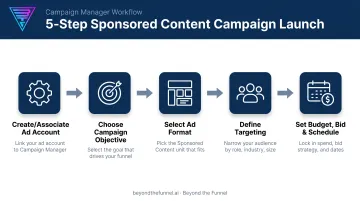
Once permissions are confirmed, here's the core setup flow inside Campaign Manager:
- Create or associate an ad account: set the account name, billing currency, and link your Company Page
- Choose a campaign objective: awareness, engagement, lead generation, website conversions, or job applicants
- Select your ad format: single image, video, carousel, document, event, or single job
- Define targeting: job title, seniority, industry, company size, and other firmographic filters
- Set budget, bid strategy, and schedule: then configure conversion tracking before launch
You have two paths to get content live. Sponsor an existing organic Page post, including the one-click "Boost" shortcut, or build Direct Sponsored Content from scratch for audience-specific messaging that never touches your public Page.
Misconfigured access is a common reason campaigns stall before launch. Beyond the Funnel handles account setup and permission structuring during onboarding so teams clear that hurdle before the first campaign goes live.
Best Practices to Maximize Sponsored Content Performance
Keep creative short, real, and visual
LinkedIn's own creative guidance is refreshingly simple. Keep posts short, real, and visual:
- Aim for 150 characters or fewer in your update copy
- Open with a statistic or unexpected point of view to earn the click
- Use authentic imagery instead of generic stock photos
- Favor image or video content — LinkedIn's internal testing showed rich media drove up to 4x higher CTR than text-only updates
Test creatives and audiences before you scale
Testing discipline matters more than any single creative trick. Run at least four creative variations against one audience before drawing conclusions. Rotate distinct concepts, not just minor color or headline tweaks, to avoid creative fatigue before you scale budget.
Targeting precision beats broad reach in B2B every time. A campaign aimed at 8,000 finance directors will almost always outperform one aimed at 200,000 "marketing professionals," even at a higher cost per click. Random testing without a framework wastes budget on the wrong segments before you ever learn what's working.
Structured validation stops that waste. Beyond the Funnel, led by Joshua Stout, one of only 80 LinkedIn Certified Marketing Experts worldwide, built its approach around testing audiences before scaling spend, not after.
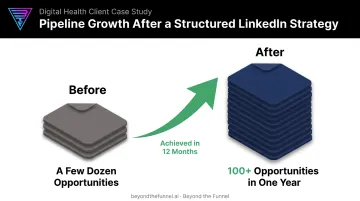
The agency's work with SaaS, finance, and healthcare clients centers on validating who actually converts, then refining creative from that data. One client, digital health company Evidation, grew its pipeline from a few dozen opportunities to over 100 in a single year after implementing a full LinkedIn strategy.
A system like that turns each campaign cycle into evidence for the next one.
Frequently Asked Questions
How much is a sponsored ad on LinkedIn?
Pricing is auction-based, not fixed. Broad benchmarks show a median CPC around $3.44 and CPM near $30.19, though B2B SaaS-specific data has shown CPCs between $10.48 and $15.72. Your actual cost depends on targeting and competition.
Can you do sponsored ads on LinkedIn?
Yes. Any LinkedIn Page can run Sponsored Content through Campaign Manager once you have the right Page and ad account permissions.
Are paid LinkedIn ads worth it?
For B2B brands targeting professional decision-makers, yes. Precise job title, industry, and seniority targeting typically delivers higher-quality leads than broader social platforms offer.
What's the difference between Sponsored Content and Direct Sponsored Content?
Sponsored Content includes posts sponsored from your existing Page. Direct Sponsored Content is built directly in Campaign Manager and never appears as an organic Page post.
What permissions do I need to sponsor a LinkedIn Page post?
You'll need Super admin, content admin, or Sponsored Content poster access on the Page, along with Creative Manager access or higher on the linked ad account.
How often will my Sponsored Content be shown?
How often ads show depends on audience size, your bid and budget, and how competitive your auction segment is. Tighter audiences and higher competition usually mean fewer impressions per dollar.