Introduction
You can see the clicks. You can see the impressions. What you can't see, without the right setup, is which LinkedIn campaign actually turned into a sales conversation.
That's the gap most B2B marketing teams live in. LinkedIn Campaign Manager shows engagement metrics, but that data sits in a silo, disconnected from your CRM, your analytics platform, and the pipeline reports your VP of Sales cares about.
According to a 2024 Gartner report on marketing measurement, B2B CMOs struggle to prove marketing's value when sales controls the bottom of the funnel and doesn't track activity in partnership with marketing.
Tracking parameters fix that gap. This guide covers what they are, how to set them up correctly in Campaign Manager, the naming structure that keeps your data clean, and the mistakes that break attribution before you ever notice.
Key Takeaways
- URL tracking parameters connect ad clicks to website visits, form fills, and CRM revenue
- Campaign Manager supports static parameters and auto-populating macros like
{{CAMPAIGN_ID}} - LinkedIn's October 2025 hierarchy update renamed key macros, so older templates may need an audit
- UTMs and the LinkedIn Insight Tag measure different things, and you need both for full visibility
What Are LinkedIn Ads Tracking Parameters?
URL tracking parameters are text snippets appended to the end of your ad's destination link. They tell Google Analytics, HubSpot, or your CRM exactly where a visitor came from (LinkedIn Marketing Solutions Help).
A tagged URL looks something like this:
yoursite.com/demo?utm_source=linkedin&utm_medium=paid_social&utm_campaign=q1_saas_demo
Once a prospect clicks that ad, your analytics tool captures each segment after the question mark. That's how "LinkedIn traffic" becomes a labeled, filterable data point instead of a mystery visit.
Static vs. Dynamic: What's the Real Difference?
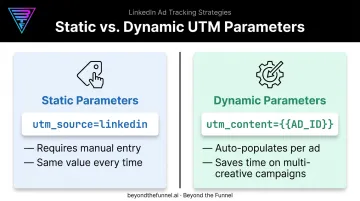
- Static parameters are values you type manually, such as
utm_source=linkedin, which never changes no matter which ad it's attached to. - Dynamic parameters are LinkedIn-populated macros, written in all caps inside double curly brackets, like
{{CAMPAIGN_ID}}or{{AD_ID}}. LinkedIn fills in the actual ID automatically when the ad serves.
The dynamic macros exist so you don't have to hand-tag every single ad in a campaign with 15 creative variations.
Why this matters more in B2B: sales cycles stretch across weeks or months, with multiple touchpoints before a deal closes. Without tracking parameters, tracing a closed deal back to the specific LinkedIn ad that started the relationship is nearly impossible.
The click happened in March; the deal closed in September. UTMs give your CRM the breadcrumb trail it needs to connect the two.
How to Set Up URL Tracking Parameters in LinkedIn Campaign Manager
You'll find the URL Tracking Parameters field at three levels inside Campaign Manager: account, campaign, and ad. Here's the part people miss: parameters set at each level combine rather than override one another (LinkedIn's official parameter hierarchy guidance).
Set utm_source=linkedin at the account level, and it applies everywhere. Add utm_campaign at the campaign level, and both values append to the final URL together.
Static vs. Dynamic Setup
For a static parameter, type it as a key-value pair:
utm_source=linkedin
For a dynamic parameter, select the macro from LinkedIn's list and format it in all caps with double curly brackets:
utm_content={{AD_ID}}
Here's where it gets tricky. LinkedIn's October 2025 hierarchy update renamed the underlying entities, and the macros changed with them:
| Before October 2025 | For new or edited ad sets |
|---|---|
| CAMPAIGN_GROUP_ID | CAMPAIGN_ID |
| CAMPAIGN_ID | AD_SET_ID |
| CREATIVE_ID | AD_ID |
| CAMPAIGN_GROUP_NAME | CAMPAIGN_NAME |
| CAMPAIGN_NAME | AD_SET_NAME |
| CREATIVE_NAME | AD_NAME |
Existing ad sets update automatically. But any template you built before the change, and haven't touched since, may still reference the old macro names.
If you edit that ad set now, you'll need the new ones (LinkedIn's ad hierarchy update announcement). Pull up your saved templates and check.
Requirements and Common Setup Pitfalls
Once your parameters and macros are in place, a few technical rules will make or break your tracking:
- Use a full, non-redirecting final URL. Avoid third-party link shorteners (LinkedIn's own auto-shortening is fine)
- Hashtags are supported in some contexts, but @mentions are not
- Keys accept letters, numbers, and underscores only. No symbols
- Values accept letters, numbers, underscores, plus signs, and hyphens
- Symbols like
#,%,@, and spaces will break the parameter string
Before launching anything, test it:
- Preview the ad inside Campaign Manager
- Click through exactly as a real prospect would
- Check the resulting landing page URL for your full parameter string
If the URL looks broken or truncated, fix it before you spend a single dollar on that campaign.
Recommended UTM Naming Structure for LinkedIn Campaigns
Consistency here is what separates clean reporting from a mess of fragmented channels six months from now. Start with the five standard UTM fields:
| Parameter | Recommended Value | Notes |
|---|---|---|
| utm_source | Always lowercase | |
| utm_medium | paid_social or paid | Pick one convention and stick with it |
| utm_campaign | Descriptive, structured name | See naming convention below |
| utm_content | {{AD_ID}} or creative label | Identifies specific ad variation |
| utm_term | Optional | Rarely needed for LinkedIn |
For utm_campaign, build a naming convention that lets you slice performance by multiple dimensions later:
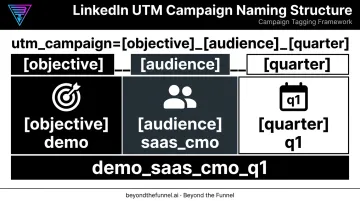
utm_campaign=[objective]_[audience]_[quarter]
Example: demo_saas_cmo_q1
This tells you, at a glance, that the campaign targeted a demo objective, aimed at SaaS CMOs, and ran in Q1, without opening a single report.
A few non-negotiables:
- Lowercase everything.
LinkedInandlinkedinregister as two separate channels in Google Analytics because UTM values are case-sensitive - Use underscores, not spaces. Spaces break parameter strings entirely
- Use dynamic macros like
{{AD_ID}}insideutm_contentso cloned campaigns retain unique tracking without manual re-tagging every time
Manual tagging is where naming conventions break down, especially when multiple team members touch campaign builds. At Beyond the Funnel, this UTM structure gets built into the campaign setup itself, so tracking stays consistent whether we're launching one ad or fifty.
Common Tracking Mistakes and UTMs vs. the LinkedIn Insight Tag
Attribution breaks quietly. Nobody notices until a quarterly report shows a huge chunk of "direct" traffic that should have been tagged LinkedIn.
The most frequent culprits:
- Inconsistent capitalization (
Linkedinvs.linkedin) fragments a single channel into several - Cloning a campaign and forgetting the manually-tagged URL carries the old campaign's tag with it
- Forgetting to add UTMs on a new ad launch, especially under deadline pressure
Here's the piece that trips up even experienced advertisers: UTM parameters only capture click-through activity. They don't know a prospect saw your ad, didn't click, and converted three days later through direct traffic.
That's where the LinkedIn Insight Tag comes in. It's a separate piece of website JavaScript that tracks view-through conversions and powers retargeting inside Campaign Manager. UTMs and the Insight Tag measure different things and answer different questions.
| UTM Parameters | Insight Tag | |
|---|---|---|
| Tracks click conversions | Yes | Yes |
| Tracks view-through conversions | No | Yes |
| Powers retargeting | No | Yes |
| Feeds external analytics/CRM | Yes | Limited |
Run both. Relying on one alone leaves a gap in your data that no amount of clever reporting can fill after the fact. And after any platform change, like the October 2025 hierarchy shift, audit your templates to confirm the dynamic macros are still populating correctly.
Turning Tracking Data Into the Metrics That Actually Matter
Raw UTM data on its own doesn't move a business forward. What it does is let you stop reporting on impressions and CTR and start reporting on what leadership actually asks about: pipeline.
Once parameters are in place, the metrics worth tracking are:
- CTR by creative - which specific ad variation earns attention
- Cost per lead - what you're paying to generate a qualified contact
- Click-to-form-fill conversion rate - how many clicks turn into completed forms
- Cost per pipeline dollar - the metric that actually justifies budget
Here's a scenario that comes up constantly: a creative with a modest CTR consistently outperforms your top-clicking ad on downstream conversion. Campaign Manager alone won't show you that. UTM-informed reporting, tied back to your CRM, will.
This is the mechanism behind Beyond the Funnel's testing framework. Founder Joshua Stout, one of 80 LinkedIn Certified Marketing Experts worldwide, built the approach across more than 1,000 managed LinkedIn ad accounts, using tracking data to validate which audiences actually convert rather than which ones simply engage.
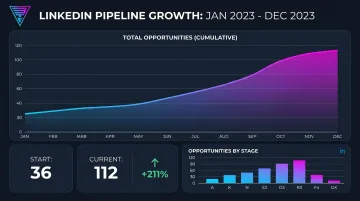
Working with Evidation, Beyond the Funnel's full-funnel LinkedIn strategy grew the company's pipeline from a few dozen opportunities to over 100 in a single year, according to former Head of Commercial Marketing Michael Arbini. That kind of shift comes from tracking creative and audience performance all the way to pipeline, then scaling what the data proves works, not from watching CTR alone.
Frequently Asked Questions
What are URL tracking parameters in LinkedIn ads?
They're text snippets appended to an ad's destination URL that let advertisers trace clicks back to specific campaigns, ads, or platforms inside analytics tools like Google Analytics or a CRM.
What are the most important LinkedIn metrics to track?
CTR by creative, cost per click, click-to-form-fill conversion rate, and downstream metrics like cost per lead and cost per pipeline dollar. All of these require tracking parameters to measure accurately.
What's the difference between static and dynamic URL parameters on LinkedIn?
Static parameters are values you type manually, like utm_source=linkedin. Dynamic parameters, such as {{AD_ID}}, auto-populate per ad or campaign so you don't have to tag each one by hand.
Do I need both UTM parameters and the LinkedIn Insight Tag?
Yes. UTMs handle click-based attribution in your external analytics or CRM, while the Insight Tag covers view-through conversions and powers retargeting inside Campaign Manager. Skip either one and you lose a piece of the attribution picture.
What changed with LinkedIn's October 2025 tracking parameter update?
LinkedIn renamed its campaign hierarchy from Campaign Group/Campaign/Creative to Campaign/Ad Set/Ad, which also changed the dynamic macro names. Review any templates built before the update to confirm they still populate correctly.
How do I test that my LinkedIn tracking parameters are working?
Preview the ad inside Campaign Manager and click through as a real user would. Confirm your full UTM string appears correctly in the resulting landing page URL before the campaign goes live.