Yet most new users hit the same wall: a blank profile, no idea where to start, and confusion about whether LinkedIn is "social media" or something else entirely.
LinkedIn now reports more than 1 billion members in over 200 countries and territories, making it the largest professional network on the planet. That scale is exactly why getting your approach right matters.
This guide walks through what LinkedIn actually is and how to use it, from your first login to a long-term content and networking strategy.
Key Takeaways
- LinkedIn is a professional network for job searching, networking, recruiting, and B2B content sharing
- A professional email, clear photo, and work history are the only prerequisites to start
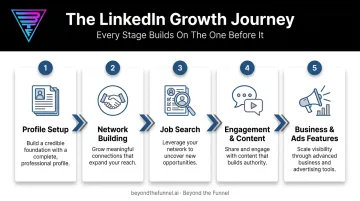
- Effective use follows a sequence: profile setup, network growth, engagement, then opportunity search
- Free accounts handle most needs; Premium adds InMail, advanced search, and analytics
- Businesses that master organic LinkedIn often graduate to paid advertising for scalable, predictable growth
What Is LinkedIn and Who Should Use It?
LinkedIn is a business and employment-oriented social networking platform. It launched on May 5, 2003, and Microsoft acquired it in an all-cash deal announced in June 2016 and completed that December.
Unlike consumer platforms built around entertainment, LinkedIn exists for one purpose: connecting professionals with opportunities, whether that's a job, a client, a hire, or a partnership.
Who actually uses it, and why:
- Job seekers searching for open roles and visibility with recruiters
- Recruiters sourcing and vetting candidates before a formal interview
- Sales professionals identifying and warming up prospects
- Entrepreneurs building a personal brand and finding early customers
- B2B marketers distributing content and running targeted ad campaigns
One thing sets LinkedIn apart from Instagram or X: its connection model. Most platforms let anyone follow anyone. LinkedIn's first-degree connections require mutual acceptance, creating a trust-based network rather than an open broadcast feed.
Where LinkedIn Fits Into Daily Professional Life
How you use LinkedIn depends entirely on your goal. Someone actively job hunting behaves very differently than someone quietly building visibility for the next opportunity, two years out.
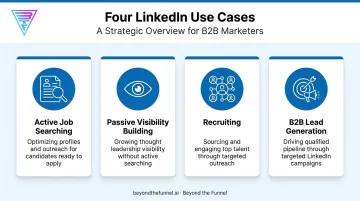
Four common use cases:
- Active job searching - applying, messaging recruiters, tracking postings
- Passive visibility building - staying "findable" without actively looking
- Recruiting - sourcing candidates and managing a talent pipeline
- B2B lead generation - publishing content and running ads toward decision-makers
That last use case has become dominant among marketers. 76% of B2B marketers named LinkedIn one of their three most effective channels for publishing thought leadership in Content Marketing Institute's (CMI) 2026 outlook. The same research found 85% rated it the best-value social platform for B2B, with 68% increasing their use of it year over year.
What You Need Before Getting Started on LinkedIn
You don't need much to open a LinkedIn account, but a few things matter more than people expect.
Before you sign up, have these ready:
- Use a professional-sounding email address. LinkedIn ties your login email to your public identity, so avoid anything you'd hesitate to put on a business card.
- Add a recent, well-lit headshot. Profiles with a photo are 14 times more likely to be viewed than those without one, according to LinkedIn's own data.
- Prepare a summary of your work history, education, and key skills. Complete profiles rank higher in LinkedIn's internal search and recruiter results, so type this up before you start filling in sections.
Here's the good news: none of this costs anything. A free Basic account covers the essentials - profile, connections, standard search, and content posting. Premium tiers (Career, Business, Sales Navigator, Recruiter Lite) exist for later, once you know exactly what extra capability you need.
How to Use LinkedIn (Step-by-Step)
Getting real value from LinkedIn follows a defined order. Connecting with strangers before finishing your profile, or applying to jobs before your experience section is filled in, tends to limit visibility rather than accelerate it.
Setting Up Your Profile
Complete every core section before doing anything else:
- Photo - clear, current, professional
- Headline - more on this below
- About/summary - a short narrative of what you do and for whom
- Experience - each role with a few bullet-point outcomes, not just duties
- Education and skills - filled in completely, not left blank
A profile with every section filled ranks higher in LinkedIn's search results than a partial one. The most common mistake? Leaving the headline as just a job title, like "Marketing Manager." That's wasted real estate. A headline should be a positioning statement, something closer to "Marketing Manager helping SaaS companies cut customer acquisition costs."
Building Your Network
Start with people you already know: former colleagues, classmates, managers, and clients. These first-degree connections form the foundation your second- and third-degree network grows from.
A practical sequence:
- Connect with 20-30 people you know personally
- Import contacts from your email if relevant
- Expand into industry peers and second-degree connections
- Follow companies, topics, and thought leaders without requiring a full connection
That last point matters. Following lets you keep up with industry news and thought leadership passively, without cluttering your connection list with people you've never met.
Searching and Applying for Jobs
The Jobs tab lets you filter by title, location, experience level, and remote status, then set alerts so new postings land in your inbox automatically.
Two features increase your visibility to recruiters without any extra effort. The "Open to Work" badge signals active job search status directly to recruiters, while skill assessments add a verified badge next to your listed skills. Both are free and take minutes to activate.
Engaging and Publishing Content
Liking, commenting, and sharing posts builds visibility over time. Publishing your own posts, even occasionally, positions you as someone with a point of view rather than a passive scroller.
Companies that post weekly on LinkedIn tend to see substantially higher engagement than sporadic posters, and that gap compounds over time. Most people treat LinkedIn as a resume, checking it once a year. Anyone posting consistently stands out simply by showing up.
Exploring Business and Advertising Features
Once an individual or company has built organic traction, LinkedIn Business Manager and LinkedIn Ads become the logical next step. Organic reach is capped by your existing network; advertising extends reach to decision-makers who've never heard of you.
This is where many B2B companies shift from personal networking toward structured, budget-backed lead generation, often partnering with agencies like Beyond the Funnel to manage audience targeting, creative testing, and full-funnel campaign strategy.
Best Practices for Using LinkedIn Effectively
A handful of habits separate people who get real results on LinkedIn from those who log in once and forget about it.
- Post consistently, not constantly. Weekly posts beat daily bursts followed by silence, since LinkedIn's algorithm rewards accounts it can predict.
- Request recommendations and endorsements from real colleagues. A skill you claim yourself carries less weight than one a former manager confirms.
- Personalize every connection request. A one-line note referencing shared context or a mutual interest converts far better than a blank invite.
- Update your profile regularly. Treat it as a living document, adding new roles, skills, and wins within weeks, not years.
When Organic Growth Isn't Enough: Moving to LinkedIn Advertising
Organic effort has a ceiling. Even a perfectly optimized profile and consistent posting schedule only reaches your existing network and whoever the algorithm shows you.
LinkedIn Ads breaks past that ceiling, putting your message in front of a targeted, high-value B2B audience that organic reach can't touch.
Moving into paid campaigns requires specialized expertise. Beyond the Funnel, founded by Joshua Stout, exists specifically for this transition.
Stout is one of just 80 LinkedIn Certified Marketing Experts worldwide and one of only 16 in the United States, a credential built through managing more than 1,000 LinkedIn ad accounts across SaaS, finance, technology, and healthcare brands.
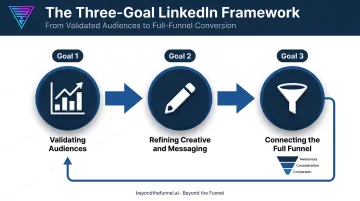
That experience shaped a testing framework built around three goals:
- Validating audiences with real performance data instead of assumptions
- Refining creative and messaging through iterative testing
- Connecting the full funnel - awareness, consideration, and conversion - into one measurable system
Michael Arbini, former Head of Commercial Marketing at Evidation, described the impact directly:
"Josh helped us map out and execute a full LinkedIn strategy that took our pipeline from a few dozen to over 100 opportunities in one year."
For B2B brands ready to move past guesswork, a strategy discussion with Beyond the Funnel is the typical starting point.
Conclusion
Success on LinkedIn comes down to sequence, not mastering every feature the platform offers: complete your profile, build real connections, engage consistently, then pursue whatever opportunity brought you there in the first place.
Treat your LinkedIn presence as a long-term professional asset, not a one-time setup task. Once your organic efforts hit their natural ceiling, Beyond the Funnel can help you turn LinkedIn into a predictable, scalable growth channel through full-funnel advertising strategy.
Frequently Asked Questions
What is LinkedIn used for?
LinkedIn is used for job searching, professional networking, recruiting, content sharing, and B2B business growth. Companies also use it for targeted advertising to reach decision-makers directly.
Is LinkedIn free to use?
Basic membership is completely free and covers profile building, networking, and job searching. Premium subscriptions add InMail credits, advanced search filters, and analytics for a monthly fee.
How do I create a strong LinkedIn profile?
Start with a clear photo and a headline that positions your value, not just your job title. Round it out with a concise About section and complete experience and skills entries, since incomplete profiles rank lower in search results.
What is the difference between LinkedIn and other social media platforms?
LinkedIn uses a closed, trust-based connection model requiring mutual acceptance, built specifically for professional and business use. Platforms like Instagram or X use open-follow models designed around consumer content.
How many connections can I have on LinkedIn?
LinkedIn caps first-degree connections at 30,000. Beyond that, your network extends through second-degree (connections of your connections) and third-degree connections, both reachable through search but not directly connected to you.
How can businesses use LinkedIn for advertising?
LinkedIn Ads and Business Manager let companies target decision-makers by job title, industry, and company size at scale. Specialized partners like Beyond the Funnel help validate audiences and refine creative to improve return on ad spend.