But here's the problem: most ads on the platform still look the same. Generic banners with stock photos and vague CTAs blend into the feed and get scrolled past in seconds. Personalization is what separates the ads people actually notice from the ones they ignore.
That's where LinkedIn Dynamic Ads come in. This guide covers what they are, the current formats and specs, why they work, what they cost, and how to build campaigns that actually convert.
Key Takeaways
- Dynamic Ads insert each viewer’s photo, name, and job title so every impression feels personal
- Three formats map to funnel stages: Follower, Spotlight, and Jobs ads
- Personalized creative typically beats standard display on click-through rate
- Auction pricing (CPC or CPM) means costs shift with industry and targeting precision
What Are LinkedIn Dynamic Ads?
Dynamic Ads are personalized right-rail ads that automatically populate with the viewer's own LinkedIn profile data—such as their photo, first name, job title, and company name. Instead of one static creative shown to everyone, each viewer sees an ad that looks like it was built specifically for them.
How the Personalization Works
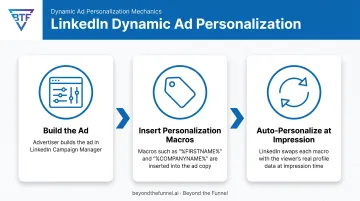
Advertisers build the ad once inside Campaign Manager, then insert macros (placeholder tags like %FIRSTNAME% or %COMPANYNAME%) directly into the copy. LinkedIn's system automatically swaps those tags for the real profile data of whoever is viewing the ad at that moment. These macros need to be written in all capital letters to render correctly, so double-check your syntax before launching.
The Privacy Model
Nobody else ever sees another member's personalized version. Each ad exists as a one-to-one experience between LinkedIn and the individual viewer.
- Profile data used for personalization is never shared with other members or the advertiser directly
- Members can turn off ad personalization anytime in Settings & Privacy > Advertising data
- Opting out doesn't remove the ads—it just shows a generic, non-personalized version instead
Current Format Lineup
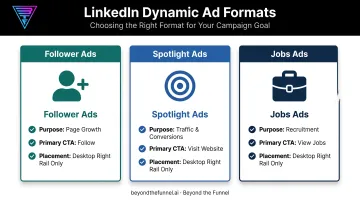
LinkedIn's Dynamic Ad family has narrowed over the years. Today, the self-serve lineup includes three formats: Follower ads, Spotlight ads, and Jobs ads. If you're reading an older guide that references Content or Document-style Dynamic Ads, that's outdated; those formats have since evolved into separate Sponsored Content offerings.
Why the Personalization Works
Seeing your own face and name in an ad pulls more attention than a generic stock photo. When LinkedIn first rolled out this format, it reported Dynamic Ads driving up to 2x the click-through rate of traditional display ads, according to LinkedIn Marketing Solutions.
That gap exists because personalization cuts through banner blindness on the right rail in a way copy alone rarely can.
Types of LinkedIn Dynamic Ads and Their Specs
Each Dynamic Ad format is built for a different job. Getting the specs right before launch prevents your creative from getting rejected or rendering incorrectly.
Follower Ads
Follower ads grow your LinkedIn Page or Showcase Page audience. They pair the viewer's own photo with your company logo and a personalized "Follow" CTA.
| Element | Requirement |
|---|---|
| Company name | 25 characters max |
| Logo | 100 x 100 px, JPG/PNG, max 2 MB |
| CTA options | Visit careers, Visit company, Visit jobs, Visit life |
Clicking "Follow" takes them straight to your company Page—no external landing page needed.
Spotlight Ads
Spotlight ads drive traffic to a specific offer: a product page, an event, a demo signup. They combine the viewer's profile photo with your company branding and a custom message.
| Element | Requirement |
|---|---|
| Headline | 50 characters max |
| Description | 70 characters max |
| Company name | 25 characters max |
| CTA button text | 18 characters max |
| Optional background image | 300 x 250 px exactly |
Important: Adding the optional custom background image removes the default profile photo and description from the layout. If personalization is your main draw, skip the background override.
Jobs Ads
Jobs ads promote open roles directly to relevant candidates based on their profile fit, right in the desktop right rail. Character limits and creative requirements on this format shift periodically—verify current specs on LinkedIn's official ads guide before you build.
Benefits of LinkedIn Dynamic Ads for B2B Marketers
Personalized creative solves real problems B2B marketers face in a crowded, competitive feed.
- Name and photo personalization creates instant recognition generic creative can't match
- One format family covers the full funnel: Follower ads for awareness, Spotlight ads for conversion, and Jobs ads for recruitment
- Right-rail placements usually show only two ads at a time, so you face far less competition than the main feed
For B2B brands managing tight budgets, that mix of relevance and less clutter usually means more efficient spend per qualified click.
Dynamic Ads vs. Other LinkedIn Ad Formats
Dynamic Ads aren't the right tool for every campaign. Here's how they compare to LinkedIn's other major formats.
| Format | Placement | Best For |
|---|---|---|
| Dynamic Ads | Desktop right rail only | Personalized awareness, conversion, or recruitment |
| Sponsored Content | Native in-feed, desktop + mobile + tablet | Broader reach beyond your existing follower base |
| Sponsored Messaging | Member's inbox | Direct, personalized outreach with more text space |
| Text Ads | Desktop right rail/top banner | Budget-friendly PPC/CPM testing |
A few things to know before choosing:
- Sponsored Content appears natively on every device, so it reaches people beyond your existing followers.
- Sponsored Messaging (Message/Conversation Ads) uses similar personalization macros but lands in the inbox, with far more copy space than Dynamic Ads allow.
- Text Ads are also desktop-only and budget-friendly, but they lack the profile-photo personalization that makes Dynamic Ads stand out.
Most full-funnel LinkedIn strategies use a mix rather than picking just one format.
How Much Do LinkedIn Dynamic Ads Cost?
LinkedIn ads run on an auction system where you bid on a CPM, CPC, or CPS basis, so there's no fixed price tag. Costs shift based on your industry, how tightly you've defined your audience, and competition for that audience.
Recent data from AgencyAnalytics' analysis of more than 150,000 LinkedIn campaigns puts the median cost-per-click at $3.94. B2B and enterprise audiences frequently run higher due to tighter targeting and stronger competition for the same job titles.
Key cost drivers to watch:
- Narrower audiences (specific job titles, company size, industry) typically cost more per click
- Dynamic Ads are often priced on a CPM basis rather than CPC
- Conversion-focused campaigns tend to bid higher than awareness campaigns
Practical budgeting advice: Start with a modest test budget before committing to a full monthly spend. Use Campaign Manager's forecasting tool to estimate reach and cost at your targeting settings before you scale.
Agencies that manage LinkedIn campaigns at scale, Beyond the Funnel included, typically structure budgets in phases:
- A validation period to confirm which audience segments convert
- Scaled spend once the data supports it
Best Practices for High-Performing Dynamic Ads
Getting Dynamic Ads to actually perform takes more than turning on personalization and hoping for the best. These practices come from what consistently drives results.
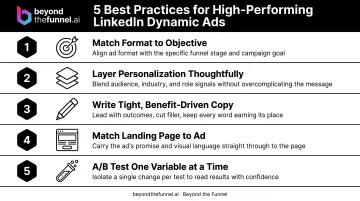
- Match the format to your objective. Choose Follower ads for awareness, Spotlight for traffic and conversions, Jobs ads for recruitment. Campaign Manager's objective flow will guide you toward the right choice.
- Layer personalization thoughtfully. Pair the viewer's name or photo with one additional detail, job title or company name, so the message reads naturally instead of feeling like a mail-merge.
- Write tight, benefit-driven copy. Character limits are unforgiving, so lead with the outcome, not the feature. In one LinkedIn case study, a European business school used personalized Spotlight ads to convert 14% of leads into application starts, nearly double its target.
- Match your landing page to the ad. If your Spotlight ad promises a demo, the landing page should open with that same offer, not a generic homepage.
- A/B test one variable at a time. Change the headline, CTA, background image, or macro combination individually, then compare performance in Campaign Manager before making your next move.
Scaling Dynamic Ads with confidence isn't a one-time setup. It requires ongoing audience validation and creative testing as your market and audience behavior shift. That ongoing testing is what Beyond the Funnel's framework is built around. Led by a LinkedIn Certified Marketing Expert, it helps B2B brands validate audiences, refine creative, and scale LinkedIn as a predictable, full-funnel channel.
Frequently Asked Questions
What are Dynamic Ads on LinkedIn?
Dynamic Ads are personalized right-rail ads that use each viewer's own LinkedIn profile data—photo, name, and job title—to create individualized creative. They're available in three formats: Follower, Spotlight, and Jobs ads.
How much do LinkedIn ads cost per 1,000 impressions?
CPM varies by industry, audience, and competition in LinkedIn's auction. Pricing swings with targeting precision; recent benchmarks also put median CPC around $3.94 as a related cost reference.
Are LinkedIn Dynamic Ads available on mobile?
No. Dynamic Ads render only in the desktop right rail. If mobile reach matters for your campaign, Sponsored Content is the better choice since it appears across desktop, mobile, and tablet.
Can members opt out of Dynamic Ad personalization?
Yes. Members can manage or turn off ad personalization in Settings & Privacy under Advertising data. Doing so doesn't remove ads entirely. It just shows a non-personalized version instead.
What happened to LinkedIn Content Ads?
Dynamic Ad formats have evolved over time. Follower, Spotlight, and Jobs ads are the current official formats, replacing older document and content-style Dynamic Ads found in outdated guides.
How do I create a Dynamic Ad in Campaign Manager?
Select your campaign objective, choose the Dynamic Ad format that fits, define your target audience, then add creative assets and personalization macros. Set your budget and launch once everything's reviewed.