Many B2B marketers stare at that same figure every week without knowing whether it's a win or a shrug. Impressions get lumped in with views, reach, and engagement — treated as one big vanity metric that looks nice in a screenshot but doesn't explain much else.
Here's the thing: impressions are useful, but only if you know what they measure and what they don't. This guide breaks down exactly what post impressions mean on LinkedIn, how they differ from reach and engagement, the three types you'll run into, and how to connect that number to actual pipeline instead of just watching it climb.
Key Takeaways
- Impressions count total post views, not unique viewers, including repeats
- Reach counts unique viewers; frequency (impressions ÷ reach) shows repeat exposure
- A "good" impression count depends on follower size and format, not a fixed number
- High impressions without engagement or conversions is a warning sign, not a win
- Organic, paid, and viral impressions each need different growth tactics
What Are Post Impressions on LinkedIn?
Post impressions measure visibility, not engagement. Every time your post loads on someone's screen, it counts as one impression, regardless of whether that person likes it, scrolls right past it, or reads every word.
LinkedIn's own help documentation keeps the definition simple: impressions are the number of times your content was displayed, and LinkedIn notes the figure is an estimate rather than a precise count.
You'll often see marketers repeat a "50% visible for 300 milliseconds" rule as if it's official LinkedIn policy. It isn't published anywhere on LinkedIn's current help pages, so treat that specific threshold as industry folklore rather than a verified counting mechanism.
How Repeat Views and Self-Views Count
Here's where confusion tends to creep in: if the same person scrolls past your post three separate times, that's three impressions, not one. LinkedIn counts displays, not people.
Say someone sees your post in their feed Monday morning, scrolls past it again during lunch when it resurfaces, then spots it a third time after a colleague comments. That's three impressions from a single viewer.
Self-views count toward that total too. Scrolling through your own recent posts or checking your profile activity adds to your impression count, and LinkedIn's post analytics help page confirms that a creator's own views and engagement are folded into the reported numbers. If you're obsessively refreshing your post to check performance, you're inflating the count yourself.
Why This Matters
Picture a post that gets displayed on 500 different screens. That's 500 impressions, period, regardless of how many people actually clicked, commented, or shared it. Impressions tell you about reach potential. They say nothing about whether the content resonated.
Post Impressions vs. Reach vs. Engagement
These three terms get used interchangeably in meetings, but they measure completely different things.
| Metric | What It Counts | What It Tells You |
|---|---|---|
| Impressions | Every display, including repeats | Total exposure volume |
| Reach | Unique people who saw it once | Audience breadth |
| Engagement | Likes, comments, shares, clicks | Content resonance |
Reach (also called "members reached") counts only distinct viewers. If 200 people see your post and 50 of them see it twice, your reach is 200 but your impressions are 250.
Engagement measures action, not exposure. The standard formula is:
Engagement rate = Total engagements ÷ Total impressions
This ratio matters more than raw impression counts because it tells you whether people who saw your content actually did something with it.
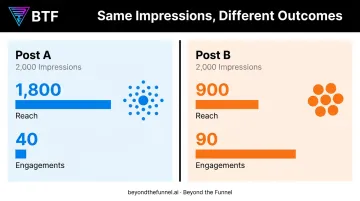
Here's a quick scenario: two posts each earn 2,000 impressions.
- Post A: Reaches 1,800 unique people through wide distribution and low repeat viewing, earning 40 engagements
- Post B: Reaches only 900 unique people through heavy repeat viewing in a smaller pool, earning 90 engagements
Same impression count, two very different stories: Post A spread wider, while Post B resonated harder with a smaller group.
The 3 Types of LinkedIn Post Impressions
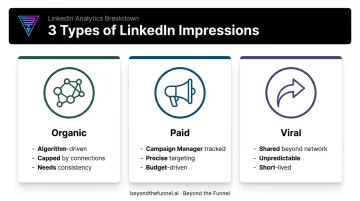
Not all impressions are created equal. LinkedIn generates them through three distinct channels, and each behaves differently.
Organic Post Impressions
Organic impressions come from LinkedIn's algorithm surfacing your content for free, based on relevance to the viewer, your existing connections, and how much early engagement the post earns.
- Driven by relevance, expertise signals, and engagement quality — not just posting frequency
- Capped by your network size; a 500-connection profile will never out-reach a 50,000-follower page organically
- Requires consistent posting to stay visible, since the algorithm favors active accounts over dormant ones
The limitation here is real: organic reach depends entirely on factors you don't fully control, which is why so many B2B brands eventually add paid distribution to the mix.
Paid Post Impressions
Paid impressions come from Sponsored Content and other ad formats, tracked separately inside Campaign Manager rather than your organic post analytics.
What makes paid impressions valuable for B2B specifically is targeting precision: you can serve content by job title, industry, seniority, and company size instead of hoping the right person scrolls by.
That precision is a big reason LinkedIn commands an outsized share of B2B ad budgets. eMarketer forecast that LinkedIn would capture 47.2% of US B2B display ad spending in 2024, well ahead of most other platforms competing for the same buyers.
For B2B brands, that's a signal LinkedIn impressions carry more targeting weight than a generic display placement.
Viral Post Impressions
Viral impressions happen when someone outside your network sees your post because one of their connections shared it. LinkedIn's ad reporting schema specifically defines these as impressions generated when a user shares content into their own network, a distinct category from regular organic reach.
The catch: viral impressions are unpredictable and usually short-lived. A post might spike for 48 hours because it caught fire in one niche community, then flatline. You can't build a distribution plan around hoping for virality.
What's a Good Impression Rate for a LinkedIn Post?
There's no universal magic number here, and anyone who tells you "aim for X impressions" without asking about your follower count is guessing. Impression performance only makes sense relative to your audience size.
As a rough starting point, many benchmarking studies of company Pages suggest normalized impressions often fall somewhere between 8 and 20 impressions per 100 followers per post, with meaningful variation by content format and account size.
Larger accounts with 50,000+ followers tend to see far higher raw totals per post than accounts in the 1,000–5,000 follower range, but the percentage of their audience reached can actually be smaller.
A few things to keep in mind:
- Document carousels and multi-image posts frequently outperform text-only posts at most account sizes
- Smaller accounts (under 10K followers) often see stronger relative reach because their content isn't competing with as much algorithmic noise
- Larger Pages generate bigger raw numbers but need proportionally more engagement to maintain algorithmic favor
The Frequency Concept
Frequency = Impressions ÷ Reach. A frequency close to 1.0 means most people only saw your post once, so you're reaching new eyes with each impression. A frequency of 3.0 or higher means you're recycling the same small audience over and over.
That frequency math applies to organic posts. For paid campaigns, forget the follower-percentage logic entirely. Judge paid impressions against your campaign objective and CPM benchmarks instead — an awareness campaign optimized for reach should behave very differently from a conversion campaign optimized for qualified clicks.
Why High Impressions Don't Always Mean Business Results
Impressions are a leading indicator. They tell you content got displayed. They don't tell you it moved anyone closer to a purchase decision.
This gap shows up constantly in B2B advertising data. In a 2025 study of 70+ B2B SaaS companies, HockeyStack found that in-platform metrics didn't always reflect actual business impact.
One striking example: a Q4 period consumed 31% of ad budget but produced only 20% of total MQLs for that quarter, even though impressions and clicks looked stable on the surface.
That's the trap. A post or campaign can generate thousands of impressions and still contribute zero qualified pipeline if the audience, message, or funnel structure isn't built to convert.
For B2B brands running LinkedIn ads, impressions only become meaningful once tied to funnel metrics: click-through rate, cost per lead, and downstream conversions. This is the exact gap Beyond the Funnel was built to close. Rather than optimizing for impression volume alone, the agency's approach centers on:
- Audience validation before scaling: testing which segments actually engage and convert before pouring budget behind them
- ICP-driven creative: building ad concepts from real audience insight so impressions land with the right professionals, not just more people
- Full-funnel structure: connecting awareness, consideration, and conversion into one traceable system, so top-of-funnel visibility has somewhere to go
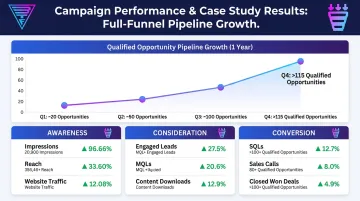
That framework is how Beyond the Funnel helped Evidation grow its qualified pipeline from a few dozen opportunities to over 100 within a single year. The results prove that impression volume matters far less than what happens after someone sees your ad.
To keep your own campaigns honest, track these ratios instead of raw totals:
- Impression-to-engagement ratio (are people reacting?)
- Impression-to-click ratio (are they moving toward your site?)
- Impression-to-conversion ratio (is it actually generating leads?)
How to Track and Improve Your LinkedIn Post Impressions
Where to check your numbers:
- Personal posts: Go to your profile, select Posts & Activity, then open analytics on any individual post
- Profile-level view: The Analytics & Tools section shows combined post performance over time
- Company Pages: Use the dedicated Content Analytics tab for aggregated organic post data
- Paid campaigns: Campaign Manager reports impressions, estimated unique reach, and viral impressions separately from organic figures
With those numbers in view, the next step is improving them.
Organic tactics that actually move the needle:
- Post consistently rather than in sporadic bursts, since the algorithm favors active accounts
- Use native formats like document carousels, polls, or short video instead of plain text or outbound links
- Reply to early comments quickly, since initial engagement signals relevance to the algorithm
For paid impressions, targeting precision and creative quality matter more than raw budget. Working with a certified LinkedIn Ads partner helps make sure your audience, ad format, and budget are optimized for impression quality, not just a bigger number on a dashboard.
Whatever tactics you use, pair impression tracking with engagement and conversion data. A rising impression count without rising leads simply means your targeting or creative needs adjusting.
Frequently Asked Questions
What do post impressions mean on LinkedIn?
Post impressions count each time your content is displayed on a screen, whether or not the viewer engages with it. LinkedIn treats this as an estimate of total exposure, not a measure of interest or interaction.
What is a good impression rate for a LinkedIn post?
There's no fixed number, but healthy organic posts often generate impressions equal to roughly 8-20% of follower count depending on format and account size. Judge paid campaigns against CPM and objective-specific benchmarks instead.
What's the difference between impressions and reach on LinkedIn?
Impressions count every display, including repeat views from the same person. Reach counts only unique viewers, so it's always equal to or lower than your impression total.
Why are my LinkedIn post impressions low?
Common causes include posting at low-traffic times, weak engagement in the first hour, a small connection count, or relying on text-only formats the algorithm deprioritizes. Native formats like video or carousels typically perform better.
Do LinkedIn post impressions include paid ad views?
No. Organic and paid impressions are tracked in separate dashboards, Page Analytics for organic and Campaign Manager for paid, though both follow the same underlying display-based counting logic.
Is 1,000 impressions on a LinkedIn post considered good?
For a personal profile, 1,000 impressions is solid and above average for most account sizes. For a business Page or paid campaign, judge it against follower count and campaign goals rather than treating it as a universal benchmark.