Introduction
LinkedIn has become the default channel for B2B advertisers chasing decision-makers, not just impressions. But Campaign Manager now houses more than 12 distinct ad formats, and picking one has gotten genuinely confusing.
Many marketing teams default to whatever format they used last quarter, or copy a competitor's approach without checking if it fits their funnel stage. That's an expensive habit.
The wrong format wastes budget, produces weak engagement, and hands sales a pile of low-quality leads, especially painful for B2B teams that don't have room in the budget for months of trial and error.
This guide breaks down every LinkedIn ad format by category, what each one actually does well, and how to match formats to your campaign goal and funnel stage. No guesswork required.
Key Takeaways
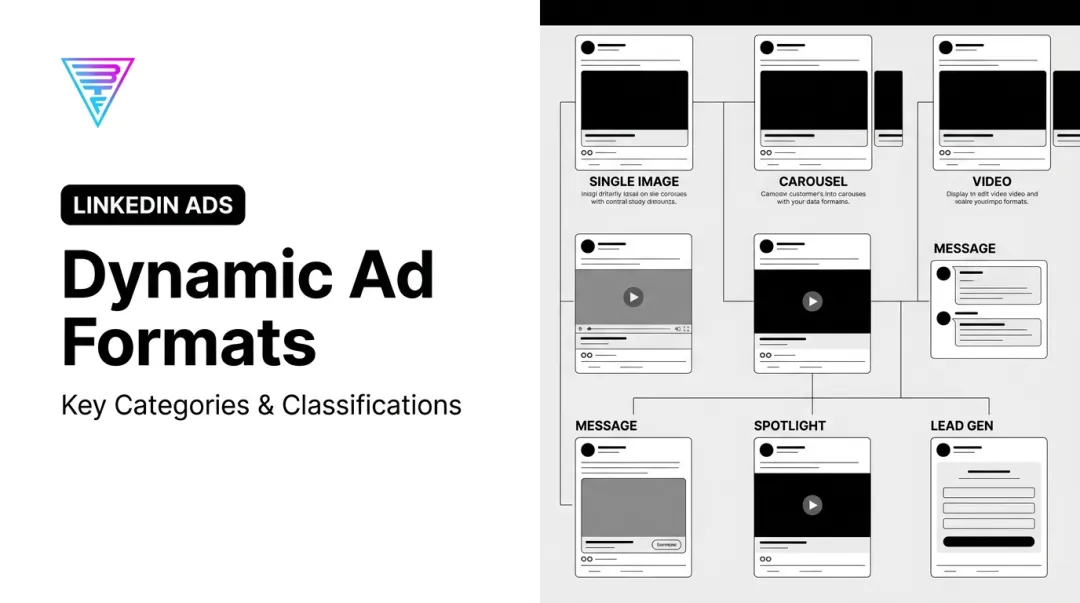
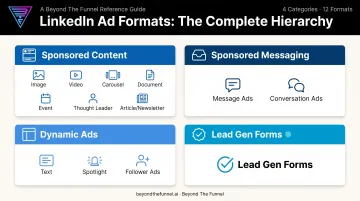
- LinkedIn ad formats split into four categories: Sponsored Content, Sponsored Messaging, Dynamic Ads, and Lead Gen Forms
- Each format aligns with a specific funnel stage — awareness, consideration, or conversion
- LinkedIn averages $7.26 CPC and $69.49 CPM, with wide cost swings by format (Metadata 2024)
- Lead Gen Forms usually beat external landing pages by keeping conversion native to LinkedIn
- Choose formats through structured testing and funnel fit—not habit or competitor copycats
What Are LinkedIn Ad Formats and What Are the Four Main Categories?
LinkedIn ad formats are pre-built ad units inside Campaign Manager. Each one has its own placement, creative specs, and file requirements, and is built for a specific campaign job.
LinkedIn runs an objective-based system. You choose a marketing objective first — Awareness, Consideration, or Conversion — and the platform only shows you formats eligible for that goal. You can't accidentally run a Lead Gen Form under a pure Awareness objective, for example.
Format choice isn't cosmetic. Mismatched formats waste spend and can hurt relevance scores in the ad auction, which raises your costs over time.
The performance gap between formats is measurable too. Video ads made viewers 18% more likely to respond positively in brand-awareness testing compared to non-video formats, based on LinkedIn's internal June 2025 data.
The Four Main Categories of LinkedIn Ad Formats
- Sponsored Content: Native, in-feed ads — image, video, carousel, document, event, thought leader, and article/newsletter formats
- Sponsored Messaging: Ads delivered directly into a prospect's LinkedIn inbox (Message Ads and Conversation Ads)
- Dynamic Ads: Personalized right-rail formats that pull in the viewer's name or photo (Text, Spotlight, Follower Ads)
- Lead Gen Forms: Pre-filled conversion forms that attach to most other formats, capturing leads without leaving LinkedIn
Sponsored Content Formats: The In-Feed Ad Types
Sponsored Content is LinkedIn's largest category, and it blends into the organic feed rather than sitting in a sidebar. That makes it the natural home for brand awareness, storytelling, and mid-funnel education that needs room to breathe.
Single Image Ads
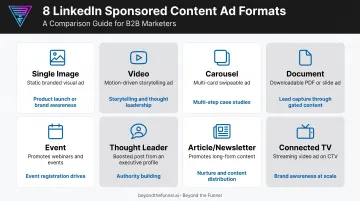
A single static image with short intro copy and a CTA, appearing natively in-feed on desktop and mobile. It's the closest thing LinkedIn has to a default ad unit.
Single Image typically delivers some of the lowest CPCs and highest volume of any Sponsored Content format, so it works well for quick promotions, product launches, and straightforward retargeting.
Video Ads
Native, autoplay (muted) video ranging from 3 seconds to 30 minutes. Use it for product demos, founder stories, customer testimonials, or short explainers. LinkedIn's own testing shows video drives measurably stronger brand response than static creative.
It's also one of the more efficient ways to build a retargeting pool cheaply, since video views count as engagement you can build custom audiences around.
Carousel Ads
A swipeable multi-card format (2 to 10 cards), each with its own headline and link. Carousel works well when you need to show several product features, walk through a case study, or tell a story one card at a time.
It often posts some of the strongest engagement rates in the Sponsored Content lineup, largely because the swipe interaction keeps people on the ad longer.
Document Ads
Document Ads let users preview and download PDFs, decks, or reports directly in the feed without an external click. This format shines for:
- Ebooks and benchmark reports
- Gated whitepapers and industry research
- Sales collateral repurposed for top-of-funnel reach
Pairing Document Ads with a Lead Gen Form turns passive scrollers into captured leads without ever sending them off-platform.
Event Ads
Event Ads promote a LinkedIn Event directly in-feed, complete with live attendee counts and one-click RSVP. LinkedIn reports that events promoted this way see substantially higher viewership and registration lift than unpromoted events. That edge matters for webinars and conferences, where every extra signup counts.
Thought Leader Ads
This format sponsors an employee's or executive's personal post rather than a brand page post. It reads as authentic rather than salesy, which makes it one of the better tools for humanizing a company's voice and earning trust before a prospect ever reaches a landing page.
Article and Newsletter Ads
Article and Newsletter Ads promote native long-form LinkedIn content or a Newsletter edition, keeping every click on-platform. It's a strong play for growing subscribers and extending thought leadership reach.
One limitation worth flagging: the creative can't be edited separately from the original post. What you published organically is what gets sponsored, headline and all.
Connected TV Ads
Connected TV Ads deliver full-screen video through LinkedIn's Audience Network onto streaming platforms. This format fits large enterprise awareness campaigns with bigger budget minimums. It is generally not the right starting point for everyday B2B campaigns still validating messaging.
Sponsored Messaging, Dynamic Ads, and Lead Gen Forms
Where Sponsored Content prioritizes reach and storytelling, this group of formats prioritizes direct outreach, personalization, and moving prospects toward conversion.
Message Ads
Message Ads deliver a single direct message with one CTA straight into a prospect's inbox, sent from a chosen sender. They work well for event invites, time-sensitive offers, and direct outreach to a defined list.
LinkedIn enforces sending limits per member to protect inbox quality, so plan cadence carefully rather than blasting the same audience repeatedly.
Conversation Ads
Conversation Ads use a choose-your-own-path structure, with multiple branching CTA buttons inside LinkedIn Messaging. That makes them excellent for lead qualification and multi-offer nurture flows where different prospects want different next steps.
The catch: pricing runs on a cost-per-send model, so this format only stays efficient with hyper-narrow, well-qualified targeting. Spraying it across a broad audience burns budget fast.
Text Ads
Text Ads are small, low-cost PPC units that appear in the desktop right rail or top banner. They won't win engagement contests, but they're an affordable, always-on way to maintain visibility with a target account list over time.
Spotlight Ads
Spotlight Ads are dynamic, personalized sidebar units that pull in the viewer's name or photo to drive clicks toward a landing page. Because the format is comparatively underused, it often delivers more impressions per dollar than more crowded placements. Worth testing for product launches and traffic campaigns.
Follower Ads
Follower Ads are personalized sidebar units built specifically to grow LinkedIn Page followers. They're one of the simplest formats to set up and work best as a long-term, low-maintenance brand-building play rather than a direct-response tool.
Lead Gen Forms
Lead Gen Forms pre-fill with a user's LinkedIn profile data and attach to most Sponsored Content and Messaging formats. That removes the friction of a manual form fill entirely.
LinkedIn reports that 90% of pilot customers beat their cost-per-lead goals using Lead Gen Forms, with lower CPLs than standard Sponsored Content campaigns, according to LinkedIn's Lead Gen Forms page.
Landing pages send members off-platform. Lead Gen Forms keep the entire experience in-app, which is a big part of why they convert well for demos, gated content, and event sign-ups.
How to Choose the Right LinkedIn Ad Format for Your Campaign
Start with your campaign objective, not the format itself. Awareness, Consideration, or Conversion: LinkedIn only surfaces formats eligible for the objective you select, so that choice narrows your options automatically.
From there, match format to funnel stage:
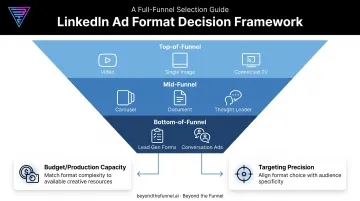
- Top-of-funnel: Video, Single Image, Connected TV
- Mid-funnel: Carousel, Document, Thought Leader
- Bottom-of-funnel: Lead Gen Forms, Conversation Ads
Budget and production capacity matter just as much. High-production formats like Video and CTV need more time, creative resources, and spend to execute well. If you're just getting started, launch with Text or Single Image ads and scale into heavier formats once the data shows what's working.
Targeting precision matters too. Narrow, account-based audiences can justify costlier per-send formats like Conversation Ads, since every send is reaching someone genuinely qualified. Broad audiences are usually better served by low-cost formats like Text Ads, where volume matters more than personalization.
The right format comes from structured testing: run controlled combinations of audience, message, and creative, then scale what performs. That's the audience-validation approach Beyond the Funnel uses with B2B clients. Test before you scale, confirm which audiences engage and convert with real campaign data, and only push budget into a format once it's proven.
Mistakes to Avoid When Choosing a LinkedIn Ad Format
Even experienced teams fall into predictable traps when picking formats. Watch for these:
- Jumping to the most advanced format first. Video, Connected TV, and Conversation Ads look impressive, but launching them before testing simpler, cheaper formats means you're spending big money on unvalidated assumptions.
- Ignoring format-specific limitations. Sponsored Messaging's per-send cost and sending frequency caps can quietly inflate spend if you're not tracking cadence and cost together.
- Overlooking creative specs. Character limits, aspect ratios, and file size requirements are easy to miss, and getting them wrong means truncated copy or outright ad rejection during review.
- Choosing based on familiarity, not fit. Running the same format a competitor uses, or the one your team knows best, isn't a strategy. It's a guess dressed up as a decision.
Partnering with a LinkedIn Certified Marketing Expert can cut through much of this trial and error. Beyond the Funnel's founder, Joshua Stout, is one of 80 worldwide.
His testing framework, built across more than 1,000 managed LinkedIn ad accounts, helps teams validate the right format-audience-message mix before they scale spend.
Frequently Asked Questions
What are the four main categories of LinkedIn ad formats?
Sponsored Content (in-feed native ads), Sponsored Messaging (inbox delivery), Dynamic Ads (personalized sidebar units), and Lead Gen Forms (native conversion forms). Each targets a different part of the buyer journey.
Which LinkedIn ad format performs best?
It depends entirely on your goal. Video and Carousel tend to drive stronger engagement, while Lead Gen Forms consistently produce better conversion rates since they keep prospects on-platform.
How much do LinkedIn ads cost by format?
Pricing models vary — CPC, CPM, and cost-per-send all exist depending on format. LinkedIn's overall average sits around $7.26 CPC and $69.49 CPM, though Video and Conversation Ads tend to run higher.
What's the difference between Message Ads and Conversation Ads?
Message Ads deliver one message with a single CTA. Conversation Ads offer multiple branching CTA buttons, letting prospects choose their own path through a conversation.
Should I use LinkedIn Accelerate or Classic campaigns?
Accelerate automates targeting, bidding, and creative decisions for speed, which suits teams wanting fast setup. Classic gives full manual control, better suited for advertisers who want precision over automation.
What's the difference between a boosted post and a sponsored ad on LinkedIn?
Boosted posts amplify existing organic content for added reach with minimal setup. Sponsored ads are built from scratch in Campaign Manager as fully customizable campaigns with their own targeting and objectives.