Every LinkedIn ad slot runs through a second-price auction, and the bid type you choose shapes your cost efficiency, reach, and how predictable your spend will be from week to week. Pick the wrong one, and you can burn through budget without the pipeline to show for it.
This article breaks down LinkedIn's three bid types — Manual, Maximum Delivery, and Cost Cap — how they differ, and how to choose the right one for your B2B goals.
Key Takeaways
- LinkedIn has three bid types: Maximum Delivery (automated), Cost Cap (semi-automated), and Manual (full control)
- Match bid type to your objective, conversion data, budget, and how hands-on you can stay
- Maximum Delivery is the default—it prioritizes spending your full budget over cost efficiency
- Cost Cap keeps average CPA or CPC near your target while LinkedIn still optimizes delivery
- Manual bidding offers the tightest cost control for precise B2B targeting but needs regular monitoring
What Is LinkedIn Bidding?
A LinkedIn bidding strategy is the setting you choose at the ad set level that controls how much you're willing to pay for a specific result: a click, an impression, a lead, or a message send. Treat it as a lever you revisit throughout a campaign's life, not a one-time technical checkbox.
How LinkedIn's Auction Actually Works
LinkedIn runs every ad slot through a second-price auction. According to LinkedIn's own Auction Elements Guide, the platform ranks competing ads using bid value combined with a Relevancy Score, which is LinkedIn's prediction of how likely a member is to engage with your ad.
Here's the part most advertisers miss: the winning bidder typically doesn't pay their full bid. They pay just enough to beat the next-highest competing bid, plus a penny. A Manual bid of $15 doesn't guarantee a $15 charge; you might pay $9 if the next competitor topped out at $8.99.
Depending on your objective, LinkedIn lets you bid toward:
- Clicks (CPC)
- Impressions (CPM)
- Video views (CPV)
- Leads (CPL)
- Message sends (CPS)
You'll set your bidding strategy every time you build or edit an ad set in Campaign Manager. It sits alongside your budget and optimization goal, so treat it with the same attention.
Why Bidding Strategy Matters for B2B LinkedIn Advertising
Your bid type doesn't just affect how fast your budget disappears — it directly shapes your CPC, CPM, and cost-per-lead. For B2B teams tracking CAC and ROAS, that's not a minor detail. It's the difference between a channel that scales profitably and one that burns budget without return.
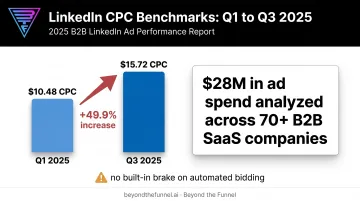
LinkedIn ad costs already run higher than most social platforms, and they swing widely by quarter and industry. HockeyStack's 2025 benchmark report, which analyzed $28 million in ad spend across 70+ B2B SaaS companies, found average CPCs of $10.48 in Q1 and $15.72 in Q3 — nearly a 50% swing within the same year.
That kind of volatility is exactly why leaving your bidding strategy on autopilot is risky. Campaigns left on the default automated setting will keep spending the full budget regardless of whether cost per result is climbing. There's no built-in brake.
Signs your bidding strategy needs attention:
- CPMs creeping up month over month with no lift in leads
- Budget fully spent daily, but cost-per-lead trending the wrong way
- No clear reason why costs shifted between campaign cycles
SaaS, finance, and healthcare advertisers hit this hardest. These industries typically run longer sales cycles and need predictable spend to forecast pipeline accurately. Match your bidding strategy to your growth stage and data maturity—not the platform default—and you keep cost control in your hands.
Types of LinkedIn Bidding Strategies
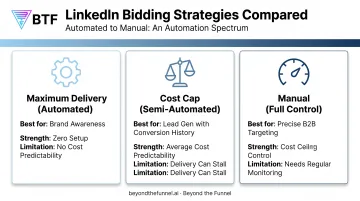
LinkedIn's three bid types sit on a spectrum from fully automated to fully manual, each built for different levels of control, data maturity, and campaign goals.
Maximum Delivery
Maximum Delivery is LinkedIn's fully automated bid option. The platform's machine learning sets your bid for every single auction. Labeled "Maximum Delivery (Automated)" in LinkedIn's documentation, it works by trying to spend your entire daily budget while generating the highest possible number of your chosen key results.
What sets it apart:
- You have zero input on cost: LinkedIn decides what to bid, auction by auction
- It's billed by CPM regardless of your optimization goal
- It's the default bid type applied to every new campaign you build
Best suited for:
- Brand awareness campaigns where reach matters more than efficiency
- Time-sensitive promotions, like event marketing with a hard deadline
- Advertisers without the bandwidth to manage bids manually
Key strengths:
- Zero setup effort
- Full budget utilization every day
- Fastest path to volume when speed outweighs cost efficiency
Limitations: Cost predictability is the trade-off. Because LinkedIn controls the bid entirely, you have no guardrail against rising CPMs during a competitive window.
A bigger budget also doesn't automatically buy proportionally more reach. Once your target audience is saturated, extra spend often chases the same members at a higher cost rather than unlocking new ones.
Cost Cap
Cost Cap is LinkedIn's middle-ground option. It's available for CPC, CPM, CPV, and CPL objectives. Instead of setting a bid ceiling, you set a target average cost per result, and LinkedIn adjusts your bid up or down across individual auctions to keep the average near that target over time.
What sets it apart: Cost Cap isn't a hard limit. Because it's optimizing for an average, individual results can land well above or below your target. Some leads might cost far less; others, noticeably more.
Best suited for:
- Advertisers with a solid, recent history of conversion data for the algorithm to learn from
- Lead generation campaigns where cost control matters more than raw volume
- Teams that want some automation without giving up all cost oversight
Key strengths:
- Average cost predictability across a campaign's lifetime
- Less day-to-day bid management than Manual bidding requires
Limitations: Set the cap too aggressively low, and delivery can stall entirely. LinkedIn simply won't win enough auctions at that price.
Cost Cap also sees limited adoption versus Manual and Maximum Delivery, so fewer shared best practices exist. WordStream's Campaign Manager review illustrates the variance well: two leads targeting a $75 average cost might land at $25 and $125. Both are valid outcomes, but wildly different in practice.
Manual Bidding
Manual bidding is LinkedIn's most hands-on option. You set the maximum bid used directly in each auction, and LinkedIn does not adjust it for you. It's available across every campaign objective and can be charged by CPC, CPM, CPV, or CPS depending on the format and goal.
What sets it apart: You control the ceiling. Thanks to LinkedIn's second-price auction mechanics, your actual cost often lands below your maximum bid (sometimes well below it) when your ad's relevance score is strong.
Best suited for:
- Precisely targeted B2B or account-based campaigns
- Teams that want tight cost control and can check performance regularly
- Advertisers testing new audiences who want to cap downside risk
Key strengths:
- Costs never exceed the bid you set
- Delivery tends to prioritize higher-intent segments over lower-quality impressions
Limitations: This control costs your own time. Set it and walk away, and you risk under-delivery or narrower reach if your bid falls below what the market needs to win auctions consistently.
How to Choose the Right Bidding Strategy
Match your bid type to three things: campaign objective, conversion history, and how much time your team can spend monitoring. Fit beats automation level or popularity every time.
Campaign objective and optimization goal Not every bid type is available for every objective. Brand Awareness campaigns optimizing for Reach, for example, lock you into Maximum Delivery — there's no manual override. Check your optimization goal in Campaign Manager before assuming you have a choice.
Volume of existing conversion history Cost Cap and Manual bidding both perform better with established data to work from. A brand-new account gives the algorithm nothing to learn from under Cost Cap, and gives you no benchmark for setting a confident manual bid.
Budget size and tolerance for variance If you need guaranteed full budget spend regardless of cost, choose Maximum Delivery. If you'd rather protect cost efficiency even if it means underspending some days, Manual or Cost Cap fits better.
Time and resources for monitoring Manual bidding rewards attention. If nobody on your team is checking Campaign Manager weekly, it's the wrong strategy no matter how appealing the cost control sounds on paper.
Common Mistakes to Avoid
- Default inertia: Leaving Maximum Delivery untouched after you have enough data to justify more control
- Over-tight Cost Caps: Setting the cap too low, which can stall delivery instead of simply lowering cost
- Bid hopping: Switching types too often. Give any change a few days to stabilize before judging results
Certified LinkedIn experts, including the team at Beyond the Funnel, typically start new B2B campaigns on Manual bidding, set intentionally below LinkedIn's suggested range. They watch early performance signals closely, then layer in Cost Cap once enough conversion data exists for the algorithm to optimize against something real.
Conclusion
Bidding strategy isn't a footnote in your LinkedIn ad setup. It directly shapes your CPC, CPM, and cost-per-lead outcomes. No single bid type wins across every campaign, objective, or growth stage.
Understanding the real differences between Manual, Cost Cap, and Maximum Delivery helps B2B advertisers allocate budget more intentionally across every stage of the funnel. That beats defaulting to whatever LinkedIn sets automatically.
If you'd rather not guess your way through bidding choices, partnering with a LinkedIn Certified Marketing Expert can help. Beyond the Funnel, led by one of just 80 LinkedIn Certified Marketing Experts worldwide, turns these decisions into a growth strategy built on testing and real account data.
Frequently Asked Questions
How much does a LinkedIn campaign cost?
Costs vary significantly by bid type, objective, and audience competitiveness. Reported ranges span roughly $5–$10 per click on the lower end, with B2B SaaS advertisers often seeing $10–$16 depending on the quarter.
What is the difference between Maximum Delivery and Manual bidding on LinkedIn?
Maximum Delivery lets LinkedIn set bids automatically to spend your full budget without cost input from you. Manual bidding puts you in control, letting you set the maximum bid per result yourself.
Is Cost Cap bidding worth using on LinkedIn?
Cost Cap can offer solid average cost control for lead generation, but it needs enough recent conversion history to work well. Set it too aggressively, and delivery can stall entirely instead of simply getting cheaper.
Why does LinkedIn default to Maximum Delivery bidding?
Maximum Delivery is the default because it's built to fully spend your budget and maximize results volume, not necessarily protect cost efficiency. Advertisers should actively evaluate whether that priority fits their goals.
Can I switch LinkedIn bidding strategies mid-campaign?
Yes, you can change your bidding strategy on an existing campaign at any time in Campaign Manager. Give it a few days after switching before judging performance, since results need time to stabilize.
Which bidding strategy is best for LinkedIn lead generation campaigns?
Manual and Cost Cap are generally favored for lead gen because both offer more cost control than Maximum Delivery. The right choice depends on how much conversion history your account already has.