Key Takeaways
- LinkedIn Messenger campaigns with connected contacts achieve a 12.2% reply rate — compared to 0.45% for cold email, per Belkins' 2026 study of 15M+ touchpoints.
- Personalized, individually sent InMails perform 15% better than bulk sends, according to LinkedIn's own data.
- Warming up a prospect before your first DM ("recognition before reach") consistently produces the strongest reply-rate lift of any single tactic.
- Most responses in outreach campaigns come from follow-up messages, not the first touch — a single attempt rarely moves the needle.
- Effective LinkedIn DM strategy depends on choosing the right channel, using a tested message framework, and maintaining a disciplined follow-up cadence.
Build Your Foundation Before You Send a Single Message
Every prospect who receives your DM will check your profile before deciding whether to reply. A weak profile doesn't just fail to impress — it actively cancels out a strong message. The DM opens the door. Your profile determines what happens next.
Optimize Your Profile to Withstand Scrutiny
When a prospect lands on your profile after receiving your message, they're evaluating four things quickly:
- Headshot — professional, approachable, current
- Headline — should communicate specific value, not just your job title ("Helping SaaS companies reduce churn" beats "Account Executive at Acme Corp")
- About section — should speak to your target audience's problems, not your career history
- Recent activity — posts, comments, and shared content signal that you're active and worth following
Beyond the Funnel founder Joshua Stout — one of only 80 LinkedIn Certified Marketing Experts worldwide — emphasizes that B2B buyers trust people, not brands. Your profile is where that trust is either established or lost. For B2B organizations running team-wide outreach, profile tone should align with the company page to avoid credibility gaps between individual and brand.
Warm Up Your Audience Before You Reach Out
The "recognition before reach" principle works like this: spend several days engaging authentically with a prospect's content before sending your first message. Like a post thoughtfully. Leave a genuine comment. Share something they published.
When your name is already familiar, the DM lands in a completely different context.
At scale, paid LinkedIn campaigns accelerate this warm-up dramatically. Running awareness or Thought Leader Ads to a curated prospect list ensures your brand appears in their feed before organic outreach begins.
Beyond the Funnel's full-funnel approach, connecting awareness, consideration, and conversion into one cohesive system, is built precisely for this: so that by the time a DM arrives, the prospect already knows who you are.
That warm-up only works when it's aimed at the right people. Before building any prospect list, define your ICP with specificity:
- Target job title and seniority level
- Industry and company size
- The specific pain point your outreach addresses
Vague targeting leads to wasted messages and weak relevance. A tight ICP makes every touchpoint feel intentional.
The Three LinkedIn Messaging Channels and When to Use Each
Not all LinkedIn messages are created equal. Choosing the wrong channel for the wrong situation is one of the most common tactical errors in B2B outreach.
| Channel | Best For | Key Consideration |
|---|---|---|
| Connection Request + Note | Relationship-first, targeted outreach | 300-character limit; notes improve subsequent reply rates by 55%, per Belkins research |
| Direct Message (1st-degree) | Warm leads, post-event follow-ups, advancing an existing relationship | Free, highly personal, sits alongside trusted contacts |
| LinkedIn InMail | Cold outreach to non-connections; high-value targets | Paid; InMails under 400 characters get 22% higher response rates than LinkedIn's global average |
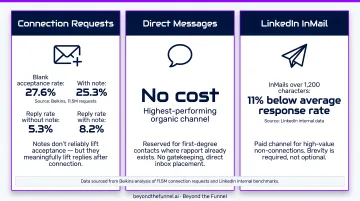
Connection requests with notes don't reliably increase acceptance rates — Belkins' analysis of 11.5M requests found blank requests had a slightly higher acceptance rate (27.6% vs. 25.3%). Notes meaningfully improve what happens after acceptance, though, lifting reply rates from 5.3% to 8.2%.
Direct messages to first-degree connections are the highest-performing organic channel. No cost, no gatekeeping, and a deeply personal inbox placement. Reserve these for contacts where some rapport already exists.
LinkedIn InMail is the paid option for reaching non-connections directly. Reserve it for high-value targets where waiting on a connection request isn't an option. LinkedIn's own data shows InMails over 1,200 characters perform 11% below average, so brevity isn't optional.
How to Write LinkedIn Messages That Actually Get Replies
The fastest way to kill a reply rate: open with your company's credentials or services. The fastest way to earn one: prove you actually read their profile.
Every message should be about the recipient — not you.
The 3-Part Message Framework
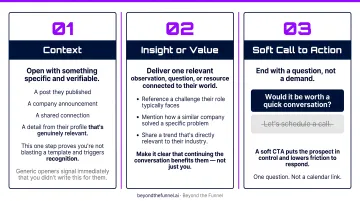
Part 1 — Context
Open with something specific and verifiable. A post they published. A company announcement. A shared connection. A detail from their profile that's genuinely relevant.
This one step does more than any other: it proves you're not blasting a template and triggers a psychological response of recognition.
Generic openers ("I came across your profile," "We help companies like yours") signal immediately that you didn't write this for them.
Part 2 — Insight or Value
Deliver one relevant observation, question, or resource connected to their world:
- Reference a challenge their role typically faces
- Mention how a similar company solved a specific problem
- Share a trend that's directly relevant to their industry
Make it clear that continuing the conversation benefits them — not just you.
Part 3 — Soft Call to Action
End with a question, not a demand. "Would it be worth a quick conversation?" consistently outperforms "Let's schedule a call." A soft CTA puts the prospect in control and lowers the friction to respond. One question. Not a calendar link.
Message Length and Formatting Rules
Keep first messages between 50 and 150 words. Anything longer risks being ignored on mobile entirely.
Avoid these openers — prospects see them dozens of times per week:
- "I saw your profile and was impressed..."
- "We help companies like yours..."
- "I came across your LinkedIn..."
Replace them with specific, human references that only apply to that prospect.
Ready-to-Adapt Message Templates
Template 1 — Post Engagement
"Your post on [specific topic] made me rethink [specific assumption]. Curious — when you mentioned [specific point], were you finding that [relevant follow-on question]? I've been looking at this from [brief relevant angle] and would value your take."
Template 2 — Value-First
"Given your role at [Company], you're probably navigating [specific challenge]. I recently came across [relevant resource/insight] that directly addresses this — happy to share if it would be useful. Would that be worth a look?"
Template 3 — Warm Introduction
"[Mutual connection] mentioned your work on [specific project/topic]. That's directly relevant to what I'm working on at [Company]. Would a brief exchange make sense?"
Every template here is a starting point. Fill in the specifics before you hit send — a real observation, a real reference, a real reason you reached out.
LinkedIn DM Mistakes That Kill Your Reply Rates
The "Connect and Pitch" Trap
Sending a sales pitch the moment a connection request is accepted is the fastest path to being ignored, or reported as spam. The correct sequence: connect, engage, demonstrate genuine interest, and introduce your offering only after some rapport exists. Treat the first message after connecting like a first conversation, not a close.
Generic, Copy-Paste Messages
Prospects spot templated messages immediately. The tells are always the same:
- No specific reference to their work or role
- Vague value claims like "We help B2B companies grow"
- Identical phrasing to every other DM in their inbox
Genuine personalization means referencing something that could only apply to that person — a specific post, a recent announcement, a shared context. If you can send the same message to 50 people without changing a word, it isn't personalized.
Over-Messaging
Multiple follow-ups within a few days, or continuing to reach out after clear disengagement signals, doesn't show persistence. It damages your reputation and risks spam flags. Spacing matters. So does knowing when to stop. The goal is a conversation, not a chase.
Follow-Up Cadence and Multi-Touch Sequences That Drive Results
Most LinkedIn outreach fails not because the message was bad, but because the sender stopped after one attempt. According to RAIN Group's 2026 research, it takes an average of 8 touchpoints to secure an initial meeting with a new prospect. Top performers average 5 touches and convert 52% of targets, compared to just 19% for average performers.
Follow-up is not optional.
The Recommended Follow-Up Cadence
A 3-4 touch sequence with consistent spacing:
- Day 1 — First message (personalized, 3-part framework)
- Day 3-4 — First follow-up: add new value (a relevant article, a new question, an observation about their industry — not "just checking in")
- Day 8-10 — Second follow-up: different angle or resource, not a repeat of the original pitch
- Day 14-16 — Final message: brief, give them a graceful exit ("No worries if the timing isn't right — happy to reconnect down the road")
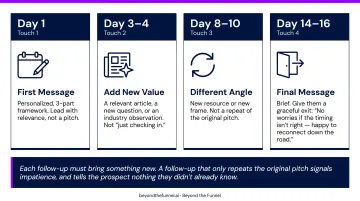
Each follow-up must bring something new. A follow-up that only repeats the original pitch signals impatience, and tells the prospect nothing they didn't already know.
Adding Value at Every Touchpoint
Value-add follow-up looks like this:
- Sharing a piece of content directly relevant to a challenge they've expressed
- Referencing something they posted since your last message
- Acknowledging a company milestone or recent news
It does not look like: "Hi [Name], just following up on my previous message. Wanted to see if you had a chance to review."
When to Switch Channels or Move On
For high-value prospects who don't respond after two LinkedIn touches, switching to email (if available) or phone can re-engage someone who simply prefers a different channel. Keep the messaging consistent across channels — the story shouldn't change just because the channel did.
After 3-4 thoughtful, spaced-out attempts with no response, move on. Keep the contact in a re-engagement list for a future quarter. Burning a relationship by over-messaging costs more than a missed conversation.
How to Track and Optimize Your LinkedIn DM Performance
The Four Metrics That Matter
| Metric | What It Tells You |
|---|---|
| Connection acceptance rate | Whether your targeting and profile are working |
| Reply rate (total replies / messages sent) | Overall message effectiveness |
| Positive reply rate | Quality of replies — advancing vs. politely declining |
| Meetings booked | Downstream conversion from outreach |
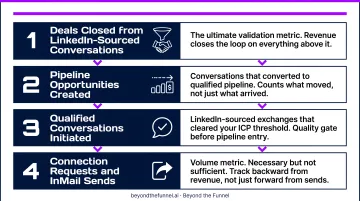
Ultimately, the metric that validates the entire strategy is deals closed from LinkedIn-sourced conversations. Track backward from revenue, not just forward from sends.
A/B Testing Your Outreach
Test one variable at a time: the opening line, the call to action, message length, or send timing. Run a consistent sample size before calling a winner. This is the same discipline Beyond the Funnel applies to paid LinkedIn ad creative testing — disciplined iteration is what separates outreach that scales from outreach that stalls.
For B2B brands ready to scale beyond organic DMs, pairing tested messaging with a full-funnel paid LinkedIn strategy produces compounding results. The organic learning informs the paid creative. The paid awareness accelerates the organic reply rates.
Practical Tracking
Log every outreach interaction in a CRM or dedicated spreadsheet. This prevents double-messaging, reveals which angles generate the most replies, and connects LinkedIn activity to actual pipeline.
Review metrics weekly. Patterns surface quickly at that cadence, and catching them early means you can double down on what's working before momentum slips.
Frequently Asked Questions
What is the ideal length for a LinkedIn cold message?
Keep first messages between 50 and 150 words. Shorter messages are easier to read on mobile and signal respect for the recipient's time. Messages longer than 150 words are frequently skipped entirely before the first sentence finishes.
How many LinkedIn connection requests can I send per day?
LinkedIn caps invitations at roughly 100 per week, and exceeding that threshold can trigger platform restrictions. Sending a smaller volume of highly targeted requests is far more effective than blasting high volumes and risking your account's standing.
What is the difference between LinkedIn InMail and direct messages?
Direct messages are free and only available to first-degree connections. InMail is a paid feature that lets you message anyone on LinkedIn regardless of connection status, making it the right tool for cold outreach to prospects you're not yet connected with.
How do I personalize a LinkedIn message without sounding generic?
Reference something specific: a post they wrote, a recent company announcement, a shared connection. Vague compliments ("I really admire your work") read as generic. The clearest signal a message was written for someone is that it couldn't have been sent to anyone else.
When is the best time to send LinkedIn direct messages?
For InMail specifically, LinkedIn's own data identifies Monday as the most effective send day, with Friday and Saturday performing below average. Generally, business hours mid-week see stronger engagement — but message quality matters far more than timing.
How do I follow up on LinkedIn without being annoying?
Add new value with each follow-up rather than repeating your original message. Space touches at least 2-4 days apart and cap outreach at 3-4 total messages. If there's no response after that, move on rather than risk leaving a negative impression.