Introduction
Your competitors are already running LinkedIn campaigns targeting the exact decision-makers you're trying to reach. Every one of those ads is a free data point sitting in plain sight.
Most B2B marketing teams never look. They build campaigns in isolation, re-testing messaging and offers rivals have already validated (or abandoned) months ago. That wastes budget and time on a channel where neither is cheap.
LinkedIn is projected to capture 22.9% of total US B2B digital ad spending in 2024, according to eMarketer. Your buyers are already there, and so are your rivals.
This guide covers what to look for in competitor LinkedIn ads, how to research it with free and paid tools, and how to turn what you find into an actual testing roadmap.
TL;DR
- Rivals' live and past LinkedIn ads reveal messaging, offers, and creative they've already tested
- Ad longevity is the best public performance proxy, since weak creative rarely stays live for months
- A repeatable six-step process turns scattered observations into a monthly competitive habit
- Funnel-stage gaps—everyone chasing demos, no one building awareness—often mark your best opportunity
- Pairing research with an experienced LinkedIn partner turns insights into validated, full-funnel campaigns faster
What Is LinkedIn Ads Competitor Analysis & Why It Matters
What Is LinkedIn Ads Competitor Analysis?
LinkedIn Ads competitor analysis means researching rivals' ad creative, messaging, offers, and available targeting signals to inform your own campaign strategy. Strong analysis pairs creative auditing (formats, copy, CTAs) with strategic auditing (funnel stage, offer type, campaign cadence).
Three main research routes:
- LinkedIn's Ads Library – a public database anyone can search with or without a LinkedIn account
- LinkedIn Page competitor analytics – a built-in admin tool that compares follower growth and organic content engagement, not paid ad performance
- Third-party competitive intelligence tools – paid platforms layering extra tracking on top of what LinkedIn shows publicly
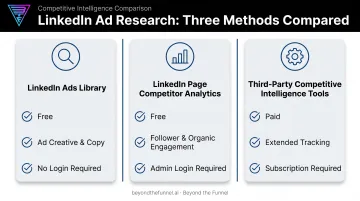
The Ads Library is where most creative and messaging intel lives. It shows advertiser, format, and creative for ads dating back to June 2023, and new activity typically appears within 24 to 48 hours of going live.
Why It's Critical for B2B Growth
LinkedIn clicks cost more than most other paid social platforms. AgencyAnalytics' 2025 study of over 150,000 agency campaigns found that LinkedIn's median CPC runs several times higher than Facebook's. At that price, guessing gets expensive fast.
Competitor analysis changes the math:
- Prevents wasted spend on messaging or offers rivals already tested and abandoned
- Surfaces funnel-stage gaps, such as a category full of demo ads with zero awareness content
- Benchmarks share of voice and creative cadence against direct rivals
- Reveals category language patterns so you can differentiate instead of blending in
- Informs your own creative refresh cadence, based on how long competitors sustain a given ad
Skip this step, and you're not just guessing. You're likely re-running a test a competitor ran and abandoned three months ago.
How to Conduct LinkedIn Ads Competitor Analysis – Step by Step
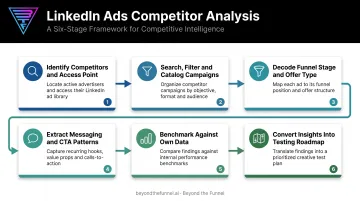
This isn't a one-time audit you run before a launch and forget. Treat it as a repeatable 15 to 20 minute workflow you revisit monthly.
The most common mistake: reading only what an ad says, without decoding its funnel stage or checking how long it's been running. Longevity is the real signal. No advertiser keeps underperforming creative live for months at typical LinkedIn CPCs.
Step 1: Identify Competitors and Choose Your Access Point
List 3 to 5 direct competitors, plus one adjacent player with visibly active creative. Then pick your access point:
- Search directly in the LinkedIn Ads Library by company name
- Visit a competitor's Company Page and check their ads tab
Start with the Ads Library when you want full creative history; use the Company Page ads tab when you only need what's running right now.
Step 2: Search, Filter, and Catalog Active Campaigns
Apply country, date range, and keyword filters. Combining a company name with keywords like "guide" or "demo" surfaces funnel-stage language quickly. Log three things per competitor:
- Total number of active ads
- Dominant creative format (image, carousel, video)
- Whether they run one consistent message or many variations
A quick catalog like this keeps later messaging and gap analysis grounded in volume and format—not gut feel.
Step 3: Decode Funnel Stage and Offer Type
Map each ad's offer to a funnel stage:
- TOFU: Guides, reports, industry research
- MOFU: Webinars, case studies, comparison content
- BOFU: Demo requests, free trials, pricing pages
Where competitors concentrate spend tells you where the category is crowded, and where it's wide open.
Step 4: Extract Messaging, Creative, and CTA Patterns
Record recurring pain points, proof-point types, and CTA language across every ad you review. Pay close attention to anything running 60 days or longer. That's a strong signal of a top performer, since weak creative rarely survives that long at LinkedIn's price point.
Step 5: Benchmark Against Your Own Campaign Data
Compare what you found against your own historical numbers:
- CTR and CPL by offer type
- Engagement by creative format
- Angles that already resonate with your audience
Match competitor patterns to your winners first. Those overlaps are your highest-confidence tests to run next.
Step 6: Convert Insights Into a Testing Roadmap
Build three assets:
- A swipe file of the strongest ads you found
- A messaging map organized by competitor
- A gap list of angles nobody in your category is running yet
Schedule a recurring monthly review. New creative, offer tests, and budget shifts show up fast on LinkedIn—monthly checks catch them before your roadmap goes stale.
LinkedIn Ads Competitor Analysis – Example Walkthrough
Here's how this plays out for a generic B2B example: a project management software company.
The marketing team shortlists three direct competitors and searches each in the Ads Library, filtering to their primary market and the last 90 days.
A pattern emerges fast. Two of the three competitors run only demo-request and free-trial ads. No educational content, no awareness plays. One carousel ad from the market leader has run continuously for more than 90 days.
The near-mistake: the team's first instinct is to copy that long-running demo ad's CTA word-for-word. It's tempting, since it's clearly working for someone.
That instinct overlooks the real opportunity, though. The entire category is skipping top-of-funnel content, leaving prospects who aren't demo-ready with nothing to engage with.
Instead, the team:
- Builds a messaging map showing exactly what each competitor is (and isn't) saying
- Adds "educational TOFU content" to the top of their gap list
- Drafts a thought-leadership carousel addressing a pain point none of the three rivals mention
That carousel becomes an A/B test against the market's default demo-focused approach. Cost per lead decides which strategy earns more budget going forward.
How Beyond the Funnel Can Help You Act on Competitive Insights
Spotting a gap in competitor messaging is the easy part. Building a validated, full-funnel campaign around it without guessing is where most in-house teams stall.
Beyond the Funnel turns that kind of research into a media plan built to convert.
- Founder Joshua Stout is one of only 80 LinkedIn Certified Marketing Experts worldwide (1 of 16 in the U.S.), so competitor cadence and category signals get interpreted with platform-level judgment
- Validates audience and messaging angles—including gaps from competitor research—before any real spend is scaled
- Closes the TOFU, MOFU, and BOFU gaps your analysis surfaces, instead of copying the BOFU-heavy plays most rivals run
- Ties competitor-informed decisions to your account performance with transparent reporting, not vanity metrics
- Surfaces cross-category patterns from 1,000+ managed LinkedIn ad accounts across SaaS, finance, technology, and healthcare
That approach helped Evidation grow its LinkedIn pipeline from a few dozen opportunities to more than 100 in a single year, by acting on competitive gaps instead of mirroring a rival's top ad.
Conclusion
LinkedIn Ads competitor analysis gives B2B marketers a free, public way to reduce guesswork, benchmark against rivals, and uncover positioning gaps nobody else is filling. That only works if it's treated as a repeatable process, not a one-time glance before a launch.
Feed what you find into a continuous, monthly testing cycle. Marketers who outperform their category act on what competitors reveal, then test their way past them. Pair that discipline with a partner who has already seen those patterns across hundreds of accounts, and you move from copying rivals to beating them.
Frequently Asked Questions
What's the best way to see what LinkedIn ads my competitors are running?
The LinkedIn Ads Library is the primary free method. Search by company name to pull up their active and recent creative. A competitor's Company Page ads tab works as a quick alternative.
Is the LinkedIn Ads Library free to use?
Yes. It's a completely free, public database that requires no LinkedIn account, login, or payment. Any marketer can search it directly.
Can I see how much competitors are spending on LinkedIn ads?
No. Exact budget and spend figures are never shown publicly. Ad longevity and format diversity are the best available proxies, apart from limited impression-range data on EU-targeted ads.
How often should I run a LinkedIn ads competitor analysis?
A monthly 15- to 20-minute review works for most categories. Run a deeper audit before major campaign launches or creative refreshes, and go weekly if your category is especially competitive.
What's the difference between the LinkedIn Ads Library and LinkedIn Page competitor analytics?
The Ads Library is public and focused on ad creative. LinkedIn Page competitor analytics is an admin-only tool tracking follower growth and organic content engagement, not paid ad performance.
How do I use competitor ad insights without just copying them?
Identify what competitors consistently aren't covering, such as a missing funnel stage or unaddressed pain point. Build differentiated tests around that gap rather than replicating their existing creative.