Yet plenty of marketers are still flying blind. They run campaigns, watch clicks roll in, and have no idea which ones actually turned into demos, form fills, or pipeline. This gap isn't rare, either: 34.2% of marketers surveyed by MarketingWeek said their company rarely or never measures ROI.
This guide covers what LinkedIn Conversion Tracking actually is, how to set it up correctly, and how to use the resulting data to build a growth engine you can predict, not just hope for.
Key Takeaways
- Conversion Tracking links ad clicks and views to real actions via Insight Tag, Conversions API, CRM Sync, or CSV uploads.
- Your data source choice determines whether you capture upper-funnel, mid-funnel, or bottom-funnel behavior accurately.
- Effective setup needs a conversion rule, tracking method, window, and attribution model matched to your sales cycle.
- Unverified tags and mismatched attribution models are the two most common reasons tracking data goes bad.
What Is LinkedIn Conversion Tracking?
LinkedIn Conversion Tracking is a feature inside Campaign Manager that measures what people do after they interact with your ad. It's built to connect ad spend to results your business actually cares about, not just impressions.
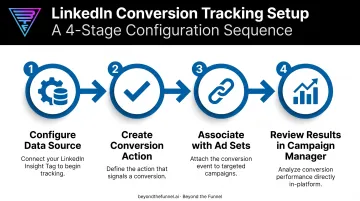
The process, per LinkedIn's own documentation, works in a straightforward sequence:
- Configure a data source (Insight Tag, Conversions API, CRM Sync, or CSV)
- Create a conversion action from that source
- Associate the conversion with specific ad sets
- Review results in Campaign Manager reporting
Most of this runs through the LinkedIn Insight Tag, a lightweight JavaScript snippet you add to your website. It reports user actions and demographic signals back to LinkedIn. According to LinkedIn's Insight Tag documentation, it's the mechanism behind most website-based conversion tracking on the platform.
Accuracy matters at LinkedIn's scale. LinkedIn now reports more than 1 billion members across 200+ countries. At that scale, even small tracking errors compound fast. For B2B companies running multi-touch campaigns, a single buyer might see five or six ads before ever filling out a form.
For SaaS, finance, and healthcare brands managing complex buyer journeys, conversion tracking is the difference between a "spray and pray" ad budget and one that contributes measurably to pipeline. Having reviewed setups across 1,000+ managed LinkedIn ad accounts, the pattern is consistent: accounts with clean tracking make faster, better-informed decisions than accounts guessing from vanity metrics alone.
Key Terminology to Know
A few terms come up constantly in Campaign Manager:
- Insight Tag / pixel: The JavaScript snippet (or, in older setups, a 1x1 image pixel) that reports user actions back to LinkedIn
- Event-specific pixel: A narrower tracking option tied to a specific on-page action, less accurate than the standard Insight Tag
- Conversion window: The timeframe LinkedIn uses to attribute a conversion back to an ad interaction (options include 1, 7, 30, 90, or up to 365 days for eligible categories)
- Attribution model: The rule that decides which ad set gets credit for a conversion when multiple ads were involved
LinkedIn's Conversion Data Sources Explained
LinkedIn builds conversions from four data sources. Picking the right one (or combination) directly affects how much of your funnel you can actually see.
LinkedIn Insight Tag (Website-Based Tracking)
This is a cookie-based tag installed directly on your website. It's best suited for upper-funnel actions: page views, website visits, and general engagement signals.
The catch: it depends on cookies. Browser restrictions on third-party tracking can weaken signal reliability, which is why LinkedIn also offers "enhanced conversion tracking" using first-party cookies to help close that gap.
Conversions API (Server-to-Server)
The Conversions API sends data directly from your server to LinkedIn, no cookies required. That makes it far more reliable. According to LinkedIn's Conversions API documentation, it's the only method that reliably tracks both online and offline actions across the full funnel.
The tradeoff is setup complexity. A direct build typically needs developer resources, though third-party partner integrations exist for teams without in-house engineering support.
CRM Sync and CSV Upload
- CRM Sync: Connects Salesforce, Dynamics 365, or HubSpot and auto-creates conversions from Leads, Qualified Leads, or Contacts
- Best for: Bottom-funnel actions like closed-won deals
- Setup time: Up to 72 hours in Business Manager, plus 24-48 hours to appear in Campaign Manager
- CSV upload: Best for lower-volume or infrequent offline conversions
- Refresh cadence: Daily or weekly file updates to keep data current
Combining sources gives you the fullest picture. Pairing the Insight Tag with Conversions API, for instance, captures both upper- and lower-funnel behavior.
LinkedIn deduplicates matching browser and server events that share the same eventId, so you won't double-count a conversion. That deduplication does not automatically extend to CSV-based events configured separately.
How to Set Up LinkedIn Conversion Tracking Step by Step
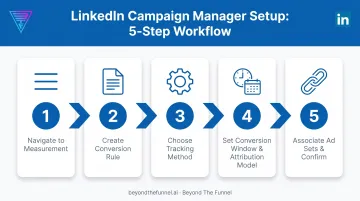
Here's the setup process inside Campaign Manager:
- Navigate to Measurement. Go to Campaign Manager, click "Measurement" in the left menu, then select "Conversion Tracking" and choose "Create conversion."
- Create your conversion rule. Name it something specific, like "Demo Request Form," then select a category (Lead, Qualified Lead, Download, or Purchase). Assign a fixed or dynamic conversion value.
- Choose your tracking method. Pick Website Actions for no-code automatic tracking, Manual Setup for page-load or event-specific control, or connect through Google Tag Manager if you already use it.
- Set your conversion window and attribution model. LinkedIn recommends a 90-day click/90-day view window for most conversions. Choose Last Touch - Each ad set (credits every ad set a user interacted with) or Last Touch - Last ad set (credits only the most recent one).
- Associate ad sets and confirm. A conversion only tracks once it's attached to a campaign or ad set. CRM-based conversions need separate ad set approval before they activate.
Practical tip: Check the Status column in Campaign Manager after launch. "Unverified" means the Insight Tag hasn't detected live traffic yet.
Visit the tagged page yourself, then confirm the signal in LinkedIn's Signals Manager under Data before assuming conversions are broken.
Metrics, Attribution & When to Use Conversion Tracking
Once tracking is live, three metrics tell you most of what you need to know:
| Metric | What It Tells You |
|---|---|
| Conversion rate | Total conversions divided by clicks — your efficiency signal |
| Cost per conversion | Total spend divided by conversions — your cost-efficiency signal |
| Total conversion value | Value per conversion multiplied by volume — your revenue signal |
Post-click and view-through conversions measure influence differently. Post-click conversions come from users who clicked your ad and later converted. View-through conversions capture people who saw the ad, never clicked, and still converted within your selected window.
Ignoring view-through data underestimates how much your awareness campaigns influence pipeline.
When should you turn on conversion tracking?
From day one. Even a pure brand-awareness campaign benefits from a baseline "engagement" conversion set up before launch. That baseline gives you data to retarget against later and a starting point for attribution once you layer in bottom-funnel campaigns.
Common Conversion Tracking Mistakes and Optimization Tips
Most tracking problems fall into a handful of predictable buckets:
- Launching before verifying the tag. If the Insight Tag hasn't registered live traffic, conversions sit as "Unverified" for weeks, silently skewing your early reporting.
- Using the wrong attribution model. Last-touch models undercredit earlier touchpoints in long B2B cycles, where buyers often engage with three or four ads before converting.
- Treating the image pixel like the Insight Tag. LinkedIn is explicit that the image pixel is less accurate and doesn't support enhanced conversion tracking, so don't rely on it as a primary source.
- Letting CSV data go stale. If you're not refreshing manual uploads weekly at minimum, your offline conversion picture falls out of sync with reality.
Optimization tips:
- Test different conversion windows periodically instead of setting one and forgetting it
- Build a retargeting segment for users who engaged with your ads but never converted—they've already shown interest and often need one more nudge
Ongoing testing is central to how Beyond the Funnel approaches LinkedIn measurement. Founder Joshua Stout built the agency's framework after managing setups across 1,000+ LinkedIn ad accounts, helping B2B brands validate tracking, fix attribution mismatches, and treat LinkedIn as a real revenue channel.
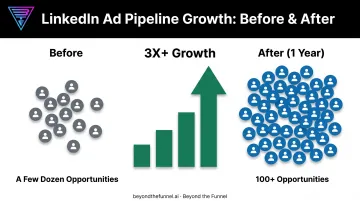
One client, Evidation, grew its pipeline from a few dozen opportunities to over 100 in a single year working with the team.
Frequently Asked Questions
When should I use conversion tracking on LinkedIn?
Set it up before or at campaign launch, not after. Even top-of-funnel campaigns benefit from baseline conversion data, which fuels retargeting and future attribution decisions.
What is the LinkedIn Insight Tag and do I need it?
It's the JavaScript snippet that powers most website-based conversion tracking on LinkedIn. You'll need it unless you're relying exclusively on the Conversions API.
How long does it take for conversions to start showing up in Campaign Manager?
Conversions stay "Unverified" until there's live traffic on the tagged page. Once traffic hits, data typically populates within a few hours to a day.
What's the difference between post-click and view-through conversions?
Post-click conversions come from users who clicked the ad before converting. View-through conversions capture users who only saw the ad and converted later, without ever clicking.
Can I track offline conversions on LinkedIn?
Yes. CRM Sync and CSV upload both support offline actions like closed-won deals, giving you visibility beyond website activity alone.
Which attribution model should B2B advertisers choose?
Match it to your sales cycle length. Longer, multi-touch B2B journeys generally benefit from "Last Touch - Each ad set" attribution, since it credits every ad set involved rather than just the final one.