Introduction
Sponsored Content costs keep climbing. If you're running LinkedIn campaigns in 2026, you've likely watched your CPCs creep higher every quarter, even as your budget stays flat.
That reality is pushing more B2B marketers to look at formats they've historically ignored. Spotlight Ads are one of them.
Joshua Stout, founder of Beyond the Funnel, has managed and optimized more than 1,000 LinkedIn ad accounts across SaaS, finance, technology, and healthcare.
That volume of testing reveals patterns most marketers never see—including which underused formats still deliver value when the obvious ones get expensive.
This guide breaks down what Spotlight Ads actually are, where they shine, where they fall short, and how to launch one correctly. By the end, you'll know whether they deserve a spot in your 2026 media mix.
Key Takeaways
- Spotlight Ads personalize creative with viewer photo, name, and job title—desktop right rail only
- Lower CPMs than Sponsored Content come with noticeably weaker click-through rates
- Best suited for retargeting warm audiences, not cold prospecting
- Custom background imagery beats default profile-photo overlays for combating banner blindness
- Pairing Spotlight Ads with a broader funnel strategy outperforms running them alone
What Are LinkedIn Spotlight Ads?
Spotlight Ads are a dynamic, personalized ad format built inside LinkedIn Campaign Manager. Instead of showing every viewer the same static creative, the format pulls each viewer's own profile photo, name, job title, and company name into the ad itself.
The effect: your ad looks like it was made specifically for the person viewing it — because it was.
LinkedIn's own documentation confirms this format is personalized to each member and linked directly to an advertiser's website or landing page. It's built for one job: getting someone to click through to a specific destination, whether that's a product page, an event registration form, or a content offer.
Placement matters. Spotlight Ads live exclusively in the desktop right-hand rail, next to the main feed. Because that rail scrolls with the user, your ad stays visible far longer than a feed post that gets scrolled past in two seconds.
Anatomy of a Spotlight Ad
Every Spotlight Ad requires a handful of creative components:
- Headline – short, benefit-driven copy
- Description – a brief supporting line
- Company name – displayed alongside your logo
- Logo or image – your brand mark
- CTA button – action-oriented text like "Learn More" or "Request Demo"
- Optional custom background image – replaces the default profile-photo treatment
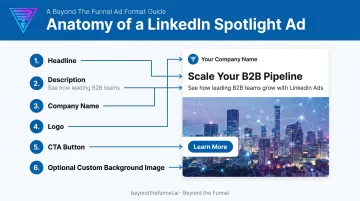
According to LinkedIn's official Dynamic Ads specifications, character and pixel limits are tight. Think headlines around 50 characters and descriptions around 70. Specs change occasionally, so verify the current numbers on LinkedIn's ad specs page before you build creative, rather than relying on a blog post (including this one).
Spotlight Ads vs. Other LinkedIn Ad Formats
Here's how Spotlight stacks up against the formats you're probably already running:
| Format | Placement | Personalization | Best Use Case |
|---|---|---|---|
| Spotlight Ads | Desktop right rail | Photo, name, job title | Retargeting, personalized awareness |
| Sponsored Content | Native feed (desktop + mobile) | None built-in | Broad reach, content promotion |
| Text Ads | Desktop right rail | None built-in | Low-cost, self-serve testing |
| Follower Ads | Desktop right rail | Photo + invitation | Growing Page followers |
Spotlight and Follower Ads are both "Dynamic Ads" under LinkedIn's classification, but they chase different goals. Spotlight drives clicks to your website. Follower Ads drive Page follows. Don't confuse the two when setting campaign objectives.
Why LinkedIn Spotlight Ads Are Worth Testing in 2026
Personalized creative earns attention differently than static creative. Seeing your own face and job title in an ad interrupts the usual scroll pattern, even briefly, and that interruption is the whole point.
The Cost Advantage
Spotlight Ads tend to be cheap on an impression basis, even when they're pricier per click.
In a 2026 AdConversion analysis of $1.7 million in B2B SaaS ad spend, Spotlight Ads averaged a $5.23 CPM, 74% lower than single-image Sponsored Content. That same dataset showed a $7.93 average CPC, 83% higher than single-image ads.
You get far more impressions per dollar, but not necessarily more clicks per dollar. That trade-off should shape how you set campaign goals.
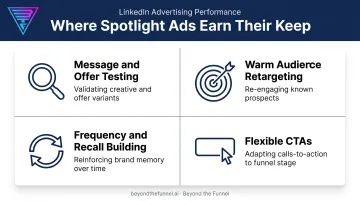
Where Spotlight Ads Actually Earn Their Keep
- Message and offer testing – Cheap impression volume lets you validate copy angles fast before committing bigger budget to Sponsored Content
- Warm audience retargeting – Website visitors, email lists, and lookalikes who already recognize your brand respond better to a familiar name than a cold pitch
- Frequency and recall – High impression volume builds familiarity even among people who never click
- Flexible CTAs – Support demo requests, event sign-ups, content downloads, or Page follows without rebuilding your funnel
Across 1,000+ managed accounts, the pattern is consistent: Spotlight Ads rarely win alone as a lead-gen engine. They earn their place as a supporting layer inside a retargeting sequence.
Potential Drawbacks to Consider Before You Launch
Spotlight Ads aren't a universal fix. A few real limitations should shape whether and how you use them.
Desktop-only means partial reach. If your buyers browse LinkedIn mainly on mobile—during commutes or between meetings—Spotlight Ads won't reach them there. Check your audience's device behavior in Campaign Manager before allocating budget.
Click-through rates lag behind the feed. ZenABM's 2026 benchmark study of 161,256 LinkedIn ads across 211 companies found a clear gap: 0.08% median CTR for Dynamic/Spotlight ads versus 0.42% for single-image Sponsored Content. Spotlight shouldn't be your primary click-driving format.
Banner blindness sets in fast. Once someone has seen five ads with their own headshot slapped on a generic template, the novelty wears off. Break that pattern with:
- Custom background imagery instead of the default overlay
- Bold, brand-relevant visuals that don't lean on the photo gimmick
- Rotating creative every few weeks to avoid fatigue
How to Set Up a High-Converting LinkedIn Spotlight Ads Campaign
Setup determines most of your outcome before the ad ever goes live. Here's the sequence that keeps performance from falling apart.
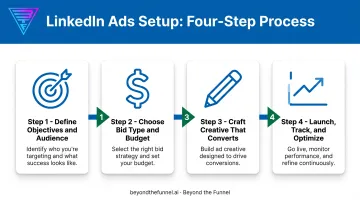
Define Objectives and Audience
Pick one trackable goal, whether that's traffic, leads, followers, or event registrations, and tie it to a specific KPI. Vague goals produce vague optimization decisions.
From there, narrow your targeting:
- Job title and seniority – Filter to actual decision-makers, not everyone at a company
- Industry and company size – Match your ICP, not a broad category
- Skills – Layer in relevant technical or functional skills where applicable
- Matched Audiences – Add retargeting lists (website visitors, CRM contacts) or lookalikes to sharpen relevance
Choose Bid Type and Budget
CPC bidding is usually the safer default, given Spotlight's lower click-through rates. Paying per click, rather than per impression, means you're not burning spend on views that never convert into action.
Start with a conservative daily budget. Watch performance for at least a week before scaling up. Jumping straight to an aggressive spend before you've validated audience response is one of the fastest ways to waste money on any LinkedIn format, not just this one.
Craft Creative That Converts
Keep creative short and benefit-driven. Don't pad the character limit with filler just because you can.
- Lead with the outcome, not the feature
- Test a custom background image against the default profile-photo overlay
- Keep the CTA specific ("Request Demo," not "Learn More") when your goal supports it
Launch, Track, and Optimize
Set up conversion tracking through the LinkedIn Insight Tag before launch, not after. Without it, you're optimizing blind.
Run structured A/B tests across creative, audience segments, and CTA variations, one variable at a time. Review performance weekly, not monthly. LinkedIn budgets can drift fast if underperforming ads sit unchecked.
This is the audience validation and creative testing process Beyond the Funnel applies across its managed accounts: confirm what's working with real data before committing more budget, rather than assuming a format will perform from general benchmarks alone.
2026 Best Practices to Maximize ROI
A few adjustments separate Spotlight campaigns that perform from ones that waste spend.
- Lead with bold, data-rich background images instead of the generic headshot overlay. A stat-driven visual or brand graphic cuts through a crowded right rail.
- Keep headlines tight and benefit-focused. Padding the character limit dilutes the offer.
- Pair Spotlight Ads with Sponsored Content in a retargeting sequence. Running Spotlight alone misses full-funnel lift—warm audiences need consistent messaging across formats.
Common Mistakes That Sink Spotlight Ad Performance
Even strong Spotlight creative fails when setup or follow-through slips. Watch for these three traps:
- Over-personalization that feels invasive. Name and photo feel clever once; in every ad they feel unsettling. Balance personalization with brand messaging so ads stay relevant, not creepy.
- Sending desktop clickers to mobile-first landing pages. Spotlight clicks come from desktop, so thin mobile pages waste that traffic. Give visitors more detail, proof points, and a clearer path to convert.
- Ignoring analytics until it's too late. Weak ads don't announce themselves. Without weekly review and A/B testing, poor creative or audience fit can burn budget for weeks unnoticed.
Frequently Asked Questions
What are LinkedIn Spotlight Ads?
They're a personalized, desktop-only dynamic ad format that pulls a viewer's own photo, name, and job title into the creative. The goal is driving clicks to a specific landing page or website.
How much do LinkedIn Spotlight Ads cost?
One 2026 dataset from AdConversion showed averages of $5.23 CPM and $7.93 CPC, though actual costs vary widely by industry competitiveness and targeting. There's no universal published price range, so treat any figure as a benchmark, not a guarantee.
Are LinkedIn Spotlight Ads available on mobile devices?
No. They appear exclusively on desktop, in the right-hand rail. If a meaningful share of your target audience browses LinkedIn primarily on mobile, factor that gap into your channel planning.
How are Spotlight Ads different from Sponsored Content?
Spotlight Ads personalize creative and sit in the desktop right rail, while Sponsored Content runs without personalization in the native feed across both desktop and mobile. Sponsored Content generally reaches more people; Spotlight targets relevance over volume.
What's considered a good CTR for LinkedIn Spotlight Ads?
A 2026 ZenABM benchmark found a 0.08% median CTR for Spotlight/Dynamic ads, well below the 0.42% median for single-image Sponsored Content. Relevance score and creative quality determine where your campaign lands versus that median.
Are LinkedIn Spotlight Ads still worth using in 2026?
Yes, particularly for retargeting warm audiences and testing messaging cheaply before scaling spend elsewhere. They work best paired with a validated audience strategy and strong creative, not as a standalone lead-gen tactic.