Here's where most B2B teams get stuck. They boost a post hoping for demo requests, then wonder why the results look thin. Or they build a full campaign with heavy targeting and testing bandwidth for a message that hasn't even been validated yet. Both mistakes cost money and time.
This guide breaks down what each option actually does, where each one earns its budget, and how a LinkedIn Certified Marketing Expert approaches the decision. Beyond the Funnel has managed and optimized more than 1,000 LinkedIn ad accounts, and this framework comes straight from that experience.
Key Takeaways
- Boosted posts extend reach fast, best suited for awareness rather than lead generation
- Campaign Manager offers precise B2B targeting, multiple formats, and conversion tracking
- Boosting costs less upfront but offers shallow reporting and limited objectives
- Smart teams boost cheaply to test messaging, then scale winners into full campaigns
Boosted Posts vs LinkedIn Ads: Quick Comparison
Here's how the two options stack up across the factors that actually affect your decision:
| Factor | Boosted Posts | LinkedIn Ads (Campaign Manager) |
|---|---|---|
| Cost | Lower upfront spend; you set a lifetime budget with no published universal minimum | Requires more budget to test properly; at least $100 in unspent campaign budget needed to launch a new ad set |
| Setup Time | Minutes: pick a post, set budget, choose audience | Hours to days: build objective, creative, audience, and tracking from scratch |
| Targeting Options | Basic: location, job seniority, job function, industry, group interests, language | Advanced: job title, seniority, company size, skills, interests, plus Matched Audiences (retargeting, contact upload, account targeting) |
| Ad Formats & Objectives | Website visits, brand awareness, engagement, video views, Lead Gen Forms | Sponsored Content, Message Ads, Conversation Ads, Document Ads, single image, video, carousel |
| Reporting | Basic engagement metrics tied to the post | Full conversion tracking, A/B testing, pipeline attribution |
Boosted posts win on speed and simplicity. Campaign Manager wins on precision and control. The right choice depends on whether you need quick visibility or measurable pipeline results.
What Are Boosted Posts on LinkedIn?
Boosting takes a post that's already live on your LinkedIn Page and adds paid budget behind it through a simplified "Boost" button. You need Super Admin or Content Admin access on the Page to do it, and eligible content includes single-image, video, event, document, and article posts. Polls and job ads can't be boosted.
What You Get and What You Don't
The appeal is speed. There's no campaign architecture to build, no creative to produce from scratch — you're just putting money behind something that already exists.
Available objectives are limited to:
- Website visits
- Brand awareness
- Engagement
- Video views
- Lead Gen Forms
One detail catches marketers off guard: boosted posts don't bill through the Page itself. LinkedIn routes the spend through a connected Campaign Manager ad account, meaning you're already touching the ads infrastructure whether you realize it or not. That means boosted spend shows up in the same reporting dashboard as any other Campaign Manager activity, which matters if you're tracking budgets across channels.
Where Boosting Actually Fits
Boosted posts work best when you're amplifying something that's already proven, not launching a cold idea. Good use cases include:
- Extending reach on a founder or executive's thought-leadership post that's already earning organic engagement
- Promoting a time-sensitive event registration
- Growing company page followers with minimal production effort
Many B2B and SaaS teams use boosting exactly this way: as a low-lift extension of organic momentum, not as a lead-gen engine. That distinction matters because "Lead Gen Forms" being available as an objective doesn't mean the interface gives you the targeting precision or optimization tools that a real lead-gen program needs.
What Are LinkedIn Ads (Campaign Manager Ads)?
Campaign Manager ads are built from the ground up, not from an existing post. You choose a business objective first: awareness, consideration, or conversion. Every downstream choice, including format, audience, and bidding, follows from that decision.
Formats available include:
- Sponsored Content: single image, video, carousel, document ads
- Message Ads: direct inbox delivery
- Conversation Ads: interactive, choose-your-own-path inbox experiences
- Document Ads: gated or ungated resource promotion
Precision Targeting Built for B2B
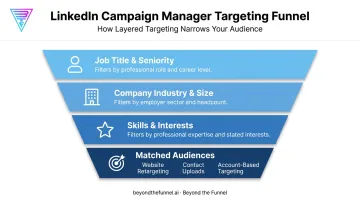
This is where Campaign Manager separates itself. According to LinkedIn's targeting documentation, you can layer targeting by:
- Job title and seniority
- Company industry and size
- Skills and interests
Add Matched Audiences, which includes website retargeting via the LinkedIn Insight Tag, contact list uploads, and account-based targeting. The result is a system built for buying committees, not just individual scrollers.
Where Full Campaigns Fit
Campaign Manager earns its complexity in scenarios like:
- Lead generation campaigns tied to specific ICP segments
- Account-based marketing targeting entire buying committees
- Retargeting website visitors who browsed but didn't convert
SaaS, finance, healthcare, and enterprise B2B companies lean on this heavily because their sales cycles are long. A single boosted post can't carry a six-month consideration journey, but a structured campaign with retargeting sequences can.
Boosted Posts vs LinkedIn Ads: Which Is Better for B2B Growth?
The honest answer: it depends on what you're solving for. Before picking a lane, weigh four factors.
- Campaign objective: Are you chasing awareness or pipeline? Boosting suits the former; Campaign Manager is built for the latter.
- Available budget: Testing and optimization inside Campaign Manager takes more spend than a single boost.
- Creative and testing bandwidth: Full campaigns reward teams that can iterate on messaging and formats.
- Speed of results needed: Boosting launches in minutes, while Campaign Manager takes longer to set up and optimize.
Choose boosting when you need fast, low-cost amplification of content that's already resonating, or you're simply trying to grow top-of-funnel visibility.
Choose full LinkedIn Ads when the goal is qualified leads, ABM outreach, or measurable ROI tied to revenue.
Most mature B2B programs don't pick one permanently. They use boosts to test cheaply, then scale what works into structured campaigns with real targeting and tracking behind them.
Real-World Example: Boosting vs. Campaigns in Action
Beyond the Funnel's engagement with Evidation, a health technology company, shows this sequencing in practice. Before scaling spend, the team validated audience and messaging signals rather than assuming what would work.
According to Michael Arbini, former Head of Commercial Marketing at Evidation:
"Josh helped us map out and execute a full LinkedIn strategy that took our pipeline from a few dozen to over 100 opportunities in one year. He's strategic, collaborative, and deeply understands how to turn LinkedIn into a growth channel."
This represents a tripling or better of qualified pipeline opportunities in twelve months. That growth came from audience validation first, then a full-funnel structure connecting awareness, consideration, and conversion into one measurable system.
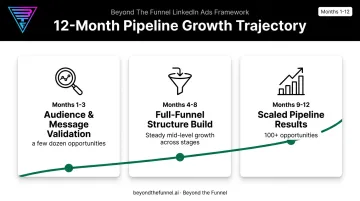
The takeaway: validate cheaply, then scale with structure. Testing an angle or audience segment at low cost before committing full budget protects you from scaling the wrong message.
If you're unsure which audience segment or message angle deserves real budget, talk to Beyond the Funnel's team. Their testing framework exists specifically to answer that question before you spend the money to find out the hard way.
Conclusion
Boosted posts and LinkedIn Ads each serve a distinct funnel stage, not the same job. The real skill is matching the right tool to the right goal instead of hunting for a universal winner.
Get that match right, and the payoff shows up in lower costs and more predictable lead flow, without wasting spend on the wrong objective. That's the framework Beyond the Funnel uses to help B2B brands turn LinkedIn spend into predictable pipeline.
Frequently Asked Questions
Is it better to boost a LinkedIn post or create an ad?
It depends on the goal. Boosting suits fast, low-cost visibility on content that's already working, while full ads suit measurable lead generation and conversion tracking.
Are boosted posts on LinkedIn worth it?
Boosting is worthwhile for amplifying already-proven organic content, like thought leadership or event announcements. It's not built for direct lead-generation goals despite Lead Gen Forms being listed as an objective.
Can people tell if a LinkedIn post is boosted?
Yes. Boosted posts carry a paid promotion disclosure, commonly shown as "Promoted," but the content itself looks identical to the organic version.
What's the minimum budget needed for LinkedIn Ads vs. boosted posts?
LinkedIn doesn't publish a universal minimum for boosting; you simply set a lifetime budget for your chosen schedule. According to LinkedIn's Campaign Manager help center, you need at least $100 in unspent campaign budget to launch a new ad set.
Can you turn a boosted post into a full LinkedIn ad campaign?
Yes. You can reuse an existing Page post inside a new Campaign Manager campaign using the "browse existing content" option, adding advanced targeting and conversion tracking on top of it.
How do LinkedIn Ads and boosted posts differ in targeting options?
Boosting offers basic targeting by location, job seniority, job function, industry, and group interests. Campaign Manager adds job title, company size, skills, and Matched Audiences like website retargeting.