Introduction
You post the ad. Impressions climb. Likes roll in. Then you check the lead count: zero.
This happens more often than most B2B marketers admit. The targeting was sharp, the creative was strong, but the reader never got a clear signal on what to do next. In most cases, the CTA is what's failing, not the content.
On a platform where users are actively in a decision-making mindset, a weak or missing CTA is one of the fastest ways to lose a qualified prospect who was genuinely interested seconds earlier.
This guide breaks down every LinkedIn CTA surface, from ad buttons to Page settings to message copy, along with the best practices and setup steps you need to turn engagement into actual pipeline.
Key Takeaways
- A CTA directly instructs your audience, such as "Register Now" or "Request Demo."
- LinkedIn CTAs appear in five places: profiles, Company Pages, posts, ads, and messages.
- Winning CTAs stay short, specific, and tied to one campaign goal
- A/B testing remains the only reliable way to find your best-converting CTA phrase.
What Is a Call to Action on LinkedIn?
A LinkedIn CTA is any button, phrase, or written prompt that pushes a member toward a specific next step, whether that's clicking to a website, filling out a form, requesting a demo, or leaving a comment.
There are two flavors: built-in CTAs, the fixed buttons LinkedIn provides on Sponsored Content ads and Company/Product Pages, and custom-written CTAs, the phrasing you craft yourself in post copy, articles, comments, or direct messages.
Why this matters more on LinkedIn than other platforms: this is a professional network where people show up to solve work problems, evaluate vendors, and research solutions.
That intent-driven mindset is exactly why a vague CTA feels like a missed handshake. If you don't tell a warmed-up prospect what to do, they simply scroll on.
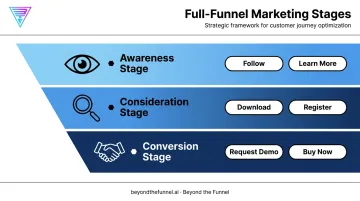
CTAs also aren't just for closing deals. They work across the entire funnel:
- Awareness stage: Follow, Learn More
- Consideration stage: Download, Register
- Conversion stage: Request Demo, Buy Now
Matching the CTA to the funnel stage the reader is actually in, rather than defaulting to the same button every time, is where most CTA strategies fall apart before they even start.
Types of LinkedIn CTAs
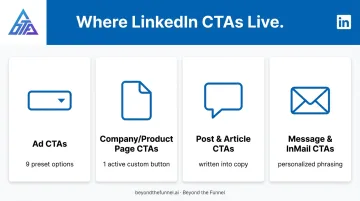
LinkedIn CTAs aren't one-size-fits-all. Each surface comes with its own rules, its own limits, and a different strategic angle.
Ad CTAs
For Single Image and Video ads, LinkedIn currently offers nine predefined CTA buttons: Apply, Download, View Quote, Learn More, Subscribe, Register, Join, Attend, and Request Demo. These come from a fixed dropdown menu inside Campaign Manager's Single Image Ad specifications, so you're choosing from a preset list rather than writing custom copy.
Format changes the rules, though:
| Ad Format | CTA Mechanism | Character Limit |
|---|---|---|
| Single Image / Video | Fixed dropdown (9 options) | N/A |
| Carousel | Free-text card headline, no fixed CTA list | 45 characters per headline |
| Message / Conversation Ads | Free-text CTA field | 25 characters |
The CTA you pick should match the offer, not just the vibe of the ad. A gated whitepaper calls for Download. A sales-qualified conversation calls for Request Demo. Mixing these up, say, using "Learn More" for a bottom-of-funnel offer, creates a mismatch between what the reader expects and what they get, which undermines conversion rates.
This CTA-to-offer alignment shouldn't be left to guesswork. At Beyond the Funnel, teams validate audiences and test the CTA against real engagement data before scaling budget behind it.
Company & Product Page CTAs
Standard LinkedIn Company Pages currently support these custom button options: Visit website, Contact us, Learn more, Register, Give, Volunteer, and Buy now. Pages that offer services can also use Request services, and published Flagship Product Pages can use Request demo.
A few things worth knowing:
- Only one custom CTA button can be active on a Page at a time
- Without a Premium Company Page, that button only shows up when a visitor clicks the "More" menu
- With Premium, the same button appears prominently at the top of the Page, in feed posts, and on search result cards
That visibility gap changes how many people ever see the button. A CTA hidden behind an extra click gets a fraction of the exposure of one sitting front and center on your Page header, according to LinkedIn's official Page CTA documentation.
Post & Article CTAs
Here's something a lot of marketers miss: organic posts and articles don't have a built-in CTA button. There's no dropdown, no click-to-add feature. The CTA has to live inside your copy or your comments.
Common organic CTA approaches:
- Direct link CTAs: "Read the full breakdown here [link]"
- Engagement questions: "What's your take on this?"
- Comment-to-receive prompts: "Comment 'GUIDE' and I'll send it your way"
That last format works particularly well on LinkedIn because it drives comments, which the algorithm rewards, while still delivering value through a follow-up DM.
Message & InMail CTAs
Message CTAs are personal by nature. They land in someone's inbox, so they need a human tone, not a scripted one. Reference shared context before you make the ask.
A few phrasings that work in B2B outreach:
- "Since we're both connected to [mutual contact], would a quick 15-minute call make sense this week?"
- "Saw your post on [topic], thought you might find this resource useful, want me to send it over?"
- "I've got some time Thursday or Friday if you'd like to talk through [specific challenge]."
Best Practices for Writing High-Converting LinkedIn CTAs
Writing a CTA that actually converts comes down to a handful of disciplines, applied consistently.
Be brief and specific. Button copy should stay under 3-5 words. "Request Demo" beats "Click here to learn about our product" every time, on any platform, but especially on a feed where attention spans are short.
Match the CTA to the objective. A lead-gen campaign needs "Download" or "Sign Up," not "Learn More." Mismatched CTAs create funnel friction that shows up as high clicks but low form completions.
Create urgency without gimmicks. Words like "Today" or a limited-time frame can lift response, but B2B audiences are wary of manufactured scarcity. Overuse damages credibility fast with decision-makers who've seen every trick before.
Align the copy that leads into the CTA. The sentence right before your button should set up the value of clicking it. That single sentence often determines whether hesitation turns into action.
Test and validate, don't assume. This is the step most teams skip. Beyond the Funnel treats every CTA choice as a hypothesis, confirmed with real audience data rather than settled in a planning meeting.
This same testing philosophy helped client Evidation grow its pipeline from a few dozen opportunities to over 100 in a single year, by validating what actually resonated with their audience instead of scaling assumptions.
Common CTA Mistakes to Avoid
- Defaulting to vague CTAs. "Click Here" or "Learn More" for every objective, regardless of funnel stage, wastes the specificity a good CTA provides
- Stacking competing CTAs. One ad or post with two or three different asks splits attention and lowers conversion on all of them
- Mismatching CTA and landing page. A "Buy Now" button that drops someone on a generic homepage instead of a checkout page breaks the promise the click made
How to Add and Measure Your LinkedIn CTA
Adding a Custom CTA Button to Your LinkedIn Page
The current setup flow is shorter than older tutorials suggest:
- Go to your Page's Super Admin view
- Click Edit Page in the left-hand menu
- Turn on the Custom Button toggle
- Select your Button Name from the preset list
- Enter the destination URL
- Optionally enable Increase Button Visibility (Premium feature)
- Click Save
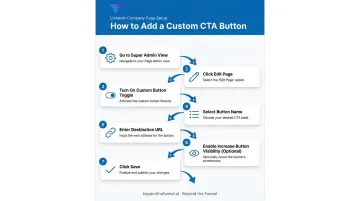
That's it: no separate "Buttons" submenu required anymore, per LinkedIn's current help documentation.
Measuring and Testing CTA Performance
Once your button is live, the real work starts: confirming it actually converts. Track these four metrics for any CTA, organic or paid:
- Click-through rate (CTR): How many people acted on the CTA out of everyone who saw it
- Conversion rate: How many clicks turned into completed forms, demos, or sign-ups
- Engagement: Likes, comments, and shares, especially relevant for organic CTAs
- Cost-per-lead (CPL): The paid-campaign metric that ultimately tells you if the CTA is earning its budget
Run a basic A/B test by keeping everything else constant (audience, creative, offer) and swapping only the CTA button or copy. Whichever variant produces a lower CPL or higher conversion rate wins.
There's no universal LinkedIn benchmark for CTR or CPL that applies across every industry. Huble's 2025 LinkedIn Ads benchmark report segments results by ad format and region, which is useful directionally, but your own account history is a more reliable baseline than any published average.
Review Campaign Manager reporting for ad CTAs, or Visitor Analytics for Page CTAs, on a recurring cadence: weekly if you're actively testing, monthly once you're in a steady state. This catches performance drop-off early, before your budget takes the hit.
Frequently Asked Questions
What is a call to action on LinkedIn?
A CTA on LinkedIn is a direct prompt, whether a button or a linked phrase, that tells members exactly what to do next. It shows up on profiles, Pages, posts, ads, and messages.
What are the best call to action examples for LinkedIn?
Strong examples include "Request Demo" for sales-ready ads, "Download" for gated content, and "Comment 'GUIDE' for the resource" for organic posts. The right choice always depends on the campaign's objective.
How many CTAs can you add to a LinkedIn Company Page?
A Company Page currently supports one active custom CTA button at a time, chosen from LinkedIn's preset button name list. You can change it, but you can't run two simultaneously.
What is the best CTA button for lead generation ads on LinkedIn?
"Register" and "Download" typically perform best for lead-gen forms since they set clear expectations upfront. Always test your specific offer against these options rather than assuming one wins universally.
Can you customize the CTA button on a LinkedIn Company Page?
Admins choose the button's destination URL freely, but the button name comes from LinkedIn's preset list, such as Visit Website, Contact Us, or Register. It's not fully free-text.
How do you know if a LinkedIn CTA is actually working?
Watch click-through rate, conversion rate, and cost-per-lead, tracked through Campaign Manager for ads or Visitor Analytics for Pages. A CTA that's underperforming usually shows up as high clicks but low completions.