Introduction
Many B2B teams land on LinkedIn's paid tools with the same question: "Which one do we actually need?" Campaign Manager and Sales Navigator share a platform and a price tag, but they serve entirely different functions for entirely different teams.
Picking the wrong one — or defaulting to one when your bottleneck lives elsewhere — means wasted budget and a go-to-market strategy pulling in opposite directions. This guide breaks down exactly what each tool does, who it serves, and how to decide — including the scenarios where running both is the right call.
TL;DR
- Campaign Manager is LinkedIn's self-serve advertising platform — built for marketers running paid ads to reach professional audiences at scale.
- Sales Navigator is a premium sales prospecting subscription — built for sales reps who need to find specific leads, monitor accounts, and send direct outreach via InMail.
- The two tools don't overlap: one drives paid awareness, the other enables direct 1:1 outreach — different budgets, different teams, different ROI metrics.
- Many B2B teams run both, but if you're choosing one, start with the tool that addresses your biggest gap: pipeline volume or audience reach.
LinkedIn Sales Navigator vs Campaign Manager: Quick Comparison
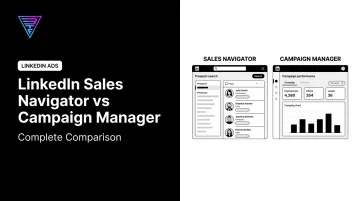
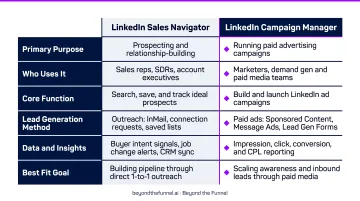
These two tools serve fundamentally different functions on LinkedIn. The table below breaks down the six dimensions that separate them — so you can quickly identify which one fits your goal.
| Dimension | Campaign Manager | Sales Navigator |
|---|---|---|
| Primary Purpose | Running paid ad campaigns | Sales prospecting and outreach |
| Primary User | Marketers and advertisers | Sales reps and BDRs |
| Core Function | Serve ads to a targeted professional audience | Find and contact specific prospects |
| Pricing Model | Pay-per-click or per impression (auction-based) | Monthly subscription per seat |
| Targeting Approach | Demographic and firmographic audience targeting | Individual lead and account search filters |
| CRM Integrations | Conversions API, Matched Audiences | Salesforce, HubSpot, Dynamics 365 |
What Is LinkedIn Campaign Manager?
Campaign Manager is LinkedIn's self-service advertising platform — the tool where marketers create, launch, and manage paid campaigns across LinkedIn's professional network. According to LinkedIn's Marketing API documentation, the account structure flows from ad account → campaign group → campaign → ad creative. Understanding this hierarchy matters because it's where budget control and performance measurement live.
Targeting Capabilities
LinkedIn offers 20+ audience attribute categories, including job title, company, industry, seniority, and skills. For B2B advertisers, this level of professional targeting is difficult to match on other platforms.
Beyond standard attributes, Campaign Manager supports Matched Audiences — which allows retargeting based on website visits, CRM contact lists, Lead Gen Form submissions, and video views. The result is precise targeting: not just "marketing directors" broadly, but the marketing directors who already visited your pricing page.
Ad Formats
LinkedIn officially supports these ad types:
- Sponsored Content — Single Image, Video, Carousel, Document, Event, Thought Leader, Connected TV, and Article/Newsletter Ads (appear in the LinkedIn feed)
- Text Ads — Self-serve PPC campaigns, pay per click or impression
- Dynamic Ads — Personalized using member profile data (Follower, Spotlight, Content Ads)
- Message Ads / Conversation Ads — Direct to inbox
- Lead Gen Forms — Pre-populated with LinkedIn profile data to reduce friction at conversion
Match format to campaign objective. Thought Leader Ads and Single Image Ads work well at the awareness stage; Document Ads are effective for consideration; Lead Gen Forms are the standard conversion driver.
Pricing Model
LinkedIn ad pricing is auction-based and depends on your objective, audience, and competition. Text Ads explicitly support PPC and CPM billing. For context, Google Ads averages $5.26 CPC across industries in 2025, while Facebook Ads average $0.70 CPC for traffic — LinkedIn typically runs higher, but the audience quality for B2B makes that premium defensible when campaigns are structured correctly.
When Campaign Manager Is the Right Tool
- Building brand awareness with C-suite decision-makers
- Generating inbound leads through gated content at scale
- Retargeting website visitors or engaged audiences
- Warming up target accounts before sales outreach begins
Getting the most from these use cases depends on how campaigns are structured — not just which objective you select. Beyond the Funnel builds full-funnel systems that connect awareness, consideration, and conversion rather than running isolated single-objective ads.
Their approach centers on audience validation over assumption: testing which segments actually engage before scaling spend — a practice refined across 1,000+ managed accounts.
What Is LinkedIn Sales Navigator?
Sales Navigator is LinkedIn's premium sales intelligence and outreach subscription, purpose-built for sales professionals who need to identify, monitor, and engage specific prospects. The distinction from Campaign Manager is straightforward: this is one-to-one outreach, not one-to-many ad delivery.
Core Prospecting Features
Sales Navigator's search functionality lets reps build highly targeted lead and account lists using advanced filters: job title, seniority, geography, company growth rate, recent job changes, and intent signals.
Saved searches trigger automated alerts when new prospects match your criteria, so reps get notified the moment the right person joins a target account.
InMail Credits
InMail is Sales Navigator's primary outreach mechanism: the ability to message LinkedIn members outside your network directly. LinkedIn's official documentation confirms 50 monthly InMail credits are included with a Sales Navigator subscription.
CRM Integrations
Sales Navigator integrates with major CRM platforms, with official documentation available from:
- Salesforce: via Salesforce AppExchange and Salesforce's integration page
- HubSpot: HubSpot's CRM Sync allows contacts and companies to be imported into Sales Navigator lists with activity logged back to the CRM
- Microsoft Dynamics 365 Sales: Documented by Microsoft
Plan Tiers and Pricing
Sales Navigator offers three tiers. Based on LinkedIn's official pricing page:
- Core — ~$119.99/month
- Advanced — ~$159.99/month
- Advanced Plus — Custom pricing
Verify current pricing at time of publication, as rates change.
When Sales Navigator Is the Right Tool
Sales Navigator is the stronger fit when direct, targeted outreach drives your pipeline:
- Your sales team has a clear ICP and needs to build outbound lists efficiently
- Your sales cycle depends on identifying the full buying committee at target accounts
- Real-time alerts on account signals (job changes, growth, news mentions) would improve outreach timing
- Deal size justifies personalized, one-to-one outreach
LinkedIn Sales Navigator vs Campaign Manager: Which Is Right for You?
The right tool depends on where your growth bottleneck actually lives.
Campaign Manager is a marketing investment that builds pipeline indirectly through brand presence, content, and lead generation. Sales Navigator is a sales investment that builds pipeline directly through prospecting and outreach. The confusion usually shows up in smaller B2B teams where one person handles both functions.
Choose Campaign Manager if:
- Your goal is generating inbound demand at scale
- You have a defined ICP but need broader reach than your sales team can manually touch
- You want to retarget website visitors or nurture warm audiences
- You need to build brand awareness with decision-makers before sales engages them
Choose Sales Navigator if:
- Your sales team has a clear ICP and needs targeted outbound lists quickly
- You need buying committee contacts at specific accounts
- Account-level signals (job moves, growth, news) would improve your outreach timing
- Your deal size justifies one-to-one personalized outreach
Use Both if:
You're running an account-based marketing (ABM) strategy — marketing warms up target accounts via ads while sales simultaneously conducts outbound. According to the 2026 ABM Benchmark Survey, 56% of organizations are targeting new accounts and 47% are integrating demand generation with ABM. That coordinated motion is precisely where having both tools in play accelerates pipeline on two fronts simultaneously.
If budget limits your options, the scenario below can help you prioritize.
Budget-Constrained Teams: A Practical Framework
| Scenario | Start With |
|---|---|
| Brand has little market awareness | Campaign Manager — build recognition first |
| Clear prospect list exists, need pipeline velocity | Sales Navigator — convert faster |
| Tight budget, unclear ICP | Neither — validate ICP before spending |
How Sales Navigator and Campaign Manager Work Better Together
The most powerful reason to use both tools is coordination: they can operate as a unified ABM engine rather than parallel efforts.
The Integration Opportunity
Sales Navigator's account and lead data can inform Campaign Manager targeting through LinkedIn's Matched Audiences feature, which supports first-party list-based targeting using CRM or contact data. By syncing Sales Navigator activity to your CRM and uploading that data to Campaign Manager, marketing can serve ads to the exact accounts and personas sales is already prospecting — so ads reinforce outreach instead of running in parallel.
A note on direct export workflows: No official LinkedIn documentation confirms a direct one-click Sales Navigator export to Campaign Manager Matched Audiences. The reliable path uses your CRM as the bridge:
- Sales Navigator syncs lead data to Salesforce or HubSpot
- That CRM data uploads to Campaign Manager as a contact list
The Full-Funnel ABM Motion
Here's how the coordination looks in practice:
- Campaign Manager runs awareness campaigns to target accounts — building brand recognition, capturing video views, Lead Gen Form opens, and website visits
- Retargeting audiences are built from those engagement signals in Campaign Manager
- Sales Navigator helps reps prioritize the same accounts now showing ad engagement
- Sales outreach arrives in an inbox where the brand is already familiar, not cold
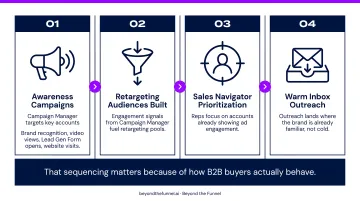
That sequencing matters because of how B2B buyers actually behave.
The 95-5 Principle
Research by John Dawes of the Ehrenberg-Bass Institute, published in Marketing Week, established that roughly 5% of your B2B audience is actively in-market. The other 95% are future buyers — not ready now, but reachable.
Campaign Manager's brand-building role becomes essential when you accept this math. If you're only using Sales Navigator to reach the 5% actively buying, you're missing the majority of your eventual market. Campaign Manager warms the 95%; Sales Navigator converts the 5% showing active signals. Running only one tool means you're either invisible to future buyers or invisible to the ones ready now.
Frequently Asked Questions
Is LinkedIn Sales Navigator or Campaign Manager worth it?
Both can deliver strong ROI when matched to the right use case — Campaign Manager for marketers running demand generation at scale, Sales Navigator for sales teams doing targeted prospecting. ROI depends heavily on having a clear ICP and strategy before investing in either tool.
What are the 95-5 and 4-1-1 rules on LinkedIn?
The 95-5 rule states that only ~5% of B2B buyers are in-market at any given time, so 95% are future buyers worth reaching through brand awareness now. The 4-1-1 rule recommends sharing four pieces of valuable content and one soft promotional piece for every one self-promotional post. Both principles reinforce consistent brand presence over pure conversion plays.
Can you use Sales Navigator and Campaign Manager together?
Yes. Use your CRM as the bridge: Sales Navigator syncs lead and account data to Salesforce or HubSpot, and that data uploads into Campaign Manager as Matched Audiences. This enables coordinated ABM strategies where ads reach the exact accounts your sales team is actively prospecting.
What is the difference between LinkedIn Sales Navigator and LinkedIn Ads?
LinkedIn Ads (managed through Campaign Manager) are paid placements shown to a broad targeted audience based on professional attributes. Sales Navigator is a subscription tool for individual sales reps to search for and reach out to specific prospects via InMail. In short: one is advertising, the other is prospecting.
Who should use LinkedIn Campaign Manager?
Campaign Manager is designed for marketers, demand generation teams, and B2B brands running paid advertising — including brand awareness campaigns, lead generation, retargeting, and account-based marketing efforts.
Does LinkedIn Sales Navigator integrate with CRM platforms?
Yes. Sales Navigator integrates with Salesforce, HubSpot, and Microsoft Dynamics 365. Sales teams can sync leads, view LinkedIn activity inside their CRM, and track prospect engagement from a single workspace.
Conclusion
Campaign Manager is the right investment when the goal is reaching and converting audiences at scale through paid advertising. Sales Navigator is the right investment when the goal is identifying and directly engaging specific high-value prospects. Neither is universally better — the right answer depends on where your B2B growth bottleneck actually is.
The most effective LinkedIn strategies treat these as complementary rather than competing tools. Campaign Manager builds brand presence and captures intent signals; Sales Navigator enables sales to act on those signals. For B2B companies serious about turning LinkedIn into a predictable revenue channel, the coordinated approach is where the real returns are built.
If Campaign Manager is part of your stack and you're not getting the results your budget deserves, the issue is almost always structural — not a platform problem. Beyond the Funnel's full-funnel framework — built across 1,000+ managed accounts by Joshua Stout, one of just 16 LinkedIn Certified Marketing Experts in the U.S. and 1 of 80 worldwide — is designed to fix exactly that.