Introduction
Most B2B professionals post on LinkedIn and get silence back. Not because their content is bad — but because they're treating engagement like a lottery instead of a system.
According to CMI's 2025 B2B research, 85% of B2B marketers say LinkedIn delivers the best value among social platforms, yet nearly half struggle to attribute ROI to their efforts. The gap between posting and performing is real — and it's fixable.
Joshua Stout, one of only 80 LinkedIn Certified Marketing Experts worldwide (1 of 16 in the U.S.) and founder of Beyond the Funnel, has seen this pattern across 1,000+ managed accounts. Consistent engagement comes from building the right system, not chasing individual tactics.
This playbook covers 20 ways to boost LinkedIn engagement — organized from foundation to amplification, so each step builds on the last.
Key Takeaways
- A weak profile silently kills engagement before anyone reads your post
- Native documents, carousels, and polls consistently outperform text and link posts
- The first hour after publishing determines how widely LinkedIn distributes your content
- Commenting on others' posts before you publish is one of the most underused reach tactics
- Let organic performance data guide your paid budget allocation — not assumptions
Ways 1–3: Build the Right Foundation First
Way 1: Optimize Your Profile Like a Landing Page
When someone sees your post and clicks your name, your profile either builds trust or costs you a follower in seconds.
A weak profile doesn't just hurt your personal brand — it directly suppresses your engagement. People don't follow accounts that feel incomplete or generic.
Three areas that matter most:
- Professional photo — A clear, well-lit headshot signals credibility. Blurry or absent photos reduce follow-through after someone views your profile.
- Keyword-rich headline — Don't just list your job title. State who you help and how. "CMO | Helping B2B SaaS companies build pipeline through LinkedIn" beats "Chief Marketing Officer at XYZ Corp."
- First-person About section — Write it as if you're speaking to your ideal connection. Lead with your value proposition, not your resume.
Complete LinkedIn Pages receive 30% more weekly views, according to LinkedIn's own guidance. The logic extends to personal profiles too.
Way 2: Define 1–3 Content Pillars
Posting about everything trains both your audience and the algorithm to expect nothing specific.
Pick 1–3 topic areas and stay in your lane. If you're a SaaS founder, maybe that's product-led growth, team building, and lessons from scaling. Consistency in topic signals expertise — and expertise earns repeat engagement from the right people.
As Hootsuite notes in their 2026 LinkedIn algorithm guide, LinkedIn uses engagement patterns to identify and reward topical consistency. Practically speaking, that means:
- Staying in your niche improves content distribution to relevant audiences
- Posting off-topic occasionally won't tank you, but doing it regularly dilutes your signal
- The algorithm treats you more like an authority when your content stays coherent
Way 3: Audit and Upgrade Your Network Quality
Your engagement rate reflects who's in your network, not just how good your content is. An audience full of people outside your niche will scroll past without interacting — and that low signal tells LinkedIn to limit your reach.
How to fix it:
- Use LinkedIn's search filters to connect with professionals who match your ideal audience (by industry, job title, seniority)
- Prioritize connection quality over quantity — 300 active, relevant connections will outperform 3,000 passive ones
- Withdraw or remove connections that were never relevant to your work
Getting your network right before you scale your posting saves you months of wondering why solid content isn't landing.
Ways 4–9: Create Content That Stops the Scroll
Way 4: Master the Hook
Your post is invisible until the first line earns the click on "See More" — making that opening sentence the single highest-leverage thing you'll write on LinkedIn.
A strong hook framework:
- Use a number: "3 things killing your LinkedIn engagement right now"
- Pose a provocative question: "Why do most B2B posts get zero comments?"
- Lead with a surprising stat: "85% of B2B marketers say LinkedIn is their top platform — and most still can't explain why their posts underperform"
- Open with a bold statement: "Your hook is the only thing that matters"
Write five versions of your opening line before you pick one.
Way 5: Choose the Right Format
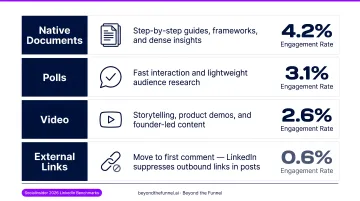
According to Socialinsider's 2026 LinkedIn benchmarks, engagement rates by format break down like this:
| Format | Avg. Engagement Rate |
|---|---|
| Native documents / carousels | 7.00% |
| Multi-image posts | 6.45%–6.80% |
| Video | 6.00% |
| Text-only | 4.50% |
| Polls | 4.20% |
| Link posts | 3.25%–3.70% |
What this means in practice:
- Native documents are ideal for step-by-step guides, frameworks, and dense insights
- Polls generate fast interaction and double as lightweight audience research
- Video works best for storytelling, product demos, and founder-led content
- Move external links to the first comment — LinkedIn suppresses posts with outbound links because they pull users off-platform
Way 6: Format for Mobile First
A post that looks clean on desktop can be nearly unreadable on mobile. Short sentences. Single-line paragraphs. White space between thoughts.
Never write a wall of text. If your post looks like an email, reformat it.
The mobile-first rule: if you wouldn't pause to read it while scrolling with your thumb, neither will your audience.
Way 7: Use Storytelling as a Strategy
Polished promotional content is the least engaging thing on LinkedIn. Posts that share real failures, counterintuitive lessons, or candid behind-the-scenes moments consistently outperform brand-approved content.
A structure that works:
- Open with the scene — one or two sentences that ground the reader in a real moment
- Name what went wrong or what wasn't working
- Share what you discovered (the less obvious, the better)
- Close with something the reader can actually use
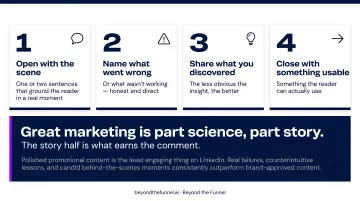
Joshua Stout's philosophy at Beyond the Funnel captures it well: great marketing is part science, part story. The story half is what earns the comment.
Way 8: Go Linkless When Your Goal is Conversation
Some of the highest-engagement posts on LinkedIn contain zero links. No CTA to click, no article to read — just a question, an opinion, or a short insight that invites discussion.
Go linkless when your goal is:
- Positioning yourself as a thought leader
- Running informal audience research
- Starting a conversation that reveals what your audience cares about
When you need to share a resource, put the link in the first comment and reference it in the post body.
Way 9: Write a Specific CTA
"Thoughts?" is not a call to action. It's a shrug.
Strong CTAs are specific and answerable:
- "What's one tactic that's worked for you? Drop it below."
- "Has your team tried this? I'd genuinely like to know."
- "Save this for your next content planning session."
Comments, saves, and reposts carry more algorithmic weight than likes — so design your CTA to earn them.
Ways 10–14: Trigger the Algorithm with Engagement Tactics
Way 10: Treat the First Hour as Your Launch Window
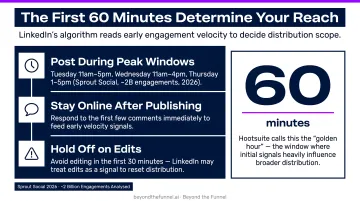
LinkedIn evaluates early engagement velocity to decide whether to push your post to a wider audience. Hootsuite describes this as a "golden hour" — the window after publishing where initial signals heavily influence broader distribution.
Practical moves:
- Post when your audience is most active. Sprout Social's 2026 analysis of nearly 2 billion engagements found Tuesday 11am–5pm, Wednesday 11am–4pm, and Thursday 1–5pm as high-engagement windows
- Stay online after publishing — respond to the first few comments immediately
- Avoid editing the post in the first 30 minutes — LinkedIn can treat edits as a signal to reset distribution
Way 11: Reply to Every Comment
Replies count as separate engagement signals. A post with 20 interactions — 10 comments plus 10 author replies — looks more active to the algorithm than one with 10 unanswered comments sitting still.
Reply thoughtfully, not just with "Thanks!" Add a follow-up question or extend the point someone made. This keeps the conversation alive and re-triggers distribution.
Way 12: Comment Before You Post
Before publishing, spend 10–15 minutes leaving substantive comments on 3–5 posts in your network — not "Great post!" but a real observation, a contrasting data point, or a follow-up question.
This warms up your feed presence and signals active user behavior to LinkedIn. It also prompts return visits to your profile, where people find your own content.
Way 13: Use the Notification Bell on Targeted Accounts
Find 5–10 influencers or high-traffic accounts in your niche and enable the notification bell on their profiles. When they post, you get alerted — and being among the first few commenters puts your name in front of their entire audience.
Early comments on high-traffic posts often stay visible for hours. That's consistent exposure to an audience you didn't have to build yourself.
Way 14: Post on a Predictable Schedule
Consistency is an algorithmic trust signal. You don't need to post every day — but you do need a rhythm the algorithm can recognize.
2–5 posts per week is the benchmark HubSpot recommends for most B2B professionals. Erratic posting — 10 posts one week, nothing the next — resets your distribution momentum each time.
Batch-create content on Fridays or weekends and schedule it out. Predictable output is a system problem, not a motivation problem.
Ways 15–17: Build a Community, Not Just an Audience
Way 15: Move Relationships Off the Feed
An audience passively consumes your content. A community shows up for it: commenting, sharing, and sliding into your DMs.
The progression looks like this: liker → commenter → DM connection → advocate
After a meaningful comment exchange, follow up with a short personal message. Not a pitch — a genuine note. This builds your inner circle: people who will reliably engage on future posts because they actually know you.
Way 16: Use LinkedIn DMs Strategically
The social selling loop works like this:
- Comment on someone's post with genuine insight
- They engage back or follow you
- You reach out in DMs to extend the conversation
- You build a real relationship, not just a contact list
Once someone engages with you in DMs, LinkedIn is more likely to show that person your future posts. Relationship depth directly affects algorithmic reach.
Way 17: Coordinate Team Amplification Early
For B2B brands, having colleagues, leadership, or company advocates engage with a key post in the first 30–60 minutes can measurably extend its reach.
This isn't engagement pods — it's internal coordination. The difference:
- Legitimate coordination: Sharing a post in Slack and asking team members to engage if they find it valuable
- Policy-violating pods: Automated or reciprocal engagement networks designed to artificially inflate metrics
Authentic team amplification costs nothing and compounds over time. Most B2B teams have the internal reach to make a real difference on key posts; few actually coordinate it.
Ways 18–20: Amplify What's Working with Paid Strategy
Way 18: Double Down on Organic Winners
Every month, identify your top 2–3 posts by engagement rate — not just impressions. These are the posts that resonated. Now put paid budget behind them.
The creative has already proven itself with a warm audience. Paid simply expands its reach to a colder one with validated messaging — which is far less expensive than testing unproven creative on the clock.
Way 19: Use Thought Leader Ads to Preserve Authenticity at Scale
Thought Leader Ads let you run an individual's organic post as a sponsored ad — preserving the personal, human feel while expanding its reach well beyond your existing followers. According to Metadata's research, Thought Leader Ads produced a 6.64% average CTR, outperforming standard image and video brand-awareness ads.
At Beyond the Funnel, this is exactly how a strong organic post gets turned into a pipeline-generating asset. As Joshua Stout has documented, B2B decision-makers scroll past polished corporate ads — but stop for familiar faces with something valuable to say. Thought Leader Ads bridge that gap.
Beyond the Funnel's full-funnel LinkedIn Ads approach is specifically built to connect these engagement signals to measurable revenue. One client, Evidation, grew their pipeline from a few dozen opportunities to over 100 in a single year using this framework.
Way 20: Let Analytics Close the Loop
LinkedIn analytics and Campaign Manager data tell you which audience segments engage most — by job title, industry, seniority, and company size. Use this to sharpen both organic content and paid targeting.
The sustainable LinkedIn engagement loop looks like this:
- Test organically — post across formats and topics to identify what earns real traction
- Validate with data — identify which posts earned the highest engagement rates
- Scale with paid — amplify winners to a larger, similar audience
- Feed insights back — let paid performance data inform your next round of organic content
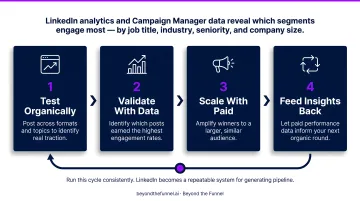
Run this cycle consistently, and LinkedIn stops feeling like a guessing game — it becomes a repeatable system for generating pipeline.
Frequently Asked Questions
How do I calculate my LinkedIn engagement rate?
There are two formulas: (reactions + comments) ÷ followers × 100 gives you a follower-based rate; (reactions + comments) ÷ impressions × 100 gives you an impression-based rate. For performance benchmarking, impression-based rate is more meaningful because it reflects how your content performs with people who actually saw it.
What type of content gets the most engagement on LinkedIn?
Native documents and carousels average 7.00% engagement — the highest of any format per Socialinsider's 2026 benchmarks. Multi-image posts and video follow closely. Link posts consistently perform lowest because LinkedIn's algorithm favors content that keeps users on-platform.
How often should I post on LinkedIn to maximize engagement?
Consistency matters more than frequency. 2–5 posts per week is a strong benchmark for most B2B professionals. Erratic posting — high volume one week, nothing the next — resets your algorithmic momentum even if individual posts perform well.
Does the LinkedIn algorithm favor certain post formats?
Yes. LinkedIn rewards content that keeps users on the platform — native posts over external links — and formats that require interaction, like carousels and polls. Early engagement velocity also determines how widely a post gets distributed.
Should I use hashtags to increase LinkedIn engagement?
Hashtags have decreased in effectiveness with recent algorithm updates. Use 1–3 highly relevant hashtags rather than a long list. Your energy is better spent on a compelling hook and high-quality content than on hashtag optimization.
Can LinkedIn Ads help boost organic engagement?
Yes — Thought Leader Ads and post boosting are highly effective for extending the reach of posts that are already performing well organically. A full-funnel paid strategy, like the one Beyond the Funnel builds for B2B clients, can turn strong engagement signals into measurable pipeline.