Introduction
Most B2B marketers running LinkedIn campaigns default to Sponsored Content — single-image ads, document ads, video. It's the format that dominates the feed, and it's where the majority of LinkedIn ad budgets go. What often gets overlooked is a separate ad category sitting in the right rail of every LinkedIn desktop page — one that most B2B teams never test: Dynamic Ads.
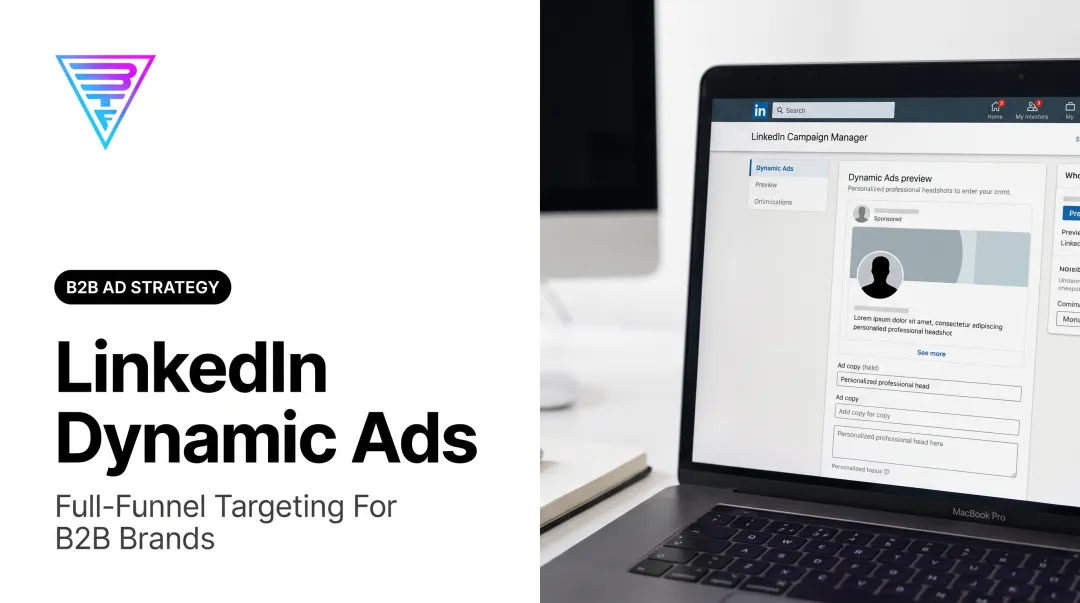
Dynamic Ads aren't a variation of Sponsored Content. They're a distinct LinkedIn ad category that automatically personalizes the ad creative using each viewer's own LinkedIn profile data — their photo, job title, and company name. LinkedIn handles that personalization at the impression level, with no manual creative customization required per viewer.
This article breaks down what LinkedIn Dynamic Ads are, why they're worth including in a B2B campaign structure, the three distinct subtypes and how they differ, and how to decide which one fits your objective.
Key Takeaways
- LinkedIn Dynamic Ads appear in the desktop right rail and auto-personalize using each viewer's profile data
- Three subtypes cover distinct goals: Spotlight Ads drive traffic, Follower Ads grow your audience, and Job Ads support recruiting
- Dynamic Ads typically cost less per impression than feed-based Sponsored Content
- They work best as a complementary layer in a full-funnel program, not as a standalone channel
- Choose your format based on campaign objective — not which features look most appealing
What Are LinkedIn Dynamic Ads?
LinkedIn organizes its ad formats into four main categories: Sponsored Content, Sponsored Messaging, Text Ads, and Dynamic Ads. According to LinkedIn Marketing Solutions, Dynamic Ads are defined as "personalized ads at scale" — meaning the ad creative automatically incorporates profile-level data from each viewer, including their profile photo, company name, and job title.
Most LinkedIn ads show a single static creative to everyone in the target audience. Dynamic Ads serve a version that reflects that specific viewer's LinkedIn identity — a senior marketing director at a SaaS company sees their own photo and job context; a VP of Sales at a healthcare firm sees theirs.
Where Dynamic Ads Fit in LinkedIn's Ad Structure
Dynamic Ads are delivered on the LinkedIn desktop interface and appear in the right-hand column rather than the main feed. This placement separates them from Sponsored Content both visually and behaviorally — viewers engaging with the feed aren't in the same mindset as those scanning the right rail.
That placement shapes how they perform. A few things worth knowing before you run them:
- Appear in the right-hand sidebar on LinkedIn desktop only — no mobile delivery
- Pull each viewer's profile photo, job title, and company name automatically
- Require minimal creative effort; LinkedIn handles the personalization fields
- Work best when the framework (copy, CTA, offer) is built around the viewer's context
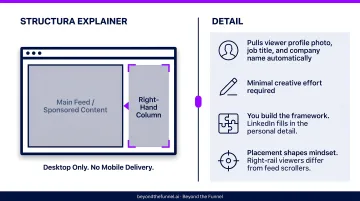
You're not building individual creatives for each audience segment. You build the framework; LinkedIn fills in the personal detail.
Why Dynamic Ads Matter for B2B Campaigns
B2B buying decisions don't happen quickly or in isolation. Forrester's 2026 State of Business Buying report found that the typical purchase involves 13 internal stakeholders and nine external influencers. Staying visible across that group — across a buying cycle that can stretch months — requires more than occasional feed impressions. Dynamic Ads address exactly that gap.
The Cost-Efficiency Case
Sponsored Content CPMs on LinkedIn are high relative to other platforms, and they climb further during competitive periods when multiple advertisers target the same audience. Dynamic Ads generally carry a lower CPM than feed placements, which makes them a practical tool for maintaining brand visibility between higher-investment touchpoints without increasing budget.
LinkedIn's own platform data includes a customer example where Dynamic Ads expanded a lead pool by 25% while reducing costs by 24% compared to previous efforts — though results will vary by campaign and audience.
The Visibility Gap Problem
Marketers who rely exclusively on Sponsored Content often encounter a recognizable pattern:
- High CPMs compress reach during competitive quarters
- Repeated impressions to the same audience accelerate creative fatigue
- Between active Sponsored Content campaigns, brand recall among in-market buyers drops
Dynamic Ads fill that gap by combining lower CPMs with automatic personalization — sustaining visibility with decision-makers across the full buying cycle without the creative overhead of feed ads. Think of them as a cost-efficient layer that keeps a brand present between the higher-investment touchpoints that actually move buyers forward.
Types of LinkedIn Dynamic Ads
LinkedIn Dynamic Ads include three distinct subtypes. Choosing the wrong one for a given objective produces results you can't optimize against — the format simply wasn't built for that goal.
Spotlight Ads
Spotlight Ads are the most versatile Dynamic Ad subtype. LinkedIn Help defines them as a Dynamic Ad format that sends viewers to a website or landing page of the advertiser's choosing. The ad pulls in the viewer's profile photo alongside the advertiser's branding, a customizable headline, and a call-to-action.
What makes Spotlight Ads distinct:
- Only Dynamic Ad subtype that drives traffic to an external URL
- Supports third-party click tracking and impression tracking (including Google Marketing Platform)
- Option to include a custom background image (300 x 250px)
- Most creative flexibility within the Dynamic Ad category
Best suited for:
- Retargeting warm website visitors
- Driving downloads, webinar registrations, or case study reads
- Directing mid-funnel audiences to demo or consultation pages
- Maintaining visibility between Sponsored Content touchpoints
Limitations to note:
- Desktop only — no mobile delivery
- Right-rail placement produces lower CTRs than feed ads; evaluate on cost-per-impression and downstream conversion, not click volume
- Performance is better against warm audiences; cold audiences require a strong, compelling offer to drive action from the right rail
Spotlight Ads fit into the retargeting layer of a full-funnel LinkedIn program, serving as a low-CPM format for keeping a brand visible to audiences that have already engaged elsewhere.
Follower Ads
Follower Ads do one thing: encourage LinkedIn members to follow a company's LinkedIn Page. LinkedIn Help confirms they're personalized with the member's profile photo next to the company logo, plus the member's first name and company name in ad copy.
The CTA behavior is dynamic: members who already follow the company see a "Visit company" button; members who don't see a "Follow" button. This prevents wasted impressions on existing followers being shown a recruitment call-to-action they've already acted on.
What makes Follower Ads distinct:
- Only Dynamic Ad type that keeps users within LinkedIn; clicks go to the company's LinkedIn Page, not an external URL
- No off-platform traffic generated
- Reporting is within LinkedIn Campaign Manager
Best suited for:
- Companies building an organic LinkedIn audience they can reach through content over time
- B2B brands that want increased LinkedIn Page visibility to support job posting reach
- Longer-term brand equity plays, not short-term pipeline goals
Limitations to note:
- Not designed for lead generation or direct conversion — evaluating Follower Ads against lead-volume KPIs will produce misleading results
- Page follower growth is a lagging indicator of business impact; the real value is in organic reach compounding over time
- Works best alongside other LinkedIn ad types, not as a standalone campaign
Job Ads
LinkedIn's Dynamic Ads Overview lists Job Ads (sometimes labeled Career Ads) as a Dynamic Ad subtype built specifically for talent acquisition. They surface open positions from a company's LinkedIn Jobs page to members whose professional background and skills align with the role requirements.
What makes Job Ads distinct:
- Built entirely for recruitment — not for marketing, lead generation, or pipeline goals
- Uses LinkedIn member data to match ads to relevant professional profiles
- Primary CTA directs viewers toward the company's LinkedIn presence rather than a custom external landing page
- Requires active LinkedIn job postings to run
Best suited for:
- B2B companies actively scaling sales, marketing, or customer success teams
- Organizations where talent brand and marketing brand overlap — recruiting the right people is part of broader growth strategy
- Promoting multiple open roles simultaneously with minimal creative effort
Limitations to note:
- No utility for marketing or revenue-generation objectives
- If hiring isn't an active priority, Job Ads have no role in a LinkedIn campaign structure
- LinkedIn determines audience reach by profile-to-role match, not manual campaign targeting in the same way as other formats
How to Choose the Right Dynamic Ad Type
The decision should start with campaign objective — not format features or familiarity.
| Objective | Format |
|---|---|
| Drive traffic to a landing page or lead form | Spotlight Ads |
| Grow LinkedIn Page following | Follower Ads |
| Promote open roles to relevant professionals | Job Ads |
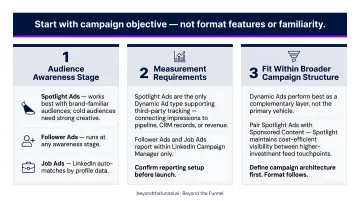
Beyond the basic objective match, three additional factors determine whether that match holds in practice.
1. Audience awareness stage Spotlight Ads work best when the audience already has some familiarity with the brand. Cold audiences with no prior exposure need a compelling offer and strong creative to act from a right-rail position. Follower Ads can run at any awareness stage. Job Ads are audience-matched by LinkedIn automatically based on profile data.
2. Measurement requirements If downstream attribution matters — connecting LinkedIn impressions to pipeline, CRM records, or revenue — Spotlight Ads are the only Dynamic Ad type that supports third-party tracking. Follower Ads and Job Ads report within LinkedIn Campaign Manager only. Confirm your reporting setup before launch, not after.
3. Fit within the broader campaign structure Dynamic Ads perform best as a complementary layer within a full-funnel program, not as the primary campaign vehicle. A structured approach pairs Spotlight Ads with Sponsored Content — using Spotlight Ads to maintain cost-efficient visibility between higher-investment feed touchpoints. Define the full campaign architecture first; the format choice follows naturally from there.
What to Confirm Before Launching
Three checks worth completing before any Dynamic Ad campaign goes live:
Format-to-goal alignment: default choices produce misaligned results Spotlight Ads are the most configurable format, which makes them a reflexive choice for many advertisers. But if the goal is audience growth, defaulting to Spotlight Ads produces traffic metrics with no connection to that objective. Match the format to the stated goal — not to the most familiar option.
Desktop audience behavior: verify reach before committing budget Dynamic Ads only display on desktop. If a meaningful portion of the target audience accesses LinkedIn primarily through mobile — common among certain executive-level segments — Dynamic Ads will miss them entirely. Before committing significant budget, verify that the segments being targeted are meaningfully active on desktop.
Tracking and attribution setup: confirm before launch, not after Follower Ads do not pass off-platform data. Job Ads report within Campaign Manager only. If the reporting requirement includes downstream attribution — connecting LinkedIn activity to CRM pipeline or revenue — confirm that the Dynamic Ad type chosen supports the tracking methodology in use before the campaign launches. A tracking gap discovered mid-flight means three weeks of data that can't be attributed.
Conclusion
LinkedIn Dynamic Ads are one of the more underused format categories in B2B advertising. When they do get used, they're often misapplied. Spotlight Ads, Follower Ads, and Job Ads each have a distinct purpose. Using Follower Ads when the goal is lead generation, or expecting Spotlight Ads to build an organic audience, produces uninterpretable results and wasted budget.
The value of Dynamic Ads in a B2B program isn't that they replace feed-based Sponsored Content — it's that they extend reach cost-efficiently across a longer buying cycle, maintaining presence with decision-makers between higher-investment touchpoints. In programs structured around the full funnel, that efficiency compounds.
The format choice becomes straightforward once three things are defined: the campaign objective, where the audience sits in the buying journey, and what the reporting setup is actually built to measure. Nail those, and the right Dynamic Ad type isn't a guess — it's the only logical choice.
Frequently Asked Questions
What is a Dynamic Ad on LinkedIn?
A LinkedIn Dynamic Ad is a personalized ad format that appears in the right-hand sidebar of the LinkedIn desktop feed. It automatically pulls each viewer's own profile data — including their profile photo, job title, and company name — into the ad creative, creating a tailored experience without requiring custom creatives per viewer.
What are the different types of Dynamic Ads on LinkedIn?
There are three: Spotlight Ads, which drive traffic to an external URL; Follower Ads, which encourage viewers to follow a company's LinkedIn Page; and Job Ads, which promote open positions to members whose profiles align with the role. Each is built for a distinct campaign objective.
What is the difference between Spotlight Ads and Follower Ads?
Spotlight Ads send viewers to an external landing page and support third-party tracking, making them suitable when conversion measurement is required. Follower Ads keep users within LinkedIn, directing clicks to the company Page. They don't support off-platform attribution.
Are LinkedIn Dynamic Ads effective for B2B lead generation?
Dynamic Ads perform best as a visibility and retargeting layer, not a primary lead generation format. Spotlight Ads can support lead gen by directing viewers to a landing page, but Sponsored Content with Lead Gen Forms typically drives higher direct lead volume.
Can LinkedIn Dynamic Ads be seen on mobile?
No. LinkedIn Dynamic Ads currently only display on desktop and are not served to mobile users. This is an important constraint for B2B marketers whose target audiences are predominantly active on the LinkedIn mobile app.
How do LinkedIn Dynamic Ad costs compare to Sponsored Content?
Dynamic Ads generally carry a lower CPM than Sponsored Content feed placements, making them a cost-efficient format for maintaining brand visibility. LinkedIn has cited examples where Dynamic Ads reduced costs by 24% while expanding reach, though exact figures vary by industry and audience.