When LinkedIn first launched Carousel Ads, 75% of beta advertisers said they planned to use the format again in their next Sponsored Content campaign, largely because they saw stronger engagement and click-through rates than they expected (LinkedIn Marketing Solutions). That's a meaningful signal from advertisers who tested it firsthand.
Yet most B2B teams still treat carousels as an afterthought: a few slides slapped together, no clear CTA, no testing plan. Low swipe-through rates and wasted spend follow.
This guide covers the specs, the setup process, real cost expectations, and best practices from the perspective of a LinkedIn Certified Marketing Expert who's managed carousel campaigns across more than 1,000 ad accounts.
Key Takeaways
- Support 2 to 10 swipeable cards, each with its own image, headline, and destination URL
- Fit every funnel stage, from brand awareness through lead gen and conversions
- Win swipe-throughs with a strong first two slides and one clear CTA
- Cannot be edited after publish—pre-launch review matters more than usual
- Drive ROI with structured testing, not by simply raising budget
What Are LinkedIn Carousel Ads?
Carousel Ads are a Sponsored Content format that lets members scroll through multiple image cards directly in the LinkedIn feed. Each card can carry its own visual, headline, and destination link, which turns a single ad unit into something closer to a mini-story than a static banner.
LinkedIn has two very different "carousel" experiences, and confusing them costs marketers time:
- Paid Carousel Ads — built in Campaign Manager, run as Sponsored Content, fully customizable per card
- Organic document posts — PDF uploads where each page renders as a swipeable slide, adopted after LinkedIn sunset native organic carousels in December 2023 (Social Media Today)
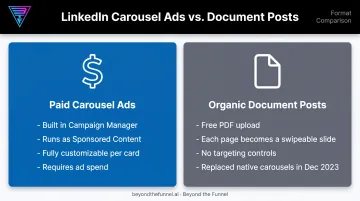
If you're running paid campaigns, you're working exclusively in the first category. The second is a free-content workaround, not an ad format.
Why the Format Fits Complex B2B Sales Cycles
B2B buying decisions rarely happen in one glance at a feed. A carousel lets you sequence a narrative across cards instead of cramming everything into one image:
- Break a product into feature-by-feature slides
- Walk through a case study, from challenge to outcome
- Stack proof points (stats, logos, testimonials) across separate cards
That's the real value: it gives you room to build a case for a considered purchase, rather than hoping one image does all the work.
LinkedIn Carousel Ad Specs & Requirements
Getting specs wrong is the fastest way to have a card rejected or scaled awkwardly in the feed. Here's what LinkedIn's current advertising specifications require (LinkedIn Marketing Solutions):
| Element | Requirement |
|---|---|
| Card count | 2–10 cards |
| Aspect ratio | 1:1 (square) |
| Recommended resolution | 1080 x 1080 px |
| Maximum resolution | 4320 x 4320 px |
| Display scaling | Images scale down to 312 x 312 px in-feed |
| File types | JPG, PNG, non-animated GIF |
| Per-card file size | 10 MB maximum |
Text and Character Limits
Cramming too much copy onto a card guarantees truncation:
- Card headline: 45 characters, roughly two lines before cutoff
- Intro text: 150 characters recommended; 255 characters is the hard max
- Ad name (internal only): up to 255 characters
Keep headlines short and punchy. If it needs a third line, cut it.
Slide Count and URL Rules
Each card can point to a different destination URL, which is what makes carousels useful for multi-offer or multi-product storytelling. A few caveats before you build:
- Lead Gen Form campaigns apply one CTA across all cards instead of individual URLs
- Carousel ads cannot be edited once published; pause and rebuild for any change
- Video is not supported inside carousel cards; images only
That last point catches teams off guard more than any other spec on this list. Build, preview, and double-check before you hit publish.
How to Create a LinkedIn Carousel Ad Campaign
Building a carousel ad in Campaign Manager follows a predictable sequence. Rushing any one step tends to show up as poor performance two weeks later.
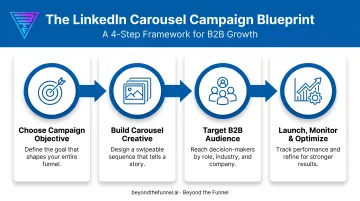
Step 1: Choose Your Campaign Objective
LinkedIn currently supports five objectives eligible for carousel ads:
- Brand awareness — maximizes impressions and reach
- Website visits — optimizes for clicks to your site
- Engagement — prioritizes likes, comments, and shares
- Lead generation — pairs with native Lead Gen Forms
- Website conversions — optimizes toward a tracked conversion event
Your objective shapes LinkedIn's delivery algorithm and which audience segments get prioritized. Pick based on where prospects sit in your funnel, not what sounds impressive in a report.
Step 2: Build the Carousel Creative
Upload 2 to 10 images, then add a headline and URL to each card. The first two slides carry the most weight. If they don't hook attention or answer "why should I keep swiping," most viewers won't make it to card three.
Add ALT text where the Campaign Manager interface allows it, since accessible creative reaches a wider professional audience and reflects well on your brand.
Step 3: Target Your B2B Audience
LinkedIn's targeting attributes are where the platform earns its reputation for B2B precision:
- Job title and seniority — reach real decision-makers
- Company industry and size — match your ICP
- Member skills — align with product use cases
Layer Lookalike Audiences onto your best-converting segments, or build ABM-style lists around named target accounts. Both approaches sharpen reach toward decision-makers instead of a broad professional pool.
Step 4: Launch, Monitor, and Optimize
Once live, track three core metrics closely:
- Engagement rate — are people swiping past card one?
- Click-through rate (CTR) — is the message translating to action?
- Conversion rate — are clicks turning into leads or pipeline?
Since edits aren't possible on a published carousel, treat underperformance as a signal to pause, rebuild with a refined headline or card order, and relaunch. Waiting it out rarely improves a weak creative.
How Much Do LinkedIn Carousel Ads Cost?
LinkedIn runs on an auction, not a fixed rate card. What you pay depends on who else is bidding for the same audience, your ad's relevance score, and the objective you've selected.
Three Bidding Approaches
| Bidding type | Best for | How it charges |
|---|---|---|
| Maximum delivery (CPM-style) | Awareness, visibility goals | Charges by impressions |
| Manual / cost cap bidding | Lead generation, clicks | Charges by clicks or landing page visits, depending on setup |
| Automated bidding | Hands-off optimization | LinkedIn's algorithm bids on your behalf |
LinkedIn's Campaign Manager also recommends a default daily budget when you set up a new ad set. The exact figure varies by currency and account, so check it directly in your dashboard rather than relying on a number from an old blog post.
Here's where longer sales cycles change things: B2B buyers rarely convert on the first impression. Advertisers targeting complex, multi-stakeholder deals typically need to budget well beyond the platform's suggested minimum to gather enough signal for the algorithm to optimize properly.
Can You "Boost" a Carousel on LinkedIn?
Not the way you can on other platforms. LinkedIn doesn't have a one-click boost button for carousel-style content. You have two real options:
- Build the carousel natively as a Sponsored Content ad in Campaign Manager
- Use the Boost button on an eligible organic Page post, which converts it into a Campaign Manager ad with a lighter setup flow
Boost simplifies the process, but it still routes through Campaign Manager billing, meaning it's paid advertising with fewer controls, not a free reach switch.
At Beyond the Funnel, the approach with client accounts is to validate audience segments with smaller test budgets before committing real spend to unproven creative. It's a far cheaper way to find out an audience doesn't convert than discovering it after a month at full budget.
Best Practices to Maximize Carousel Ad Performance
Most carousel ad underperformance traces back to a handful of fixable habits, not bad luck with the algorithm.
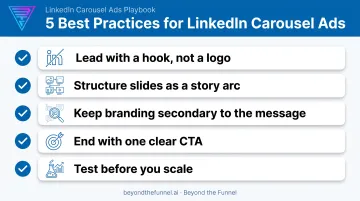
Lead with a hook, not a logo. Your first two slides decide whether someone swipes further or scrolls past. Open with a bold statement, a sharp question, or a stat that stops the scroll.
Structure slides as a story arc. Problem, solution, proof, call-to-action. Formats that work well include:
- Educational breakdowns (one concept per card)
- Product launch walkthroughs
- Data-backed research recaps with one stat per slide
Keep branding secondary to the message. A logo in the corner is fine. A carousel that reads like a static ad chopped into ten pieces isn't. The story should carry the weight.
End with one clear CTA. Not three. Pick the action that matches your objective and repeat it consistently across cards rather than mixing "Learn More," "Sign Up," and "Download" in the same sequence.
Test before you scale. This is the methodology Joshua Stout uses across 1,000+ managed LinkedIn accounts: validate audiences first with modest budgets, refine messaging based on what the data shows, then scale spend only on combinations that have already proven themselves.
Common Mistakes to Avoid
- Dense text or multiple CTAs — kills the scannable, swipeable feel that makes carousels work
- Skipping A/B tests — scaling slide order, headlines, or audiences without data wastes spend
- Desktop-only previews — LinkedIn scales images down, so text and visuals can get cut off on mobile
Frequently Asked Questions
How much do LinkedIn carousel ads cost?
Cost depends on LinkedIn's auction-based bidding, your objective, and audience competition. Campaign Manager suggests a default daily budget at setup—check your dashboard for the live figure.
Does LinkedIn support carousel ads?
Yes, as a paid Sponsored Content format built in Campaign Manager. Native organic carousel posts were removed in December 2023 and replaced by document/PDF uploads.
Can carousel posts be boosted on LinkedIn?
Not with a simple one-click boost like other platforms. LinkedIn's Boost feature converts an eligible organic post into a Campaign Manager ad, with billing and a limited setup flow.
How many images or slides can a LinkedIn carousel ad include?
Between 2 and 10 slides. Each one can carry a unique image, headline, and destination URL, except when using Lead Gen Forms, which apply one CTA across every card.
Can you edit a LinkedIn carousel ad after it's published?
No. Once a carousel ad is saved, its cards cannot be edited. You'll need to pause the ad and build a new version for any changes.
What's the difference between a LinkedIn carousel ad and a document post?
Carousel ads are paid, image-based Sponsored Content built in Campaign Manager with per-card links. Document posts are free, organic PDF uploads shared directly on a profile or Page.