Yet most B2B brands still use LinkedIn like a megaphone. They run feed ads. They blast InMail. They wait for replies that rarely come, because a one-way broadcast doesn't invite a conversation, it just interrupts one.
Conversation Ads flip that script. This guide covers what they are, how they differ from Message Ads, why they work, how to set one up, and what it actually costs to run one well.
Key Takeaways
- Conversation Ads deliver interactive, chatbot-style LinkedIn Messaging with branching CTA paths
- Multiple response options set them apart from single-CTA Message Ads
- Cost-per-send (CPS) pricing means tight targeting directly protects your budget
- Best deployed as a retargeting layer in a full-funnel strategy—not cold outreach
What Are LinkedIn Conversation Ads?
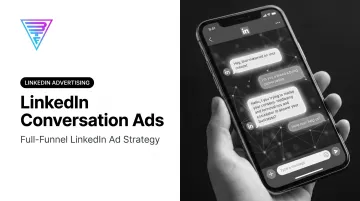
LinkedIn launched Conversation Ads in March 2020 as an extension of Message Ads, built around a choose-your-own-path structure instead of a single message. Instead of pushing one static offer, the ad lets each recipient pick from several buttons and follow the path that fits them.
The ad shows up in LinkedIn Messaging with a "Sponsored" label attached. LinkedIn allows the sender to appear as either a real employee's profile or a company page, which gives the ad a far more personal feel than a typical display placement.
How the Conversation Flow Works
Think of it as a decision tree built entirely in advance:
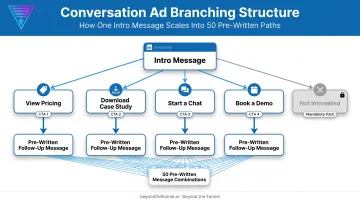
- Each intro message includes up to 5 CTA buttons
- Clicking a button reveals a new pre-written message, branching the conversation further
- An entire flow can include as many as 50 buttons total
- Every intro message must include a "Not Interested" button by default
That last point matters more than it seems. Clicking "Not Interested" lets the recipient archive the message, and LinkedIn uses that signal to reduce how often that person sees the campaign again. It's a built-in respect valve, and it keeps your sender reputation intact.
Campaign Objectives & Pricing Model
Conversation Ads currently support five campaign objectives:
- Brand Awareness
- Website Visits
- Engagement
- Lead Generation
- Website Conversions
All five share the same pricing model. Billing runs on a cost-per-send (CPS) basis: you pay each time the intro message lands in someone's inbox, not per impression or click. CPS applies across Sponsored Messaging, covering both Message Ads and Conversation Ads.
Since you pay per send, every audience list should earn its place. Sloppy targeting doesn't just hurt performance. It burns budget line by line.
Conversation Ads vs. Message Ads: What's the Difference?
Both formats fall under LinkedIn's Sponsored Messaging umbrella. They share the same delivery mechanism, targeting infrastructure, and ability to personalize a sender's identity. The difference comes down to what happens after the recipient opens the message.
Message Ads offer one CTA button and one path. The recipient either clicks or doesn't. That's the entire interaction.
Conversation Ads offer branching paths. A prospect might choose "See pricing," "Download the guide," or "Talk to sales," and each choice triggers a different pre-written follow-up.
| Feature | Message Ads | Conversation Ads |
|---|---|---|
| CTA buttons | 1 | Up to 5 per message, 50 total |
| Interaction style | One-way | Multi-step, two-way |
| Best for | Simple, direct offers | Mini-qualification funnels |
| Pricing | CPS | CPS |
Use Message Ads when you have one clear offer, like a webinar registration or a single asset download.
Use Conversation Ads when you want prospects to self-select, especially if you're unsure whether they're ready for a demo, a case study, or just more information.
Benefits of LinkedIn Conversation Ads for B2B Marketers
Conversation Ads offer more than a chatbot-style format. A few specific advantages make them worth budget allocation for B2B teams.
Personalization at scale. Dynamic macros pull in first name, company, job title, and industry automatically. That matters more than most marketers assume.
According to Gartner's 2025 survey of 632 B2B buyers, 73% actively avoid suppliers who send irrelevant outreach. Generic messaging isn't just ignored anymore. It's actively penalized.
Inbox placement cuts through feed clutter. An ad in someone's feed competes with dozens of posts for attention. A message in their inbox doesn't.
A reserved window of attention. LinkedIn strictly limits Sponsored Messaging frequency, and ads auto-archive between 20 and 40 days after delivery. That gives your message a defined runway without constant rival ads crowding the same inbox.
Multiple outcomes from one ad. Because Conversation Ads branch, a single campaign can drive a lead gen form fill, a website click, or a continued chat, all from the same setup. Prospects self-qualify based on the path they choose.
Built for mid-funnel retargeting. These ads work especially well with warm audiences, like website visitors or people who've already engaged with your content. Cold outreach through Conversation Ads tends to underperform because there's no context for the branching choices yet.
Real senders build real trust. A message from a founder or CMO reads differently than one from a faceless company account. At Beyond the Funnel, this principle is baked into campaign builds for clients across SaaS, finance, and healthcare. Sender identity isn't an afterthought; it's tested like any other creative variable.
How to Set Up a LinkedIn Conversation Ad (Step-by-Step)
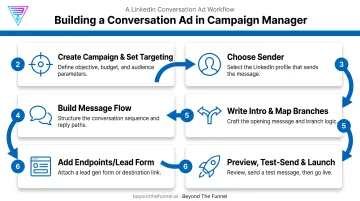
Setting up a Conversation Ad inside Campaign Manager follows a specific sequence. Skip a step, and you'll either get blocked mid-build or launch a flow that doesn't convert.
- Create the campaign with an eligible objective. Choose Brand Awareness, Website Visits, Engagement, Lead Generation, or Website Conversions. Then set your targeting filters: job title, industry, company size, and seniority.
- Choose your sender. Pick an admin's personal profile or an approved Company Page. Company Page senders need LinkedIn customer support approval first.
- Build the message flow. Start from a template or build from scratch. Optionally add a banner image (300x250px, desktop only, 2MB max) plus a footer or terms section.
- Write the intro message and map the branches. Use personalization macros throughout. Keep messages under 500 characters for stronger engagement. Campaign Manager flags anything longer, even though the hard limit is 8,000.
- Add your endpoints. Attach a Lead Gen Form for lead gen campaigns, or link out to destination URLs for other CTAs. The Not Interested button is mandatory and can't be removed.
- Preview, test-send, and launch. Send yourself a test message before going live. Track performance in LinkedIn's Conversation Ad Flowchart for button-by-button engagement across the full flow.
That flowchart is the closest thing LinkedIn gives you to a live audit trail of prospect intent. It shows exactly where people drop off and which branches get clicked. Use it to prune weak paths and double down on what converts.
Best Practices, Costs & Common Challenges
Once the mechanics are in place, execution quality determines whether a Conversation Ad becomes a pipeline driver or an ignored inbox notification.
Best Practices for Higher Engagement
- Retarget warm audiences first. Site visitors, engaged followers, and event attendees respond far better than cold lists, since they already have context for your brand.
- Segment tightly. A message tailored to a healthcare compliance officer shouldn't read the same as one aimed at a SaaS growth marketer. Build separate flows per persona instead of one generic script.
- Test your sender. Title, seniority, and photo all influence open and response rates—validate those combinations before you scale spend.
Beyond the Funnel's testing framework, built across more than 1,000 managed LinkedIn accounts, runs that validation on audience, sender, and messaging before any single format gets budget.
Costs & Common Challenges
Conversation Ads run on the cost-per-send (CPS) model, meaning your bid competes against other advertisers targeting the same audience.
Niche or in-demand segments—such as enterprise CISOs or VP-level finance leaders—push CPS higher because fewer available sends mean tighter competition inside Campaign Manager's bidding system.
Two limitations worth planning around:
- No live takeover. Every path is fully automated. There's no human jumping in mid-chat, so every branch needs to be scripted and tested before launch.
- The archive clock is real. Since messages auto-archive between 20 and 40 days after delivery, your strongest offer should sit early in the flow, not buried three branches deep.
Frequently Asked Questions
What are conversation ads on LinkedIn?
Conversation Ads are interactive LinkedIn Messaging ads that let prospects choose from multiple CTA buttons and navigate a branching conversation with your brand. They work like a pre-scripted chatbot delivered straight to a prospect's inbox.
What's the difference between LinkedIn Conversation Ads and Message Ads?
Message Ads offer a single CTA button for one-way outreach. Conversation Ads support up to 5 buttons per message and 50 across a full flow, enabling multi-step, two-way interaction.
How much do LinkedIn Conversation Ads cost?
Pricing runs on a cost-per-send (CPS) basis, meaning you pay each time the intro message reaches an inbox. Costs rise for smaller or high-demand audiences due to increased bidding competition.
What campaign objectives can I use with Conversation Ads?
You can use five objectives: Brand Awareness, Website Visits, Engagement, Lead Generation, and Website Conversions. Choose based on where your audience sits in the funnel.
How many CTA buttons can I include in a Conversation Ad?
Each message supports up to 5 CTA buttons, with a maximum of 50 buttons across the entire conversation flow. One of those five must always be the mandatory "Not Interested" option.
Are LinkedIn Conversation Ads available to audiences in the EU?
Yes, but only to members in the EEA and Switzerland who have specifically opted in to receive Sponsored Messaging ads in their inbox. Without that opt-in, messages won't deliver in those regions.