That gap between expertise and visibility is exactly what keyword strategy solves. LinkedIn functions less like a digital resume and more like a search engine, matching recruiter and buyer queries against the specific words on your profile. Get those words wrong, and even the most qualified professional stays buried. In fact, 71% of recruiters surveyed in Employ's 2024 Recruiter Nation Report said they currently use or plan to use LinkedIn as a primary recruiting channel. This article breaks down exactly where keywords matter most, how to find the right ones, and the mistakes that quietly sabotage your visibility.
Key Takeaways
- Your headline, About section, experience, and skills carry the most search weight, in that order.
- Mine job postings and competitor profiles for phrases your audience actually searches.
- Keyword stuffing hurts readability and trust more than it helps visibility.
- Align keywords with where you're headed, not just where you've been.
- Revisit your keyword strategy whenever your goals or industry language shift.
What Are LinkedIn Profile Keywords?
LinkedIn profile keywords are the specific words and phrases describing your job titles, skills, tools, and certifications that LinkedIn's search system matches against what recruiters, clients, and partners type into the search bar.
If someone searches "revenue operations manager" and your profile never uses that phrase, you likely won't surface, no matter how qualified you are.
Not all keywords carry the same weight. It helps to think in three tiers:
- Primary keywords: the core terms defining your role, like "Product Manager" or "Financial Analyst"
- Secondary keywords: supporting context, such as tools, methodologies, or adjacent skills
- Long-tail keywords: specific multi-word phrases like "SaaS pricing strategy consultant" that narrow your visibility to a precise niche
How LinkedIn's Search Algorithm Uses Keywords
LinkedIn's own research on its people-search system describes a combination of signals that shape results. Keyword and semantic matching, structured filters like location and seniority, network proximity, and engagement history all factor into what shows up in a search. Keywords are one input among several, not the entire equation.
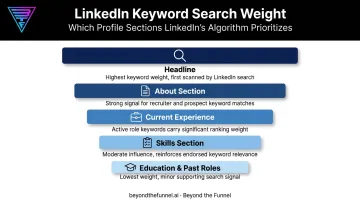
Placement still matters a lot, even though LinkedIn hasn't published an exact weighting formula. Both LinkedIn's documented search attributes and tools built specifically to audit profiles, such as Jobscan's LinkedIn profile guide, point to the same practical hierarchy:
- Headline: the single most scanned and search-weighted field on your profile
- About section: where context and long-tail phrases can live naturally
- Current experience: your most recent role, described with present-tense, specific terms
- Skills section: a direct match point for structured filter searches
- Education and past roles: present, but carrying far less search influence
Completeness and recent activity matter too, though LinkedIn hasn't published exact numbers. Profiles with a photo, recommendations, and recently edited sections tend to perform better in visibility and in how they read to a human recruiter.
A quarterly refresh, updating your headline, adding a new certification, tweaking your About section, keeps your profile from going stale.
Connection degree also plays a documented role. LinkedIn's search research confirms that network distance and common connections influence how results are ranked for a given searcher.
Being a 1st or 2nd-degree connection to someone searching keeps you more visible in their results. Staying active through posts and comments has a similar effect within your existing network, even if it doesn't guarantee a boost in cold search results.
Why This Matters for Your Visibility
Strategic keyword placement pays off in ways you can measure:
- More search appearances in recruiter and prospect queries relevant to your actual expertise
- More inbound InMails and connection requests from people who found you, not the other way around
- Stronger personal brand credibility, since your profile language matches what industry insiders expect to see
- Better conversion from profile view to conversation, because visitors immediately recognize you as relevant
What to Consider When Choosing the Best Keywords for Your Profile
Keyword selection isn't one-size-fits-all. A job seeker targeting recruiters needs different terms than a consultant targeting clients or a founder building thought leadership. The following factors help you connect your profile language to measurable outcomes, like search appearances and inbound messages, rather than guessing.
Aligning Keywords with Career Goals and Industry Language
Your keywords should reflect the role or opportunity you want next, not just the one you had five years ago. A project manager pivoting into product should lead with "product strategy" and "roadmap ownership," not "project coordination." Track relevant inbound inquiries and InMails as your KPI here. If the messages you're getting don't match your goals, your keywords are pointing backward.
Industry-specific terminology and certifications add credibility just as fast. Naming specific methodologies, tools, and certifications (think "Salesforce Certified Administrator" or "Six Sigma Black Belt") tells a niche searcher you speak their language. These terms also tend to show up in long-tail searches, where competition is lower and match quality is higher.
Sourcing and Placing Your Keywords Strategically
Don't guess. Pull real language from real sources:
- Mine 5-10 job postings for the role or client type you're targeting, and note recurring phrases
- Study top-ranking competitor profiles in your field for terminology patterns
- Use LinkedIn's search autocomplete to see what terms the platform itself suggests
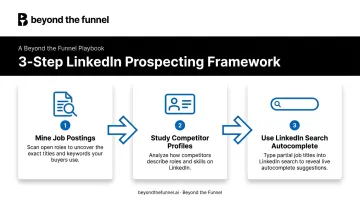
This directly impacts keyword accuracy, since you're using the exact vocabulary your audience already types.
Placement determines how much weight those keywords carry. As covered above, headline, About, experience, and skills carry different weight. Front-load your most important 2-3 keywords into your headline, then reinforce them in your About section and current role description. Placement precision, not just keyword choice, is what moves your search ranking position.
Keeping Keywords Natural and Current
There's no official density formula LinkedIn has published, but the principle holds: if a term appears in every other sentence, it reads as spam, not expertise. Aim for natural, readable integration over repetition. A comma-separated list of ten skills crammed into your About section helps no one, least of all the human reading it.
Just as density requires regular calibration, so does relevance over time. Career goals shift, and industry language shifts with them. What worked for "coordinator" might not work once you're targeting "director" roles. Review your keywords periodically, especially after a promotion, a pivot, or a new certification, so your profile keeps pace with where you're actually headed.
Common Keyword Mistakes to Avoid
Even motivated professionals sabotage their own visibility with a few recurring habits:
- Leaning on vague buzzwords. Terms like "results-driven" or "team player" carry zero searchable value. Replace them with specific, measurable skills recruiters actually type into search bars.
- Stuffing keywords unnaturally. Comma-separated lists and repeated phrases feel algorithmic to a human reader and undermine trust. If it doesn't read like a sentence a person would say out loud, rewrite it.
- Describing only your past. A profile built entirely around previous job duties can miss the language of where you're going next. Align your terms with your target role, not your resume history.
How Beyond the Funnel Can Help
Optimizing your personal profile gets you noticed as an individual. Scaling that same precision across a company page or a paid campaign is a different challenge entirely, one that requires audience-level targeting instead of keyword-level tweaks. That's where a dedicated LinkedIn advertising strategy comes in.
Joshua Stout leads Beyond the Funnel as one of just 80 LinkedIn Certified Marketing Experts worldwide and 1 of 16 in the U.S. The same discipline that goes into choosing the right personal keywords, testing what resonates and refining based on real data, shapes how Beyond the Funnel builds B2B advertising strategy at scale.
That approach shows up in a few specific ways:
- Validates audiences with real engagement data before committing ad spend, instead of guessing which segments matter
- Connects awareness, consideration, and conversion into one measurable full-funnel system rather than isolated campaigns
- Delivers clear, regular reporting on performance and next steps
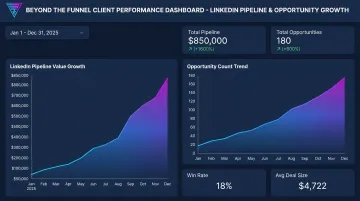
One client, Evidation, saw its LinkedIn pipeline grow from a few dozen opportunities to over 100 in a single year working with Beyond the Funnel. If your visibility challenge has outgrown a single profile, a strategy consultation can show what that same precision looks like at the company level.
Conclusion
Choose keywords that authentically reflect your expertise and match what your target audience is actually searching for, rather than chasing every trending term.
Keyword optimization isn't a one-and-done task either. Revisit your profile as your goals evolve and as industry language shifts around you.
Get the placement and the language right, and the visibility compounds, bringing the right conversations to you instead of the other way around.
Frequently Asked Questions
What are keywords for LinkedIn?
LinkedIn keywords are the specific terms, job titles, skills, tools, and certifications that recruiters and prospects use in search to find relevant profiles. They're the language your profile needs to speak to be discoverable.
Where should I put keywords in my LinkedIn profile?
Prioritize your headline first, then your About section, current experience, and skills section. These four areas carry the most search weight on your profile.
How many keywords should I use on my LinkedIn profile?
Focus on 3-5 primary keywords that define your core expertise, supported by secondary and long-tail variations woven naturally throughout. Avoid overloading any single section with repeated terms.
Can too many keywords hurt my LinkedIn profile?
Yes. Keyword stuffing reduces readability and can make your profile feel inauthentic to human readers, even without a confirmed automatic penalty. Natural, specific language builds more trust than repetition.
How often should I update my LinkedIn keywords?
A quarterly review works well for most professionals, especially after a career shift or when targeting new roles. Treat it as routine maintenance, not a one-time project.
Do LinkedIn keywords matter for company pages, not just personal profiles?
Yes. Company pages and ad campaigns rely on the same audience-matching principles as personal profiles. Strong keyword use here improves organic discoverability and strengthens the audience targeting used in paid LinkedIn campaigns.