Introduction
Webinars remain one of the most reliable ways to generate qualified B2B pipeline, but only when enough of the right people actually show up.
According to ON24's 2025 Webinar Benchmarks Report, average webinar attendance climbed to 216 people in 2024, up 7% year over year, with a 57% registration-to-attendee conversion rate.
Solid numbers, but they assume you've already filled the registration list. That's where most B2B marketers get stuck.
Boosting a webinar post on LinkedIn feels simple: pick an audience, set a budget, hit publish. In practice, registration results swing wildly based on targeting precision, ad format, creative angle, and how you pace your budget.
This playbook breaks down the exact process for running LinkedIn Ads for webinar registrations: what you need before launching, the variables that move results, and the mistakes that quietly kill campaigns.
Key Takeaways
- LinkedIn Ads perform best with organic speaker activation and a 3-4 week campaign runway, not a last-minute boost.
- Lead Gen Forms typically drive higher registration volume since they auto-populate LinkedIn profile data.
- Targeting precision, ad format, creative angle, and budget pacing separate a full room from an empty one.
- Skipping audience segmentation or retargeting is the most common, and costliest, failure point.
- Paid ads should run alongside organic and email, never in place of them.
How to Promote a Webinar Using LinkedIn Ads: Step-by-Step Playbook
Full-funnel LinkedIn strategies have produced real pipeline growth for B2B teams. Beyond the Funnel, for instance, helped its client Evidation grow from a few dozen opportunities to over 100 in a single year with this kind of structured approach.
Here’s the same process applied to webinar registrations.
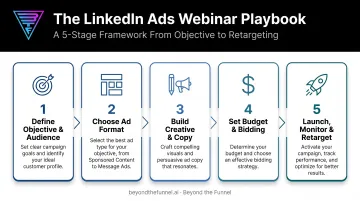
Step 1: Define Your Campaign Objective and Build Your Target Audience
Before touching the ad manager, decide how you'll capture registrations. LinkedIn gives you two paths:
- Website Conversions objective: sends traffic to your registration page (needs the Insight Tag plus a form-submit conversion event)
- Lead Generation objective: uses LinkedIn’s native Lead Gen Form with profile auto-fill—no landing page or pixel required
Once you've picked an objective, layer your audience filters: job function, seniority, company size, and industry. Upload a Matched Audience list of existing contacts too, either to target warm leads directly or exclude them so budget focuses on net-new prospects.
Resist going broad. A tighter, ICP-based test audience—say, VP-level marketing leaders at 200+ employee SaaS companies—gives a cleaner signal on what’s actually converting.
Validate that smaller segment with real engagement and conversion data before you scale spend. The widest audience rarely performs best out of the gate.
Step 2: Choose the Right Ad Format for Registration Volume
Format choice affects completion rates more than almost any other variable.
- Lead Gen Forms: lowest friction, auto-filled fields, and an on-platform experience
- Single Image or Sponsored Content to a landing page: more friction, but richer data capture and stronger downstream qualification
- Message Ads / Conversation Ads: higher-touch invites for priority accounts or VIP prospects
LinkedIn’s own Lead Gen Forms product page notes that traditional landing pages pull members off-platform, while Lead Gen Forms keep the flow on LinkedIn.
Don't guess which one wins. Run at least two formats during the first week of spend, then reallocate remaining budget toward whichever produces a lower cost-per-registration.
Step 3: Build Registration-Focused Creative and Copy
Generic "join our webinar" graphics get scrolled past. High-converting creative follows a consistent anatomy:
- A benefit-led headline (what attendees walk away knowing, not just the topic)
- Visible speaker credibility, including name, title, and headshot
- Clear date and time, stated plainly
- One CTA, never two competing asks
Write 2-3 ad variations testing different angles: one leading with a pain point, one with the outcome, one with social proof or a stat. Testing surfaces the winning angle before you've spent the bulk of your budget guessing.
Native-feeling formats also tend to outperform polished event banners in the feed. A short speaker video clip or founder-style commentary post reads as content, not an ad, and that distinction matters when you're competing against organic posts in the same scroll.
Step 4: Set Budget, Bidding, and Campaign Structure
Budget pacing works in two phases:
- Reach phase (weeks 1-3): broader delivery to build awareness and let the algorithm learn which segments engage.
- Conversion push (final week): tighter targeting, heavier spend, urgency-driven creative like "seats filling up" or "last chance to register."
On bidding, choose between manual bid caps (more control, more oversight) and maximum delivery (LinkedIn spends automatically to maximize volume).
Cost still comes down to auction dynamics: advertisers compete for the same audience, and your required bid tracks how desirable that audience is. There’s no universal webinar CPL benchmark to bank on, so treat early spend as research—not a final performance grade.
Use that learning window to confirm which segments and creative angles convert before you commit the bulk of the budget.
Step 5: Launch, Monitor, and Retarget Through Registration Close
Once live, check performance daily. Track three metrics closely:
- Cost-per-lead (CPL): trending up or down as the audience saturates?
- Click-through rate (CTR): signals whether creative and targeting are aligned
- Form completion rate: reveals friction points in your registration flow
Set up a retargeting campaign for anyone who visited the landing page but didn't complete registration. A simple reminder ad, something like "still time to save your seat," aimed at this warm segment typically produces some of the lowest-cost registrations available.
By day 3-4, you'll usually have enough signal to identify underperforming variations. Pause them and shift budget toward whichever creative or audience is producing the strongest cost-per-registration.
Is LinkedIn Ads Right for Your Webinar? Fit, Timing, and What You Need
When LinkedIn Ads Make the Most Sense
LinkedIn Ads deliver the strongest return for B2B webinars for professional audiences, where job title, seniority, and company size targeting genuinely change who sees your ad. A webinar for finance directors or healthcare IT buyers benefits from that precision. A broad, consumer-facing topic doesn't, since the platform's targeting advantage goes unused.
Timing matters just as much as fit. LinkedIn's algorithm needs time to optimize delivery, and same-day or last-minute boosts rarely get that runway. Plan for at least 3-4 weeks of lead time and a modest test budget to validate an audience segment before scaling.
What You Need Before Launching
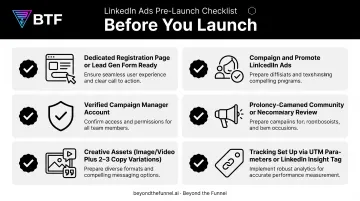
Before opening Campaign Manager, get these in place:
- A dedicated registration page (or a Lead Gen Form ready to go)
- A verified Campaign Manager account
- Creative assets: at least one image or video plus 2-3 copy variations
- Tracking via UTM parameters or the LinkedIn Insight Tag
It also pays to align your CRM and sales workflows in advance, so registrant data flows into follow-up sequences automatically instead of sitting in an export file for three days.
Teams new to the platform often partner with a LinkedIn Certified Marketing Expert instead of learning through wasted spend. Beyond the Funnel starts with a brief audit and a fit call that aligns the webinar goal with LinkedIn targeting, then scopes the campaign before any budget goes live.
Key Targeting, Creative, and Budget Parameters That Drive Registrations
Registration outcomes hinge on how well four variables are configured, not simply on how much you spend. Get these right, and a modest budget can outperform a careless campaign with triple the spend.
Audience Targeting Precision
Overly broad targeting wastes spend on clicks from people who'll never attend. Overly narrow targeting limits scale and drives up cost-per-lead as LinkedIn struggles to find enough matching profiles.
The sweet spot is layering three filters together:
- Job function
- Seniority
- Company size
That mix improves registrant quality and lowers cost-per-qualified-registrant, because you're not paying to reach people outside your buying committee.
Ad Format Selection
Lead Gen Forms cut friction versus sending traffic to an external landing page, so more people finish registration. Off-platform pages pull members out of the app; native forms keep the experience in-feed.
There's no universally verified conversion-rate gap between the two formats. Test both against your audience rather than assuming one always wins.
Creative and Messaging Fit
Generic "join our webinar" creative underperforms benefit-driven, speaker-led messaging in a feed dominated by native, personal content. People scroll past anything that reads like an ad.
A/B test 2–3 creative angles until one pulls ahead:
- Pain point — the problem your session solves
- Outcome — what attendees leave with
- Social proof — speaker credentials or past attendance
The winner cuts cost-per-lead by resonating with more of the audience you're already paying to reach.
Budget Pacing and Campaign Duration
Front-loading all spend in the final days limits how much the algorithm can learn and optimize. LinkedIn needs exposure time to figure out which segments are actually engaging.
Spread budget across a 3–4 week window, with heavier spend in the final week. You get early data to optimize, then a strong closing push when registration urgency peaks.
Common Mistakes and Quick Fixes When Promoting Webinars With LinkedIn Ads
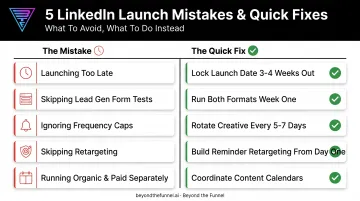
Even well-funded campaigns fail for predictable reasons:
- Launching too late: Starting ads less than a week before the event leaves no time for the algorithm to optimize or a retargeting audience to build. Fix: lock your launch date 3-4 weeks out.
- Skipping Lead Gen Form tests: Sending all traffic to one generic page instead of testing a native form drives more drop-off and less diagnostic data. Fix: run both formats in week one.
- Ignoring frequency caps: Repeatedly hitting the same narrow audience causes ad fatigue and rising costs in the final days. Fix: rotate creative every 5-7 days.
- Skipping retargeting: Non-converting landing page visitors are low-cost, high-intent registrants most campaigns never follow up with. Fix: build reminder retargeting from day one.
- Running organic and paid separately: When speaker posts and company updates aren't synced with paid spend, the two channels compete instead of compounding. Fix: coordinate your organic content calendar with your paid launch date.
Alternatives and Complementary Channels to LinkedIn Ads for Webinar Promotion
LinkedIn Ads work best as one layer in a multi-channel plan, not a standalone tactic.
Organic LinkedIn (Speaker and Company Page Posts)
Personal profiles typically reach far more of the feed than company pages do. When speakers have engaged networks tightly aligned with the webinar topic, organic posts can outperform paid spend on a per-impression basis.
Scale is the limit. Reach stays capped by existing follower count, so a speaker with 500 connections won't move the needle the way paid targeting can.
Email to Existing Database
For warm contacts and past attendees, email consistently drives strong registration rates at near-zero incremental cost. It's often the highest-ROI channel in the entire promotion mix.
That strength is also its ceiling. Email only reaches people already on your list—it does nothing to bring in new prospects outside your database, which is exactly the gap LinkedIn Ads fills.
Meta Ads for Retargeting
Meta works well as a lower-cost retargeting layer for site visitors who haven't registered yet. Cold Meta targeting generally underperforms for B2B purchase intent compared to LinkedIn's professional data.
Reserve it for warm traffic. Meta can't match LinkedIn's precision on job titles, seniority, and firmographics, so it's a poor fit for prospecting new audiences from scratch.
Put simply, assign each channel a job:
- Organic LinkedIn: Amplify through speaker networks when alignment is strong
- Email: Convert warm contacts and past attendees at near-zero cost
- Meta: Retarget site visitors who didn't register
- LinkedIn Ads: Prospect net-new B2B audiences with firmographic precision
Frequently Asked Questions
What is the 95-5 rule on LinkedIn?
The 95-5 rule, from Ehrenberg-Bass Institute research, holds that up to 95% of B2B buyers aren't actively in-market at any given time. Webinar ad messaging should build credibility and stay top-of-mind rather than push a hard registration ask on every impression.
Are webinars still effective in 2026?
Yes. ON24's 2025 report found average attendance reached 216 people in 2024, up 7% year over year, with a 57% registration-to-attendee conversion rate. Webinars remain strong when paired with solid promotion and follow-up.
How far in advance should I promote a webinar?
Aim for 3-4 weeks of lead time, with the heaviest push concentrated in the final week. This gives LinkedIn's algorithm time to optimize and lets a retargeting audience build.
What LinkedIn ad format works best for webinar registrations?
Lead Gen Forms generally reduce friction and improve completion since they auto-fill from the viewer's profile. Still, test both Lead Gen Forms and an external landing page against your audience before committing full budget.
How much should I budget for LinkedIn ads to promote a webinar?
There's no universal CPL benchmark for webinar campaigns. Cost depends on your audience's size and auction competitiveness. Start with a modest test budget to validate targeting before scaling spend.
Should I rely on organic LinkedIn posts or paid ads for webinar promotion?
Both, together. Organic posts, especially from speakers, build credibility and reach within existing networks, while paid ads scale registration beyond those networks to new, qualified prospects.