Introduction
Other ad platforms compete on reach. LinkedIn's edge is the verified professional data behind its audience.
Facebook and Instagram infer interests from likes and scrolling habits. LinkedIn builds targeting on data members maintain for their careers: job titles, company size, seniority, and skills.
That precision creates a common trap. Many B2B marketers cast too wide a net and burn budget on irrelevant clicks. Others narrow their audience so aggressively that delivery stalls and costs spike.
This guide breaks down every major LinkedIn targeting option, shows how to combine them strategically, and explains how to validate audience assumptions with performance data—not guesswork.
Key Takeaways
- LinkedIn targeting relies on professional attributes like job title, function, and company, not personal interests
- The optimal audience size for most B2B campaigns sits between 50,000 and 300,000 members
- Layering 2-3 targeting parameters beats single-attribute or overly broad targeting
- Matched Audiences convert better because they reach prospects who already know your brand
- Testing your audience assumptions with real data is the fastest path to better LinkedIn ROI
Understanding Why LinkedIn's Targeting Model Is Different
LinkedIn is a low-intent, professional-context platform. Compare that to Google Ads, where someone typing "best CRM software" is actively shopping. LinkedIn members are scrolling their feed between meetings, not searching for solutions. That distinction should shape every targeting decision you make.
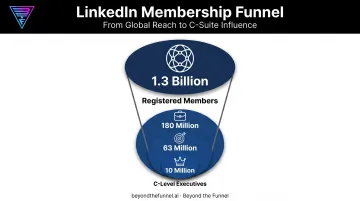
The scale is hard to ignore. LinkedIn's platform includes more than 1.3 billion registered members, including:
- 63 million decision-makers
- 180 million senior-level influencers
- 10 million C-level executives
Here's what makes that audience valuable: accuracy. Members keep their profiles current for career and networking purposes, not entertainment. A VP of Sales lists that title because recruiters, partners, and peers are watching.
That self-interest in accuracy makes LinkedIn's targeting more reliable than interest-based platforms, where a "like" from three years ago might still shape your ad delivery today.
Core LinkedIn Audience Targeting Options Explained
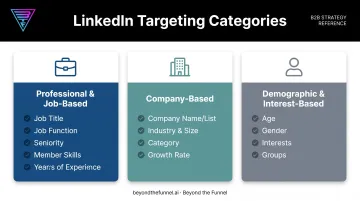
LinkedIn organizes targeting into three broad categories. Each serves a different purpose, and understanding when to use each one separates campaigns that convert from campaigns that just spend.
Professional & Job-Based Targeting
Job Title targeting sounds precise, but it's often unreliable. Titles vary wildly between companies. A "Director of Marketing" at one company might do the same job as a "VP of Growth" at another.
LinkedIn also classifies title associations as current, past, or current-or-past. Choose carefully depending on whether you want people currently in a role or those who've held it previously.
Job Function + Seniority is the more scalable combination. This pairing captures an entire department at the right decision-making level, regardless of what any individual's title says. LinkedIn maps titles to standardized functions and seniority tiers using its own taxonomy, which smooths out the title inconsistency problem entirely.
Member Skills targeting works well when your buyer persona doesn't map to one clean title. Project management software buyers, for example, might hold titles ranging from "Operations Manager" to "Program Lead" to "Delivery Director." Targeting the skill itself sidesteps that variance.
Years of Experience rarely works well alone. Pair it with function or skills for a modest refinement, not as a primary filter.
Company-Based Targeting
Company-level targeting lets you go account-specific:
- Company Name/List: Target up to 200 companies manually, or upload lists of up to 300,000 through Matched Audiences for account-based campaigns
- Company Industry & Size: Standard filters based on the employer's LinkedIn Page data; use exclusions if a target account lacks a Page
- Company Category: Newer facet covering funding stage, ownership type, and editorial or Fortune list inclusion
- Company Growth Rate: Identifies fast-growing companies likely to have fresh budget for B2B solutions
For B2B teams in SaaS, finance, technology, and healthcare, this is often where campaigns get their sharpest edge. Beyond the Funnel frequently layers Company Category and Growth Rate facets to surface funded, expanding accounts before competitors know they're in-market.
Demographic & Interest-Based Targeting
Member Age and Gender are inferred estimates, not verified data. LinkedIn doesn't publish accuracy rates for either, and reliability drops further outside the U.S. Most B2B advertisers should avoid these filters or use them sparingly.
Member Interests and Groups, by contrast, work well for top-of-funnel awareness campaigns. When your other filters feel too narrow, Interests and Groups add breadth without abandoning relevance entirely.
Note that Groups can't be used as an exclusion, and this facet has been unavailable in the EEA and Switzerland since May 2024.
Advanced Targeting Strategies: Matched Audiences, ABM & Predictive Audiences
Once your baseline targeting is set, LinkedIn's advanced tools let you get specific with warm audiences.
Matched Audiences
Matched Audiences let you reach people and companies you already know. You can:
- Retarget website visitors through the Insight Tag
- Upload contact lists
- Upload company lists
Any matched audience needs at least 300 members to run in a campaign.
Account-Based Marketing (ABM)
ABM lets you target named accounts directly. This fits enterprise sellers with a defined list of dream accounts—you layer job function and seniority on top of that list to reach the right buyers at each company.
Predictive Audiences
Predictive Audiences replaced Lookalike Audiences, which LinkedIn discontinued on February 29, 2024. They use LinkedIn's AI to expand reach from a source you already trust—a Lead Gen Form, conversion event, or retargeting audience.
List-based sources need between 300 and 300,000 rows. These audiences refresh daily, so performance data continuously reshapes who you reach.
Which combination do you actually scale? Guessing which Matched, ABM, or Predictive audience will convert best wastes budget fast.
That's why audience validation has to come before scale. Beyond the Funnel built its testing framework around this gap—using real account and engagement data to confirm which audience is converting before committing spend.
That approach helped one client, Evidation, grow qualified pipeline from a few dozen opportunities to more than 100 in a single year.
Audience Size & Budget Optimization Best Practices
Audience size is one of the most misunderstood levers in LinkedIn advertising. Too broad, and you waste spend on irrelevant impressions. Too narrow, and the algorithm can't optimize.
The sweet spot: most B2B campaigns perform best between 50,000 and 300,000 members. Below that range, CPMs tend to spike because the algorithm lacks enough data to find efficient impressions. Above it, you pay for reach that rarely converts.
AND/OR logic is how you steer audience size into that window without guessing.
Using AND/OR Logic to Balance Reach and Precision
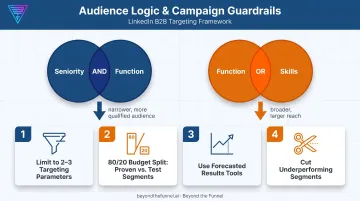
LinkedIn's Campaign Manager lets you combine targeting facets using AND/OR logic.
- AND narrows your audience (Seniority AND Function = only people who match both)
- OR expands it (Function OR Skills = anyone who matches either)
- AND + OR stacks both for scale without losing relevance
LinkedIn's own example shows the pattern clearly. Target "Job Title = software engineer OR Skill = software engineer," then add "AND Years of Experience = five or more." You capture anyone who fits the role through either path, while still enforcing the experience threshold.
Practical guardrails to follow:
- Limit campaigns to 2-3 targeting parameters beyond the mandatory Location field
- Allocate roughly 80% of budget to proven combinations, 20% to testing new segments
- Use LinkedIn's forecasted results and demographic breakdown tools to see which segments actually convert
- Double down on winners and cut underperforming segments quickly
Common LinkedIn Targeting Mistakes to Avoid
Even experienced marketers make targeting choices that quietly burn budget. Avoid these three:
- Mixing personas, industries, or countries in one campaign: dilutes messaging and makes performance reporting nearly impossible to read cleanly
- Hyper-targeting audiences under 50,000: creates a false sense of precision while limiting reach and inflating cost-per-result
- Neglecting exclusions and the Insight Tag: wastes spend on irrelevant audiences and leaves conversions untracked, so optimization becomes guesswork
Each mistake shares a root cause: skipping validation before you scale. Exclusions, a correctly installed Insight Tag, and separate personas are strategic setup decisions—not a launch-day checkbox.
Frequently Asked Questions
Can LinkedIn ads be targeted?
Yes. Location is required, and you can layer professional attributes such as job title, function, seniority, company, industry, skills, and interests.
How much does a targeted LinkedIn ad cost?
LinkedIn Ads usually cost more than other platforms, with average CPCs of $6–$7 globally and $8–$10 in the U.S.. Final cost depends on audience size, competition, and how tightly you target.
What is the best audience size for LinkedIn ads?
Most B2B campaigns perform best between 50,000 and 300,000 members. Smaller, niche audiences may need broader criteria to avoid delivery issues.
What's the difference between Job Function and Job Title targeting?
Job Function groups standardized roles and scales better across companies. Job Title is more specific but inconsistent, since the same role can carry different titles at different companies.
Can I combine multiple targeting options on LinkedIn?
Yes, through AND/OR logic in Campaign Manager. Stick to 2-3 combined parameters to avoid over-narrowing your audience and stalling delivery.
What is LinkedIn Matched Audiences?
Matched Audiences lets you retarget website visitors via the Insight Tag, upload contact or company lists, or reach accounts you already know. You need at least 300 matched members to activate.