Introduction
Most LinkedIn InMails get ignored. Not because InMail doesn't work — it does, outperforming cold email by a wide margin — but because most messages lead with the sender's agenda instead of the prospect's interests.
Cold B2B email averages a 0.45% reply rate, according to Belkins' 2026 study. A well-crafted LinkedIn InMail, sent to the right person with the right message, can clear 25%. That gap isn't luck. It's formula.
This post breaks down what separates high-converting InMails from the noise — and backs it up with 13 templates organized by strategy type. Each one is built to adapt, whether you're in B2B sales, building partnerships, or re-engaging cold leads.
Key Takeaways
- InMails under 400 characters generate 22% higher response rates than average, per Search Engine Journal's reporting on LinkedIn data
- Personalizing InMails instead of using canned templates lifts reply rates by 15%, per Fast Company
- Every high-converting InMail needs four components: a sharp subject line, personalized opener, prospect-first value prop, and low-friction CTA
- The 13 examples cover five strategy types: sales triggers, value-first offers, problem-solution, relationship building, and re-engagement
- InMail credits are finite — spend them on prospects who match your ICP, not on spray-and-pray volume
The 25% Reply Rate Formula: Anatomy of a High-Converting InMail
Every InMail that generates a reply has four components working together. Skip one, and the message falls apart.
Component 1: The Subject Line
The subject line's only job is to earn the open. That's it. LinkedIn caps subject lines at 200 characters, but mobile devices truncate around 30–40 — so shorter is sharper.
Subject line types that work:
- Trigger-based (recent news hooks attention): "Saw [Company] just closed Series B"
- Intrigue-based (creates curiosity without overselling): "Quick question about your hiring pace"
- Referral-based (borrowed trust opens doors): "[Name] suggested I reach out"
- Result-driven (leads with proof): "How [Peer Company] cut CAC by 30%"
Avoid "Quick question," "Exciting opportunity," or anything that sounds like a mass blast. If it could apply to 500 people without editing, rewrite it.
Component 2: The Personalized Opener
One sentence. Written for this person only. The fastest way to prove it: spend 90 seconds on their profile before writing anything.
Look for:
- A post they published in the last 30 days
- A recent company announcement or news item
- A shared connection or former employer
- A tenure milestone or role change
One real detail is enough. "I noticed you recently moved from VP to CRO — congrats on the step up" does more persuasion work than three paragraphs of generic flattery.
Component 3: The Value Reason
This is where most InMails fail. Sellers lead with features, pricing, or a deck link. None of that belongs in message one.
Apply the 90/10 rule: 90% of the message is about the prospect's world, 10% is context about you.
Every prospect is silently asking: "What's in it for me?" Answer that before anything else. If you can't answer it clearly, the message isn't ready to send.
Component 4: The Low-Friction CTA
Ask for the smallest possible commitment. A yes/no question. A "would this be useful?" prompt. Not a 30-minute discovery call and definitely not a calendar link in the first message.
Even a "not interested" reply is valuable. LinkedIn returns your InMail credit if the recipient responds within 90 days, declines included. The goal of message one is any reply, not a closed deal.
Timing and Length
LinkedIn-attributed data reported by Search Engine Journal shows clear patterns in when and how long InMails perform best:
| Variable | Recommendation | Performance Note |
|---|---|---|
| Best days | Tuesday–Thursday | Friday is ~4% below average |
| Worst day | Saturday | ~8% below average |
| Target length | Under 400 characters | Sweet spot for response rates |
| Hard ceiling | Under 1,200 characters | Longer messages underperform |
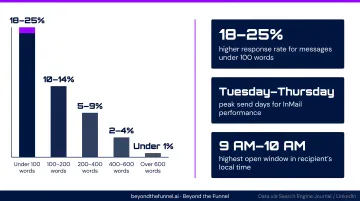
Short messages get read. Long ones get skipped.
13 LinkedIn InMail Examples That Drive 25%+ Reply Rates
All 13 examples follow the four-component formula above. They're grouped by strategy type — B2B sales, value-first offers, problem-solution, relationship-building, and follow-up. Treat each as a starting framework — the personalization is what makes them convert, not the template itself.
B2B Sales InMail Examples (Examples 1–5)
Example 1 — The Trigger-Based Open
Subject: Congrats on the funding round
Hi [Name], saw [Company] just closed [Series X] — exciting milestone. Companies at that stage often need to move fast on [relevant challenge]. We recently helped [Similar Company] do [specific result] in [timeframe]. Worth a quick conversation? Happy to share what worked.
Why it works: Timeliness makes the prospect feel noticed, not targeted. Set up Google Alerts or use Sales Navigator's news filters to catch funding rounds, product launches, or leadership changes before the moment passes.
Example 2 — The Mutual Connection Play
Subject: [Mutual Name] thought we should connect
Hi [Name], [Mutual Connection] mentioned you're working on [initiative/challenge]. We helped [their company type] achieve [specific result] — and [Mutual Name] thought the approach might be relevant for you. Is [specific outcome] something you're actively working toward?
Why it works: Fast Company's reporting on LinkedIn data shows that sharing a former employer makes a prospect 27% more likely to respond. Shared context matters — use it.
Example 3 — The Insight Hook
Subject: Something I noticed about [Company]
Hi [Name], I noticed [Company] recently [specific observation — tech stack, strategic move, gap]. I put together a quick breakdown on how two similar companies addressed this. Would it be useful if I shared it?
Why it works: The CTA is framed as a service to them. They're not agreeing to a call — they're agreeing to receive something helpful. That reframe removes the defensive reflex.
Example 4 — The Social Proof Open
Subject: How [Peer Company] solved [specific pain]
Hi [Name], we helped [Recognizable Company] reduce [specific metric] by [X%] in [timeframe] by addressing [named pain point]. Curious whether that's something on your radar at [their company]?
Why it works: A specific result with a named company does more persuasion work than a full feature description. Prospects connect with companies they recognize — industry match and company size matter as much as the result itself.
Example 5 — The Straight-Line Direct Approach
Subject: Not pitching — one question
Hi [Name], I'm not pitching yet. Just want to know: is [specific challenge] something [Company] is actively trying to solve this quarter? Yes or no works.
Why it works: High-volume buyers appreciate directness. "Not pitching yet" disarms the defensive reflex. Works best with senior prospects who receive heavy outreach and have low tolerance for manufactured warmth.
Value-First & Offer InMail Examples (Examples 6–7)
Example 6 — The Content or Lead Magnet Offer
Subject: Free guide for [role/industry] leaders
Hi [Name], I put together a [guide/report/cheat sheet] on [relevant topic] specifically for [their role or industry]. Given what [Company] is doing in [space], thought it might be useful. Interested?
Why it works: Give before you ask. This approach works well for broader outreach campaigns because it removes the sales association entirely — the prospect receives value before any ask is made.
Example 7 — The Free Demo or Trial Offer
Subject: [Stat] caught my attention
Hi [Name], [relevant market stat]. We helped [client] achieve [specific result] in [timeframe]. If you'd like to see how in a 20-minute demo, here's a link: [URL]. No prep required.
Why it works: Best suited for warmer prospects or shorter sales cycles. Lead with one benefit only — a full feature list in a first message overwhelms rather than converts.
Problem-Solution InMail Examples (Examples 8–9)
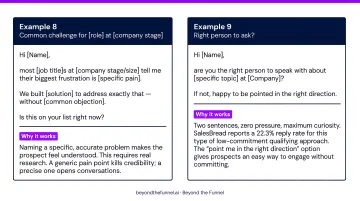
Example 8 — The Pain Point Focus
Subject: Common challenge for [role] at [company stage]
Hi [Name], most [job title]s at [company stage/size] tell me their biggest frustration is [specific pain]. We built [solution] to address exactly that — without [common objection]. Is this on your list right now?
Why it works: Naming a specific, accurate problem makes the prospect feel understood. This requires real research. A generic pain point kills credibility; a precise one opens conversations.
Example 9 — The Qualifying Question Approach
Subject: Right person to ask?
Hi [Name], are you the right person to speak with about [specific topic] at [Company]? If not, happy to be pointed in the right direction.
Why it works: Two sentences, zero pressure, maximum curiosity. SalesBread reports a 22.3% reply rate for this type of low-commitment qualifying approach. The "point me in the right direction" option gives prospects an easy way to engage without committing.
Relationship & Common Ground InMail Examples (Examples 10–11)
Example 10 — The Common Ground Open
Subject: Saw you follow [speaker/topic]
Hi [Name], noticed you follow [shared interest or speaker]. We're hosting a [virtual event/conversation] on [related topic] next [timeframe] — thought you might find it worth an hour. No pitch, just [value]. Want me to send the details?
Why it works: The conversation starts on their turf — something they already care about. That shared starting point lowers friction before any ask is made.
Example 11 — The Partnership Collaboration Ask
Subject: Idea for your audience
Hi [Name], I have a specific idea for how we could bring [relevant value] to [their audience]. We'd handle the heavy lifting. Would 15 minutes this week make sense to run it by you?
Why it works: Leading with their audience's benefit — not what you want — reframes the conversation from vendor pitch to peer collaboration. Partnership outreach almost always fails when it opens with "here's what we'd get out of this."
Follow-Up & Re-Engagement InMail Examples (Examples 12–13)
Example 12 — The Resurfacing Ping
Subject: Following up
Hi [Name], sent you a note a few weeks back about [brief topic reference] — wanted to bump it up in case it got buried. Still happy to share [specific value]. Let me know if the timing is better now.
Why it works: Short, friendly, no new pitch content. The message resurfaces the original thread without adding pressure or manufacturing urgency.
Example 13 — The Breakup or Final Prompt
Subject: Closing the loop
Hi [Name], this'll be my last note — I don't want to clutter your inbox. If [specific challenge] ever becomes a priority, feel free to reach back out. You can also find me at [email]. Wishing you well either way.
Why it works: The low-pressure "I'll leave you alone" framing often generates replies from prospects who meant to respond earlier. A well-written breakup message removes the obligation to engage — which paradoxically makes people more likely to.
InMail Best Practices: What to Do Before You Hit Send
Prospect Targeting First
The best InMail sent to the wrong person is a wasted credit. Build your target list using Sales Navigator filters — title, seniority, industry, company size — and prioritize warm signals over cold ones.
Warm signals to prioritize:
- Prospects who follow your company page
- Active LinkedIn users (posted or commented in the last 30 days)
- Second-degree connections through a current client or partner
That first signal matters more than most senders realize. Fast Company's reporting on LinkedIn data notes that users who follow a company are 81% more likely to respond than those who don't — which means your warm list should always come before your cold one.
Optimize Your Profile First
Prospects click your profile before deciding whether to reply. A thin or inactive profile kills reply rates regardless of message quality.
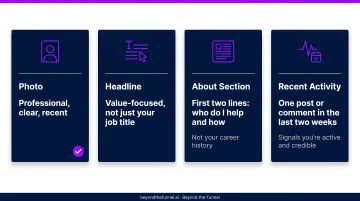
Quick profile checklist before any outreach:
- Photo: Professional, clear, recent
- Headline: Value-focused, not just your job title
- About section: First two lines should answer "who do I help and how" — not describe your career history
- Recent activity: At least one post or comment in the last two weeks signals you're active and credible
Credit Management
LinkedIn InMail credits by plan:
- Sales Navigator Core: 50 credits/month (verified)
- Recruiter Lite: 30 credits/month (verified)
- Premium Business: ~15 credits/month
- Premium Career: ~5 credits/month
Credits roll over, up to a plan-specific maximum. If a recipient replies within 90 days — even to decline — the credit returns.
Before spending a credit, check whether the prospect has an Open Profile (gold badge) — Premium members with this enabled can receive messages from any LinkedIn member for free, so you won't need to use a credit at all.
Common InMail Mistakes That Kill Your Reply Rate
Leading With Yourself
"I work at [Company] and we help businesses like yours..." is a mass-blast signal. Every sentence should answer the prospect's question: what's in this for me?
Before: "I'm the VP of Sales at [Company]. We offer a leading platform that helps enterprise teams manage their pipeline more effectively..."
After: "I noticed [Company] scaled from 50 to 200 reps in 18 months — that kind of growth usually surfaces forecasting challenges pretty fast. Is that something you're working through?"
The second version proves research. The first version proves a template.
Over-Pitching in Message One
Attaching a deck, listing three benefits, or dropping a calendar link in the first InMail overwhelms the prospect before any trust is established. Message one has one job: earn a reply. Save the features for follow-ups.
Sending on the Wrong Days and Not Following Up
Friday and Saturday are the two worst days to send InMail — 4% and 8% below average response rates respectively. Send Tuesday through Thursday.
One InMail is not a strategy. A simple multi-touch sequence looks like this:
- InMail — personalized, under 400 characters
- Connection request — short note referencing the InMail
- Email — if the address is available
- LinkedIn voice note — reserved for high-priority prospects
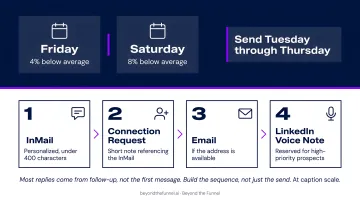
Most replies come from follow-up, not the first message. Build the sequence, not just the send.
Conclusion
The 13 templates above are starting points. What makes them convert is the formula underneath: a specific subject line, a personalized opener, a value reason that answers "what's in it for me," and a low-friction CTA. Get those four elements right, and InMail stops feeling like cold outreach — it starts feeling like a relevant conversation.
When InMail is working and you're ready to scale that momentum with paid LinkedIn advertising, that's where expert strategy compounds the results. Beyond the Funnel is led by one of 80 LinkedIn Certified Marketing Experts worldwide — and 1 of 16 in the U.S. — with experience across 1,000+ managed accounts and a testing framework built to turn LinkedIn into a predictable revenue channel.
Frequently Asked Questions
What are LinkedIn InMail ads?
LinkedIn InMail ads (officially called Sponsored Messaging) are paid campaigns sent to targeted audiences at scale through LinkedIn Campaign Manager — not from an individual's account. This article covers organic InMail, which is the credit-based direct message feature available through Premium, Sales Navigator, and Recruiter accounts.
What is the 4-1-1 rule on LinkedIn?
The 4-1-1 rule is a content-sharing guideline: for every self-promotional post, share four pieces of educational or industry content and one piece of content from others. Applying it on LinkedIn builds a credible, active presence — which warms up your audience and supports higher InMail reply rates.
What is a good response rate for LinkedIn InMail?
Well-targeted, personalized InMails consistently achieve reply rates in the 18–25% range, compared to cold email averages below 1%. Campaigns targeting tightly defined ICPs — especially those showing warm signals like company page follows — can push reply rates even higher.
How many InMail credits do you get per month on LinkedIn?
Sales Navigator Core includes 50 credits/month, Recruiter Lite includes 30, Premium Business typically provides 15, and Premium Career around 5. Credits roll over up to a plan maximum, and any recipient reply within 90 days returns the credit — even a declined response counts.
What is the best length for a LinkedIn InMail message?
Under 400 characters. LinkedIn-attributed data reported by Search Engine Journal shows messages in this range generate 22% higher response rates than average. Brevity signals respect for the prospect's time — and on mobile, long messages often go unread.
Can you send LinkedIn InMail to someone you're not connected with?
Yes — LinkedIn Premium and Sales Navigator users can message anyone on the platform without a prior connection. If a prospect has Open Profile enabled (indicated by a gold badge on their profile), any LinkedIn member can message them for free, making it worth checking before spending a credit.