That's why a $2,000/month test budget and a $50,000/month enterprise program can both be correct. It depends on your company size, industry, and what you're actually trying to achieve. A SaaS company chasing enterprise buyers will pay more per click than a regional professional services firm targeting a local market.
This guide walks through the exact steps to calculate a defensible budget, real B2B benchmarks by size and industry, the variables that swing your costs, and the mistakes that waste money before you've even collected useful data.
Key Takeaways
- Calculate budget backward from your lead or pipeline targets and known CPL benchmarks, not gut feel
- LinkedIn's technical minimum is $10/day, but meaningful data usually requires $3,000-$5,000+ per month
- Required budgets shift sharply by company size and industry, with SaaS and finance paying more than manufacturing
- Treat your first 30-60 days as a testing phase before scaling spend
- Review CPC, CPL, and conversion data weekly, and adjust for seasonality
How to Set Your LinkedIn Ads Budget: A Step-by-Step Framework
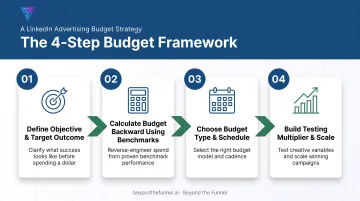
Step 1: Define Your Objective and Target Outcome
Your budget has to map to one primary objective. Trying to drive awareness, engagement, and lead generation simultaneously without clear structure spreads your spend thin and inflates cost across the board.
Pick one:
- Awareness: optimized around CPM, built for reach and brand recall
- Engagement: optimized around cost-per-click or interaction
- Lead generation: optimized around CPL, tied directly to pipeline
Once you've picked an objective, set a concrete monthly outcome. Not "more visibility," but something like "40 marketing-qualified leads" or "$150,000 in new pipeline." Vague goals produce vague budgets.
Step 2: Calculate Budget Backward From Lead Targets Using Benchmarks
Once you know your target, the formula is simple:
Target leads × expected CPL = required monthly budget
Say you need 30 qualified leads a month. LinkedIn CPL for B2B advertisers ranges widely by industry and ad type. B2B House's 2026 benchmark data puts the range at $15 to $350, depending heavily on offer, audience, and creative quality.
If your industry sits around $125 CPL (typical for SaaS), your math looks like this:
- 30 leads × $125 CPL = $3,750/month
Research current CPL figures for your specific industry before finalizing a number. A generic average will either underfund your campaign or leave money on the table.
Step 3: Choose Your Budget Type and Schedule
LinkedIn gives you two structural choices, and picking the wrong one causes real pacing problems.
- Daily budget: Best for continuous, always-on campaigns
- Lifetime (total) budget: Best for fixed-date promotions like a webinar push or event campaign with a hard deadline
With a daily budget, LinkedIn can spend up to 150% of your daily amount on a strong auction day. Total flight spend stays capped at daily budget times flight days.
LinkedIn recommends lifetime pacing for more efficient spend distribution. It uses forecasting to smooth delivery across the week rather than front-loading spend.
For teams just starting out, LinkedIn's technical floor sits at $10/day or $100 lifetime for new campaigns. Neither floor will generate statistically meaningful results on its own.
Step 4: Build in a Testing Multiplier and Plan to Scale
Month one shouldn't run at your target budget. New campaigns sit in a learning phase where LinkedIn's algorithm is still figuring out who responds. Budget a 1.5-2x buffer over your baseline for month one, then taper toward 1x by month three as performance data matures.
Before committing to a scaled monthly number, validate your audience and creative assumptions with structured testing. This is where a lot of in-house teams get stuck guessing.
A LinkedIn Certified Marketing Expert can shortcut months of trial and error. Beyond the Funnel’s testing framework, used across full-funnel campaign builds, validates what actually converts before you scale real dollars behind it.
Real B2B LinkedIn Ads Budget Benchmarks
Budget Ranges by Business Size
There's no single universal benchmark tying company size to monthly spend, but patterns show up consistently across managed accounts. Based on structuring campaigns for B2B brands from early-stage through enterprise, here's a directional breakdown:
| Business Size | Typical Monthly Spend | Notes |
|---|---|---|
| Small business / early-stage | $2,000-$5,000 | Single vertical, testing phase |
| Mid-market | $5,000-$20,000 | Multiple verticals, active scaling |
| Enterprise | $30,000-$80,000+ | Multi-market, global campaign oversight |
Companies in competitive verticals like tech and finance tend to sit at the higher end of their tier. More bidders chasing the same job titles push CPCs up regardless of company size.
Cost Metrics to Benchmark Against (CPC, CPM, CPL)
Different benchmark sources report different numbers because they pull from different samples, currencies, and time periods. Here's a rounded snapshot:
| Metric | Typical Range | Notes |
|---|---|---|
| CPC | $3.44-$10 | Lower medians from broad account samples; higher estimates in competitive niches |
| CPM | $30-$34 | Fairly consistent across recent benchmark reports |
| CPL | $15-$433 | Wide swing depending on ad type and industry |
Figures compiled from Databox, WordStream, and B2B House benchmark data (2024-2026); treat as directional ranges, not fixed targets.
Plug your industry's realistic CPL into the Step 2 formula before finalizing your number. If your proposed budget assumes a $50 CPL in an industry where $125 is typical, you'll underfund the campaign and mistake a math error for a performance problem.
Benchmarks by Industry
CPL varies significantly by vertical, largely driven by customer lifetime value and how much competition exists for the same buyer titles:
| Industry | Typical CPL |
|---|---|
| SaaS/technology | ~$125 |
| Financial services | ~$100 |
| Healthcare | ~$125 |
| Professional services | ~$60 |
| Manufacturing | ~$100 |
Higher-LTV industries like SaaS and finance can sustain higher CPCs because one closed deal covers many failed clicks. Lower-margin industries need tighter cost control since the math doesn't forgive an inflated CPL the same way.
Benchmarks by Campaign Objective
Comparing costs across objectives without adjusting your frame leads to bad conclusions. A $40 CPM for an awareness campaign isn't comparable to a $150 CPL for a lead gen campaign. They measure entirely different things.
- Awareness: measured in CPM, generally the lowest per-unit cost
- Engagement: measured in cost-per-click or cost-per-interaction, moderate cost
- Lead generation: measured in CPL, the highest per-unit cost but tied directly to pipeline value
Keep these separate when reporting results internally. Mixing units makes an efficient program look wasteful on paper.
Key Factors That Affect Your LinkedIn Ads Budget and Costs
Audience Size and Targeting Specificity
Layering job title, seniority, and company size narrows your reach and typically raises CPC. That tradeoff often improves lead quality enough to justify the cost. LinkedIn's Matched Audiences require a minimum of 300 matched members to run at all, so avoid shrinking targeting below a viable delivery threshold just to feel "precise."
Bidding Strategy
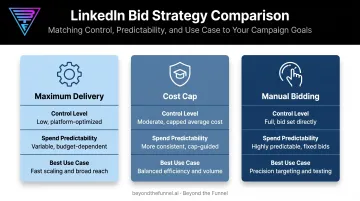
Your bidding approach changes how predictable your spend is:
- Maximum delivery: auto-bidding, spends your full daily budget, least manual control
- Cost cap: sets a target average cost per result, strongest documented cost control
- Manual bidding: you set the bid directly, most control but no guaranteed final CPC
Ad Relevance and Quality Score
LinkedIn rewards high-engagement ads with better delivery at lower effective cost. Relevance reflects your bid, targeting precision, and predicted response rate.
No fixed discount is published for high relevance scores, but the pattern is consistent: stale, low-engagement creative costs more to run.
Seasonality
Budgets often need to flex during high-competition windows like end-of-quarter and end-of-year pushes, when more advertisers compete for the same buyers. More spend still doesn't guarantee proportional results.
HockeyStack's analysis of $28M in LinkedIn spend across 70+ B2B SaaS companies found that Q4 absorbed 31% of annual spend but produced only 20% of MQLs, while CPC climbed from $10.48 in Q1 to $15.72 in Q3. Plan for the auction pressure; don't assume it buys efficiency.
Ad Format Choice
Formats like Document Ads and Lead Gen Forms tend to reduce friction in the conversion path compared to standard single-image ads sending traffic to an external landing page. Fewer steps between the ad and the conversion generally means a lower cost-per-lead, though the exact discount depends heavily on your offer and audience.
Common LinkedIn Ads Budget Mistakes to Avoid
- Exiting the learning phase too early. Setting a budget so low that you can't gather enough data in the first two to three weeks means your early performance numbers aren't reliable. They're noise.
- Increasing budget to fix structural problems. After auditing hundreds of underperforming LinkedIn accounts, a consistent pattern emerges: teams raise spend when results disappoint, when the real issue is account structure, audience targeting, or messaging, not budget size.
- Comparing CPL across incompatible objectives. A job applicant lead and a sales-qualified lead are not the same unit. Measure cost against downstream deal value, not a generic CPL average pulled from a different context.
- Ignoring frequency and creative fatigue. Running the same ad to the same narrow audience for months inflates CPC as engagement drops. Refresh creative before fatigue shows up in your numbers.
When and How to Adjust Your LinkedIn Ads Budget
Track CPC, CPL, and conversion rate weekly, but resist the urge to make drastic changes immediately. Give each adjustment at least 7 days before judging results. LinkedIn's algorithm needs time to exit its learning phase and stabilize delivery.
Once you have enough data:
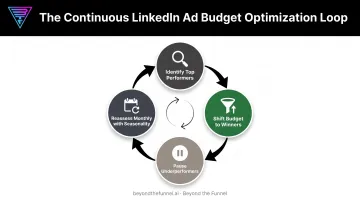
- Identify top performers by cost-per-result and lead quality, not just volume
- Shift budget toward those ad sets rather than spreading spend evenly across everything
- Pause underperformers instead of letting them drain budget
- Reassess monthly, factoring in known seasonal swings like end-of-quarter competition
Many B2B teams eventually bring in a dedicated LinkedIn ads partner once budgets scale past the testing phase. Beyond the Funnel's work with Evidation is a clear case in point.
The company's pipeline grew from a few dozen opportunities to more than 100 in a single year after building out a full-funnel LinkedIn strategy, according to former Head of Commercial Marketing Michael Arbini. That kind of jump usually comes from translating performance data into a structured growth plan, not reacting to weekly numbers in isolation.
Frequently Asked Questions
How much should I budget for LinkedIn ads?
Most B2B advertisers need $3,000-$5,000/month minimum for meaningful data. Small businesses can start below that range while testing; enterprises often spend far more depending on industry and lead targets.
What is the minimum budget required for LinkedIn ads?
LinkedIn's technical minimum is $10/day or $100 lifetime for new campaigns. These floors rarely produce statistically meaningful results, so treat them as a platform limit, not a strategy.
Should I choose a daily or lifetime budget?
Daily budgets suit always-on, continuous campaigns. Lifetime budgets suit fixed-date promotions like events or webinars. LinkedIn also recommends lifetime pacing for more efficient spend.
What is a good cost per lead (CPL) on LinkedIn for B2B?
"Good" depends entirely on your customer lifetime value. As a general reference, CPL ranges from roughly $60 in professional services to $125 in SaaS and healthcare.
How much of my overall paid social budget should go to LinkedIn?
Many B2B companies allocate 40-60% of paid social budget to LinkedIn, given its access to verified professional audiences and job-title-level targeting unavailable on consumer platforms.
How often should I adjust my LinkedIn ads budget?
Review KPIs weekly, but wait at least 7 days after any change before judging results. Layer in seasonal adjustments for known peak and slow periods in your industry.