If that sounds familiar, you're not alone. It's one of the most common complaints among B2B marketers running LinkedIn campaigns, and it usually isn't a sign that LinkedIn "doesn't work" for B2B. In most cases, the cause is predictable and fixable.
This article breaks down the real reasons LinkedIn ads stop converting, walks through a step-by-step framework to diagnose and fix them, and covers how to know when it's time to bring in outside expertise like Beyond the Funnel.
Key Takeaways
- Non-converting campaigns almost always trace back to targeting, offer, creative, landing pages, or default settings draining budget
- Some "broken" campaigns are just too new — B2B sales cycles can stretch well past 30 or even 90 days
- Diagnose the real issue first—random overhauls waste time and budget
- Knowing when to fix it yourself versus bringing in a certified expert can save months of wasted spend
Common Reasons Your LinkedIn Ads Aren't Converting
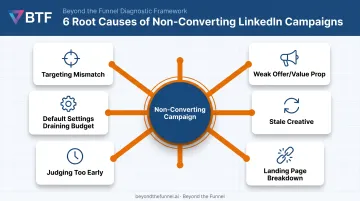
Low-converting campaigns rarely fail for mysterious reasons. They usually trace back to one of six root issues. Diagnosing the correct one prevents wasted testing cycles and stops you from fixing something that was never broken.
Targeting Is Too Broad, Too Narrow, or Misaligned With Your ICP
Symptoms: High impressions but low relevance, weak lead quality, or an audience that feels either massive or nearly invisible.
LinkedIn requires a minimum of 300 members to run an ad set, but it doesn't publish an official "healthy" delivery range beyond that floor. The more useful signal is whether your job titles, seniority filters, and company-size parameters actually match your buyer personas.
An audience of 500,000 marketing directors is technically valid, but if your product only sells to VPs at 200-person SaaS companies, you're paying to reach people who will never buy.
The Offer or Value Proposition Isn't Compelling
Symptoms: Solid impressions and clicks, then a steep drop-off right before form completion.
This usually means the ad never answers "why should I act now?" Many ads bury their value proposition under three lines of throat-clearing before getting to the point. Buyers scrolling their feed won't dig for it.
Ad Creative Has Gone Stale
Symptoms: Rising CPC or CPM alongside falling CTR and relevance score, even though nothing else changed.
This is creative fatigue. The same audience keeps seeing the same ad until they stop noticing it. There's no universally agreed refresh interval, but if CTR is sliding while cost climbs on unchanged creative for several weeks, that's your signal to rotate.
Landing Page Experience Breaks the Chain
Symptoms: Healthy CTR, but conversions collapse the moment someone clicks through.
Common culprits include:
- Messaging on the landing page that doesn't match what the ad promised
- Slow load times or a non-mobile-optimized layout
- Forms with too many fields, especially open text areas and dropdowns
You're Judging Performance Too Early
Symptoms: Little to no click-attributed pipeline in the first 30 days, tempting you to pause the campaign.
B2B buying cycles run long. 6sense's 2025 B2B Buyer Experience Report, based on nearly 4,000 buyers, found an average end-to-end buying cycle of 10.1 months.
Thirty days of data tells you almost nothing about a journey that long. Early weeks build audience familiarity and retargeting pools. They aren't meant to close deals.
Default Campaign Settings Are Quietly Draining Budget
Symptoms: Spend looks fine on paper, but engagement quality is weak despite a decent-looking cost per lead.
Two defaults often go unchecked:
- Audience Network extends your ads to third-party sites beyond the LinkedIn feed, stretching reach past your intended ICP
- Maximum Delivery is the default bid strategy for new campaigns, according to WordStream's 2025 guide to LinkedIn bidding. It's fully automated and prioritizes spending your budget over precision targeting
Neither setting is inherently bad, but both deserve a deliberate decision, not a default one.
How to Fix Non-Converting LinkedIn Ads: A Step-by-Step Framework
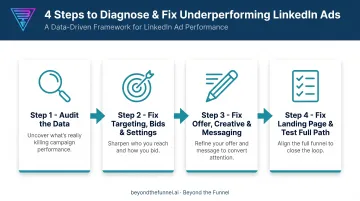
Jumping straight to "new creative" or "new audience" without diagnosis wastes budget and often repeats the same mistake. This framework isolates the actual problem before you touch anything.
Step 1: Audit the Data Before Changing Anything
Pull your Campaign Manager reports and look at CTR, CPL, impression frequency, and audience demographics against your ICP. Then check the Revenue Attribution Report, not just click-attributed conversions. It surfaces influenced pipeline that standard tracking misses entirely. Compare your numbers against realistic vertical expectations before concluding anything is actually broken.
Step 2: Fix Targeting, Bids, and Campaign Settings
- Adjust your audience size and filters until it genuinely reflects your ICP, not just a large enough pool to satisfy LinkedIn's minimum
- Turn off Audience Network and Audience Expansion if quality matters more than raw volume
- Switch from Maximum Delivery to manual or target-cost bidding to keep budget from chasing low-value placements
Step 3: Fix the Offer, Creative, and Messaging
- Rewrite copy to lead with the value proposition and a specific CTA, not a vague "learn more"
- Add testimonials, client logos, or third-party proof directly in the ad
- Build three to four creative variations per ad set and rotate them on a consistent cadence to prevent creative fatigue
Step 4: Fix the Landing Page and Test the Full Path
Make sure your landing page headline, offer, and visuals match exactly what the ad promised.
According to HubSpot's analysis of over 40,000 landing pages, conversion rates decline as field count rises, with open text areas and dropdown fields causing the steepest drops.
- Simplify your form, or switch to LinkedIn Lead Gen Forms to remove friction
- Run A/B tests on one variable at a time
- Give results a full sales-cycle-appropriate window before calling anything a fix
Fix It Yourself or Bring in a LinkedIn Ads Expert?
Some fixes are quick internal adjustments. Others signal a deeper strategic gap that benefits from certified expertise.
| Scenario | Fix It Yourself | Bring in an Expert |
|---|---|---|
| One metric is off (like a CTR dip) | Refresh creative or tighten one targeting filter, then monitor for 1-2 weeks | If the same metric stays broken after two rounds of internal changes |
| Multiple levers underperforming at once | Rarely effective alone: compounding issues are hard to isolate without a structured audit | A full-funnel audit of audience, creative, and tracking is usually faster and cheaper than months of trial and error |
| Scaling budget or expanding to new markets | Feasible at low spend with a single ICP | Recommended once budget or account complexity grows, where mistakes get expensive fast |
| No internal LinkedIn-certified expertise | Possible, but slower and costlier through trial and error | Where a partner adds real, measurable value |
That last row is where Beyond the Funnel fits. Founder Joshua Stout is one of just 80 LinkedIn Certified Marketing Experts worldwide, and 1 of 16 in the U.S.
The agency builds on audience validation, creative testing, and transparent full-funnel reporting shaped across more than 1,000 managed LinkedIn accounts.
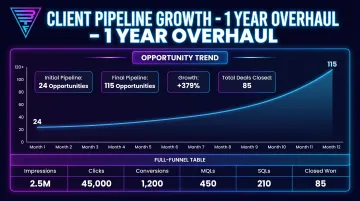
Take Evidation, a Beyond the Funnel client. Michael Arbini, the company's former Head of Commercial Marketing, credits Joshua with helping the team "map out and execute a full LinkedIn strategy." Pipeline grew from a few dozen opportunities to more than 100 within a year through structured diagnosis and testing.
Common Mistakes to Avoid When Fixing LinkedIn Ads
Even well-intentioned fixes can backfire if you rush them. Avoid these three traps:
- Changing everything at once: When you adjust audience, creative, and landing page together, you can’t tell what actually moved results
- Pulling budget too soon: Pausing before the sales cycle produces closed-won deals throws away data you already paid for
- Trusting click-attributed data alone: Influenced pipeline and engaged accounts often tell a different story than last-click conversions
Preventive Measures to Keep Your LinkedIn Ads Converting
A little maintenance prevents most of the problems covered above. Build these habits into your process:
- Refresh at least one creative element regularly, before performance metrics start sliding rather than after
- Set up both the LinkedIn Insight Tag (browser-side) and Conversions API (server-side) for complete tracking across long B2B sales cycles
- Schedule monthly check-ins on audience composition, campaign settings, and performance trends to catch drift before weeks of wasted spend
Frequently Asked Questions
What is a good conversion rate for LinkedIn ads?
There's no single universal number — rates vary widely by industry, offer type, and funnel stage. Benchmarking your CTR, CPL, and pipeline influence together gives a far more useful picture than chasing one target percentage.
How long should I wait before deciding my LinkedIn ads aren't working?
B2B sales cycles often run several months, so 30 days of data rarely tells the full story. Evaluate early weeks on audience health and engagement signals, not closed-won revenue.
Why is my LinkedIn ad getting clicks but no conversions?
This usually points to a landing page mismatch, an unclear offer, or a form that's too long. Check that everything on the page matches what the ad promised before touching your targeting.
Should I turn off LinkedIn's Audience Network and Audience Expansion?
These settings can extend your reach beyond your intended audience, which sometimes trades quality for volume. If precision matters more than reach, turning them off is worth testing.
How do I know if my LinkedIn targeting is too broad or too narrow?
Start by checking your audience size and demographic breakdown in Campaign Manager against your actual ICP. LinkedIn requires a 300-member minimum, but relevance to your buyer persona matters more than hitting any specific number.
When should I hire a LinkedIn ads agency instead of managing campaigns myself?
If multiple levers are underperforming at once, budgets are scaling, or you lack in-house LinkedIn expertise, bring in a specialized partner. That route typically resolves issues faster than continued internal trial and error.