Here's the tension every B2B advertiser eventually runs into: narrow your targeting too much, and CPMs climb while delivery stalls. Go too broad, and you're paying to show ads to people who will never buy from you. There's no universal "right" number that solves this for every account.
This guide breaks down what actually drives audience size, the ranges that tend to work by campaign type, how size affects cost and delivery, and how to tell when yours needs adjusting.
Key Takeaways
- LinkedIn's Matched Audiences floor is 300 matched members, but stable delivery for most campaigns needs far more
- The "right" size depends on objective, ad format, and budget, not a fixed number
- Too-small audiences drive high CPMs, fast frequency fatigue, and inconsistent delivery
- Oversized audiences dilute relevance even when CPMs look attractive
- Test narrow, balanced, and broad versions of the same audience to find the size that performs
What Audience Size Really Means in LinkedIn Ads
Audience size is the estimated number of unique LinkedIn members who match your combined targeting selections. You'll see it live in Campaign Manager's forecasted results panel, updating in real time as you build your campaign.
This isn't something you type in. It's a derived output, not a direct input. Every time you add a job title, layer in a seniority level, or exclude a segment, that number shifts up or down automatically.
LinkedIn documents 300 matched members as the minimum usable size for a Matched Audience built from an uploaded list. But here's the catch: a raw list can technically exceed 300 contacts and still fail this threshold once LinkedIn applies its privacy filtering, which strips out members who've opted out of matching.
According to LinkedIn's Matched Audiences documentation, that filtering happens after the match, not before.
You'll also encounter LinkedIn's "Audience Too Narrow" warning well before this floor. That warning is a signal, not a stop sign, but it's a strong hint that delivery is about to get expensive.
What Actually Changes Your Audience Size
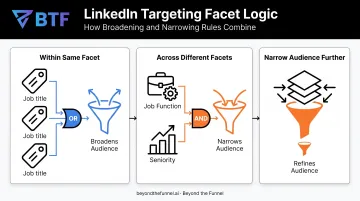
LinkedIn's targeting logic runs on a straightforward AND/OR structure:
- Within the same facet, options behave as OR. Selecting three job titles broadens your pool because a member only needs to match one.
- Across different facets, the logic switches to AND. Adding "Seniority = Director" on top of "Job Function = Marketing" narrows the pool to people who satisfy both.
- Stacking facets under "Narrow audience further" compounds this effect, and each additional layer typically shrinks your eligible audience further.
Exclusions work differently. Removing competitors, existing customers, or students shrinks the pool, but only improves quality when applied with intent. Excluding segments reflexively, without checking whether they're actually hurting performance, just costs you reach for no real gain.
Campaign format also changes your baseline. Sponsored Content, Message Ads, and Text Ads carry different delivery mechanics, so what counts as "healthy" for one format can be far too small for another.
The Ideal LinkedIn Ads Audience Size Range
There's no single magic number here, and anyone who tells you otherwise is oversimplifying. LinkedIn's own targeting guidance has long stated that no one-size-fits-all recommendation exists and that testing against real performance is essential.
The right range still depends on your objective, funnel stage, and whether you're running cold targeting or Matched Audiences built from first-party lists.
Recommended Ranges by Campaign Type
Based on how these formats deliver and what they're built to accomplish, here are practical starting ranges to test:
| Campaign Type | Typical Starting Range | Why |
|---|---|---|
| Sponsored Content (awareness/consideration) | 50,000–150,000+ | Larger pools give the algorithm more room to optimize delivery |
| ABM / Matched Audiences | 300–20,000 | Built from account lists; precision matters more than scale |
| Message Ads / Conversation Ads | Under 15,000 | Strict frequency caps and higher cost per send |
| Lead Gen Form campaigns | 20,000–150,000 | Balances form-fill volume against lead quality |
Treat these as starting benchmarks, not guarantees. An account-based campaign targeting 40 named enterprise accounts might have an audience of just a few hundred members, and that's entirely appropriate given the objective.
Matching Audience Size to Budget
Audience size and budget have to move together, or you'll run into one of two problems:
- Small budget, huge audience → your ads under-deliver with minimal frequency, and you never gather enough signal to know if the audience works
- Small audience, big budget → you burn through the pool fast, frequency spikes, and CPMs climb as LinkedIn runs out of new people to show your ad to
Use this as a starting map of monthly budget tiers to audience ranges worth testing—not fixed rules:
| Monthly Budget | Audience Size to Test |
|---|---|
| Up to $5,000 | 20,000–50,000 |
| $10,000–$15,000 | 50,000–100,000 |
| $20,000–$30,000 | 75,000–150,000 |
| $40,000–$60,000 | 100,000–250,000 |
| $80,000+ / Enterprise | 150,000–500,000+ |
If your delivery pacing looks choppy or your frequency is climbing fast, that mismatch is usually the first place to look.
How Audience Size Impacts Campaign Performance
Think of audience size as a dial that moves four levers at once: cost, algorithm learning, frequency, and how relevant your reach stays to the buyers you actually want.
Cost and competition. Smaller pools mean fewer available impressions, and more advertisers targeting similar B2B segments compete for the same eyeballs. That competition tends to push CPMs upward, especially in crowded verticals like SaaS and financial services where multiple competitors often chase identical job titles.
Algorithm optimization. LinkedIn's delivery system needs a threshold volume of impression and engagement data before it can optimize efficiently. Practitioners who manage accounts regularly tend to see this play out with audiences under roughly 20,000 members. Delivery is often slower and less consistent, simply because there isn't enough activity for the system to learn from.
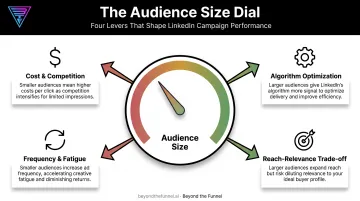
Frequency and fatigue. Small audiences hit their frequency ceiling faster than large ones, since the same people keep seeing your ad. Once frequency climbs too high, engagement typically drops and cost per click tends to follow it upward.
LinkedIn applies frequency management tools on certain formats, but general Sponsored Content and Sponsored Messaging campaigns don't currently follow one universal published cap. That makes daily frequency checks in Campaign Manager worth doing manually.
The reach-relevance trade-off. Larger audiences generally deliver lower CPMs, but that's only a win if the added reach still reflects your ideal customer. Bigger for the sake of bigger is how budgets get wasted. As WordStream's LinkedIn optimization guide points out, a smaller, more precisely targeted audience frequently outperforms a broad one on the metrics that actually matter.
Too Small vs Too Big: Warning Signs and How to Fix Each
Signs Your Audience Is Too Small
Watch for these patterns:
- Persistent "Audience Too Narrow" warnings that won't clear
- CPMs sitting well above your own account benchmark
- Frequency climbing fast within days, not weeks
- Delivery that's inconsistent day to day, with spend spiking and stalling
One exception: small audiences aren't a mistake when they're intentional. High-value ABM campaigns, retargeting segments, and narrow enterprise TAMs are supposed to be small. Precision is the point.
Signs Your Audience Is Too Big
The warning signs here are quieter, which is what makes them dangerous:
- Strong delivery and low CPMs that mask weak lead quality
- High volume of unqualified clicks and form-fills
- Relevance scores drifting downward over several weeks while spend keeps flowing
The exception: broad audiences are fine, even ideal, when the actual goal is top-of-funnel awareness or content reach rather than immediate conversion. A brand campaign doesn't need the same precision as a demand gen push.
The Fix in Either Direction
If you're too narrow:
- Add adjacent job titles or related skills instead of just widening seniority
- Expand geography slightly rather than dropping it entirely
- Loosen one "Narrow audience further" facet before removing all targeting discipline
If you're too broad:
- Layer in one additional targeting facet based on your actual converters
- Add exclusions for segments you already know are poor fits
- Refresh creative first to rule out a messaging problem before you shrink the audience
At Beyond the Funnel, audience testing comes before scaling spend. Validate with real engagement data, refine targeting and messaging together, then scale what actually converts—not what simply looks efficient on paper.
Common Audience Size Mistakes to Avoid
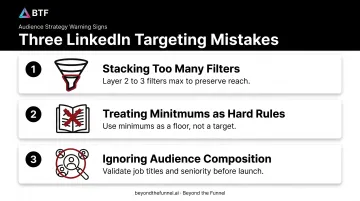
A few patterns show up again and again in account audits:
- Stacking too many filters at once. Isolate the 2-3 attributes that genuinely define your ICP instead of layering five or six facets that collapse your reach.
- Treating LinkedIn's suggested minimums as hard rules. They're starting benchmarks. Real delivery and lead quality data should override them.
- Ignoring composition in favor of size alone. A 100,000-member audience means nothing if it doesn't match your personas. Validate with LinkedIn's audience insights before scaling budget.
Audience size isn't a one-time setup decision. It's a lever you keep testing as campaigns run. Pair platform benchmarks with your own delivery and lead-quality data to land on a size that performs for your account.
Frequently Asked Questions
What is the ideal audience size for LinkedIn ads?
There's no single ideal number. Most Sponsored Content campaigns perform best between 50,000 and 150,000 members, while ABM and Message Ads campaigns can work well with audiences far smaller.
How do I target an audience on LinkedIn?
LinkedIn targeting combines a required location with attributes like job function, seniority, company, and skills. You can also layer in Matched Audiences for retargeting website visitors or uploaded account lists.
What happens if my LinkedIn audience is too small?
Small audiences typically drive higher CPMs, faster frequency fatigue, and a stalled learning phase that leads to inconsistent delivery. You'll often see the "Audience Too Narrow" warning appear before spend starts flowing consistently.
Can a LinkedIn audience be too large?
Yes. Oversized audiences can dilute relevance and waste spend on unqualified prospects, even when CPMs look attractively low. Low cost doesn't mean the traffic is right for your funnel.
How do I fix an "Audience Too Narrow" warning on LinkedIn?
Add adjacent job titles or related skills, loosen one narrowing facet, or slightly expand geography. Avoid stripping out all targeting just to clear the warning quickly.
Does audience size affect LinkedIn ad cost?
Generally, yes. Smaller audiences tend to raise CPMs due to competition for limited impressions and faster frequency caps, while larger, well-targeted audiences tend to lower cost per impression.