Introduction
LinkedIn has grown into a platform with 1.3 billion members, and a large share of them are the exact professionals B2B marketers spend their careers trying to reach. No other ad platform lets you filter an audience by job function, seniority, company revenue, and skills at the same time.
But most B2B marketers still get targeting wrong. They go too broad and burn budget on people who will never buy, or too narrow and their ads never deliver. Too often, they build audiences on a hunch instead of data.
This guide breaks down every LinkedIn targeting option available today, how to layer them for real B2B buying committees, the mistakes that quietly drain budgets, and how to match your CTA to the audience you're actually targeting.
Key Takeaways
- LinkedIn targeting spans six categories: location, company, job, demographics, interests, and matched audiences
- Layering company lists with job function and seniority is the most reliable path to B2B decision-makers
- Narrower, validated audiences cost more per lead but convert at higher rates
- Turning off Audience Expansion and the LinkedIn Audience Network protects targeting precision
- Test audience combinations against performance data instead of guessing
Why LinkedIn Ad Targeting Matters for Reaching B2B Buyers
B2B purchases are rarely made by one person clicking "approve." Gartner's most recent research puts the typical B2B buying group at 5 to 16 people spanning up to four functions, based on a survey of 632 B2B buyers (Gartner, 2025).
Target only the VP of Marketing and you miss the other voices who weigh in before a deal closes:
- Finance stakeholders who control budget approval
- IT reviewers who assess technical fit and risk
- End-user champions who drive day-to-day adoption
Gartner also found that when buying-group relevance was high, buyers were three times more likely to report a high-quality deal. Individual-level relevance alone actually had a negative effect on group consensus. Reaching one persona well isn't enough. You need messaging that resonates across the whole committee.
There's a cost side to this too. In a Demandbase-commissioned EMARKETER report, 58% of B2B marketers named ad waste a major concern, and over half estimated they lose 16% to 45% of their total budget to it (EMARKETER, 2025). Imprecise targeting is a major driver. Every impression served to someone who will never buy inflates cost per lead and erodes ROI on an already tight budget.
The Complete List of LinkedIn Ad Targeting Options
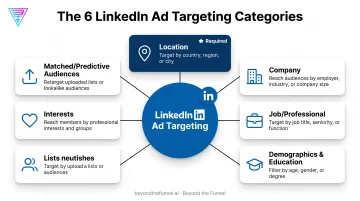
LinkedIn's Campaign Manager offers more than 20 targeting attributes, grouped into a handful of categories. Location is the only one that's required. Everything else is optional, and the real skill is knowing which ones to stack.
Location Targeting (Required)
Every campaign starts here. LinkedIn gives you two approaches:
- Permanent location — targets based on the member's listed profile location, ideal for reaching people wherever they officially live and work
- Recent (IP-based) location — targets based on current IP address, useful for short-term visits or event-based campaigns
For B2B campaigns, align your location targeting with where your sales team can actually close deals. There's no point running ads in a region your reps can't service. It also helps to limit the number of time zones in a single campaign. Spreading delivery across too many zones makes daily budget pacing unpredictable.
Company Targeting
This is where B2B precision really starts. LinkedIn lets you filter by:
- Company name — target specific accounts by name, the foundation of account-based marketing
- Industry — a broad qualifying filter for relevant sectors
- Company size — narrows by employee count
- Revenue — LinkedIn's estimated annual revenue for the company
- Growth rate, followers, and connections — signals of momentum or existing brand affinity
Company name (or an uploaded matched list) gives you the tightest precision: you're naming exact accounts. Industry and size are better used as qualifying filters layered on top, not as your only targeting criteria.
Job and Professional Targeting
This category defines who inside those companies sees your ad:
- Job function — the department someone works in (Marketing, Sales, IT, Finance)
- Job seniority — from entry-level to owner/C-suite
- Job title — the specific role listed on a profile
- Member skills and years of experience — supplementary signals
Job function plus seniority is generally more reliable than job title alone. LinkedIn's title-matching is broad by design, which means a "Director of Growth" search can pull in loosely related titles that dilute your audience. Function and seniority filter on structured data instead, so you get a cleaner match.
Demographic, Education, and Interest Targeting
These attributes cover member age, gender, degrees, fields of study, schools, groups, and interests. They're niche tools, best suited for:
- Awareness-stage campaigns where broad reach matters more than precision
- Alumni or association-based campaigns using school or group targeting
- Layering a light qualifier onto an already-defined company and job audience
Treat these as a supplement, not a replacement. A B2B campaign built entirely on interests or age brackets will struggle to reach the right buying committee.
Matched Audiences and Predictive Audiences
Matched Audiences let you build on data you already own:
- Company list uploads — target named accounts directly
- Contact list uploads — target known leads or customers
- Website retargeting — reach visitors who've already shown interest
- Video, lead form, and engagement retargeting — reach people who've interacted with previous content
Predictive audiences take this further. LinkedIn's AI builds a new audience modeled after a source list (say, your closed-won customers) to find similar profiles. Sources need at least 300 member accounts (or 300 to 300,000 rows for list uploads), and each ad account can run up to 200 predictive audiences.
Matched audiences are the closest thing LinkedIn has to true account-based targeting, and they should anchor most B2B campaigns.
Buyer Group Targeting (Newer Feature)
LinkedIn's Buyer Group targeting automatically reaches multiple stakeholders within a predefined buying committee, so you don't have to manually stack job functions to approximate one. It's a useful shortcut for B2B advertisers trying to cover a full committee without building five separate campaigns.
That said, it currently comes with real constraints. Advertisers report limits like one buyer group per campaign, restricted exclusion options, and less audience visibility than standard targeting. Treat it as a testing tool to run alongside your manual stack, not as your entire B2B targeting strategy.
How to Combine Targeting Options to Reach the Right B2B Buyers
Understanding LinkedIn's targeting logic is the difference between a precise audience and a leaky one. Options within the same category generally combine with OR logic, while options across categories combine with AND logic. Target Job Function = Marketing OR Sales, then add Company Size = 1,000+ employees, and LinkedIn shows your ad to marketing or sales people who also work at large companies.
The Primary B2B Stack
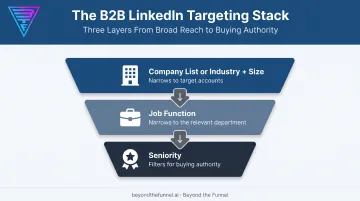
For most B2B campaigns aiming at decision-makers, the most dependable layering approach is:
- Company list (or industry + size) — define the accounts worth reaching
- Job function — narrow to the relevant department
- Seniority — filter for people with actual buying authority
This three-layer stack is common in well-run B2B accounts because it balances precision with enough scale to deliver impressions.
Audience Size and Delivery
LinkedIn requires a minimum of 300 member accounts for a campaign to run at all. Below that, delivery simply won't happen.
Above that floor, most B2B advertisers aim for a practical sweet spot: narrow enough to stay relevant to the buying committee, wide enough for the algorithm to optimize delivery and spend.
Two things wreck this balance:
- Over-segmentation — stacking too many filters until the audience shrinks below a usable size
- Audience Expansion and the LinkedIn Audience Network left on: both extend delivery beyond your defined audience and beyond the LinkedIn feed, trading relevance for reach
For B2B campaigns where precision is the entire point, both should be turned off.
Matching Targeting to Funnel Stage
Your targeting stack shouldn't stay static through the funnel:
- Cold/awareness: broader stacks (industry + size + function) to build reach
- Warm/engagement: narrower, adding seniority and matched audience overlap
- Hot/conversion: tightest stacks, often matched audiences or retargeting layered with seniority
Test Before You Scale
Guessing at the "right" combination is expensive. Beyond the Funnel starts client work by validating audience combinations against real engagement and conversion data before increasing spend. Scaling a stack because it looks right on paper is how budget gets wasted.
That approach paid off in Beyond the Funnel's work with Evidation. According to Michael Arbini, the company's former Head of Commercial Marketing, a full LinkedIn strategy helped grow the pipeline "from a few dozen to over 100 opportunities in one year." Structured tests on audience combinations made that pipeline growth measurable before spend scaled.
Common LinkedIn Targeting Mistakes B2B Marketers Make
Even experienced marketers fall into a handful of recurring traps:
- Relying on job title as a primary filter. LinkedIn's title-matching is broad, so "VP of Sales" can pull in loosely related roles. Use function and seniority as your backbone, with title as a secondary layer.
- Leaving Audience Expansion or the LinkedIn Audience Network enabled. Both trade precision for reach — fine for awareness, damaging for qualified pipeline.
- Targeting a single persona instead of the full buying committee. Buying groups run 5 to 16 people deep, so one-title campaigns miss the influencers and reviewers who shape the decision.
Fix these three first. They show up most often in underperforming accounts and are usually the fastest path back to cleaner targeting.
Aligning CTAs and Creative With Your Targeting Strategy
Targeting gets someone in front of your ad. The CTA decides what happens next, and it needs to match how well that audience already knows you.
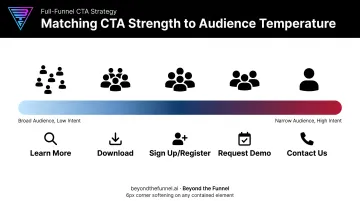
Common LinkedIn CTA options include:
- Learn More — low-commitment, ideal for cold or broad audiences
- Download — for gated content like guides or reports
- Sign Up / Register — for webinars, newsletters, or events
- Request Demo — for warm audiences closer to a buying decision
- Contact Us — for prospects ready for a direct conversation
- Subscribe — for ongoing content programs
- Apply Now — recruitment or program-specific campaigns
The general rule: soften your CTA as your audience gets broader, sharpen it as your audience gets narrower. A cold, industry-and-size audience should see "Learn More," not "Request Demo." A narrow, matched-audience retargeting campaign full of engaged prospects can handle the stronger ask.
Creative should follow the same logic. Cold audiences respond better to problem-focused, educational creative. Warm retargeting audiences can handle product proof, case studies, and direct offers.
Testing CTA and creative variations alongside your audience combinations isn't optional. It's part of the full-funnel optimization work agencies like Beyond the Funnel build into every campaign cycle. Mismatched messages and asks both waste spend.
Frequently Asked Questions
What are the different types of LinkedIn targeting options?
LinkedIn organizes targeting into location, company, job/professional, demographic and education, interests, and matched/predictive audiences. Location is required; everything else layers on top to narrow your audience.
What are the CTA options for LinkedIn ads?
Common options include Learn More, Download, Sign Up, Register, Request Demo, Contact Us, Subscribe, and Apply Now. Choose based on your campaign objective and how far along the funnel your audience sits.
What is the minimum audience size for LinkedIn ads?
LinkedIn requires at least 300 member accounts for a campaign to be eligible to run. Most B2B advertisers aim for well above that floor so delivery stays reliable while the audience stays relevant.
How does LinkedIn's Buyer Group targeting work?
Buyer Group targeting automatically reaches multiple stakeholders within a predefined buying committee in one campaign. Current constraints include one buyer group per campaign and limited exclusion and insight options, so it works best alongside manual targeting rather than replacing it.
Should I use job title or job function targeting for B2B campaigns?
Job function plus seniority is generally more reliable because LinkedIn's title-matching is broad and can dilute your audience. Use job title as a supplementary layer, not your primary filter.
Can I combine matched audiences with demographic or job-based targeting?
Yes. Layering matched audiences — like uploaded company or contact lists — with job function and seniority is standard practice and typically sharpens precision.